
8.0
热点
AI SCORE
开源项目2026-10-13 17:47
BitNet 提供低比特模型本地推理框架
GitHub Trending#微软#模型量化#本地推理
Editor brief · 编辑速览
微软的 bitnet.cpp 是面向 1-bit 大语言模型的官方推理框架,提供源码构建与环境配置说明。项目还发布了采用 BitNet I2_S 量化的 CPU 多语言语音识别引擎 VibeASR.cpp。
07/23/2026:📣 我们发布了 VibeASR.cpp——一款在 CPU 上运行的实时多语言 ASR 推理引擎,采用 BitNet I2_S 量化。在 x86(AVX2)和 ARM(NEON)平台上,只需很少的线程就能实现 RTF < 1。[代码] [模型] [报告]
07/20/2026:📣 我们在 Hugging Face 上发布了 BitNet-embedding-0.6B 和 BitNet-embedding-270M——首批 1-bit embedding 模型,在提供有竞争力的 embedding 质量的同时,大幅加快 CPU 推理。
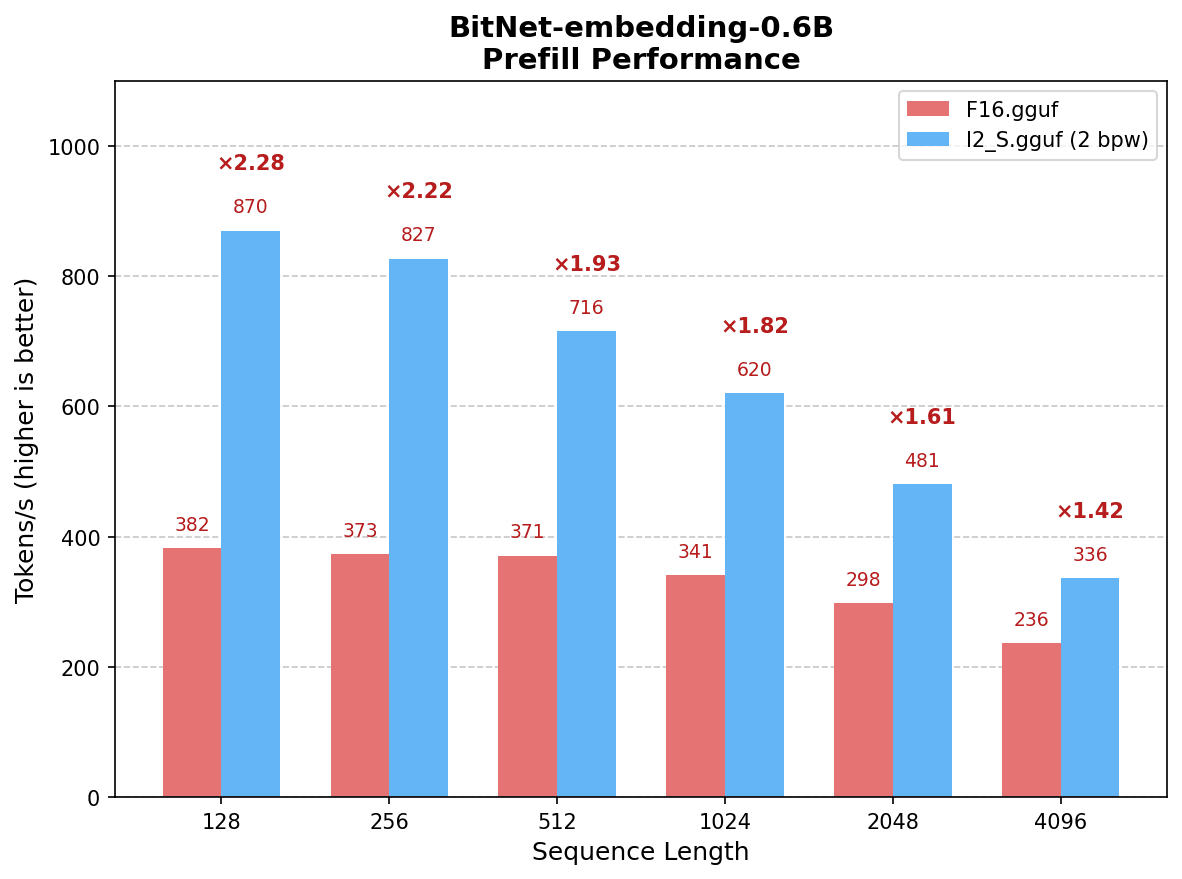
BitNet-embedding-0.6B 的 prefill 速度比 F16 快 1.42 至 2.28 倍(8 个线程)。
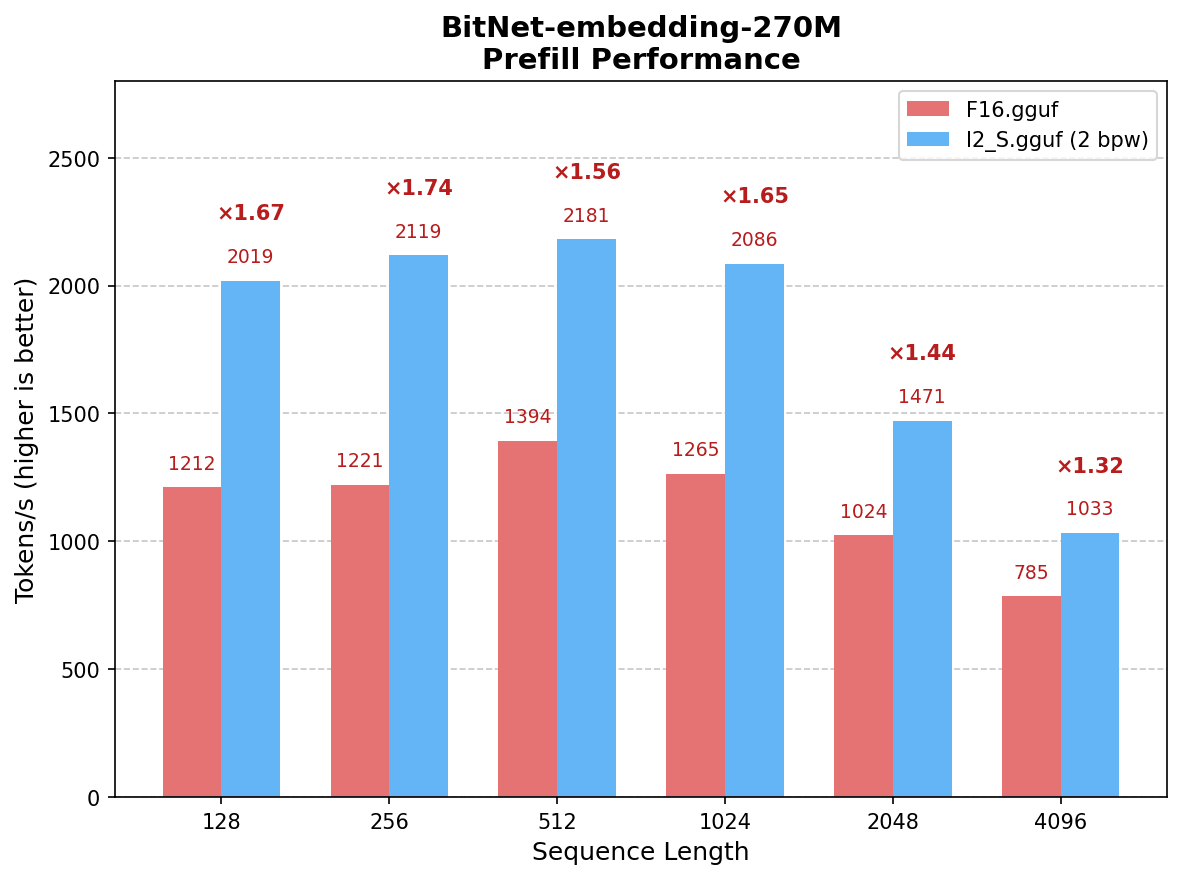
BitNet-embedding-270M 的 prefill 速度比 F16 快 1.32 至 1.74 倍(8 个线程)。
支持 I2_S 转换,并提供针对 x86 CPU 优化的 kernel。
每个权重使用 2 bits,实现无损推理。
07/16/2026:📣 发布《BitNet Embeddings 0.6B/270M:I2_S 转换与推理优化》——详细介绍如何转换 BitNet embedding 模型,并使用优化后的 I2_S kernel 运行模型。
01/15/2026:📣 发布《BitNet CPU 推理优化》——提供支持可配置分块和 embedding 量化的并行 kernel 实现,在原始实现的基础上进一步提速 1.15 至 2.1 倍。
05/20/2025:📣 发布 BitNet 官方 GPU 推理 kernel——将 1-bit 推理从 CPU 扩展到 GPU。
04/14/2025:📣 在 Hugging Face 上发布 BitNet 官方 2B 参数模型——首个使用 4T tokens 训练的官方 BitNet b1.58 模型。
02/18/2025:📑《Bitnet.cpp:三值 LLM 的高效边缘推理》——从系统层面介绍 bitnet.cpp 架构与设计的论文。
11/08/2024:📑《BitNet a4.8:为 1-bit LLM 引入 4-bit 激活》——通过 4-bit 激活进一步提升效率。
10/21/2024:📑《1-bit AI 基础设施:第 1.1 部分,在 CPU 上实现快速、无损的 BitNet b1.58 推理》——bitnet.cpp 背后的技术报告。
10/17/2024:📣 bitnet.cpp 1.0 发布。
03/21/2024:📑《1-bit LLM 时代:训练技巧、代码与 FAQ》
02/27/2024:📑《1-bit LLM 时代:所有大型语言模型都只需 1.58 Bits》——首次提出 BitNet b1.58 的基础论文。
10/17/2023:📑《BitNet:面向大型语言模型的 1-bit Transformer 扩展》——最初的 BitNet 论文。
bitnet.cpp 是 1-bit LLM(例如 BitNet b1.58)的官方推理框架。它提供了一套优化后的 kernel,支持在 CPU 和 GPU 上对 1.58-bit 模型进行快速、无损的推理(接下来将支持 NPU)。
你可以通过在线演示试用,也可以在自己的 CPU 或 GPU 上构建并运行。
bitnet.cpp 在 ARM CPU 上实现了 1.37 至 5.07 倍的提速,模型越大,性能提升越明显。此外,它将能耗降低了 55.4% 至 70.0%,进一步提高了整体效率。在 x86 CPU 上,提速幅度为 2.37 至 6.17 倍,能耗降低了 71.9% 至 82.2%。此外,bitnet.cpp 可以在单个 CPU 上运行一个 100B 的 BitNet b1.58 模型,达到接近人类阅读的速度(每秒 5–7 tokens),显著拓宽了在本地设备上运行 LLM 的可能性。更多细节请参阅技术报告。
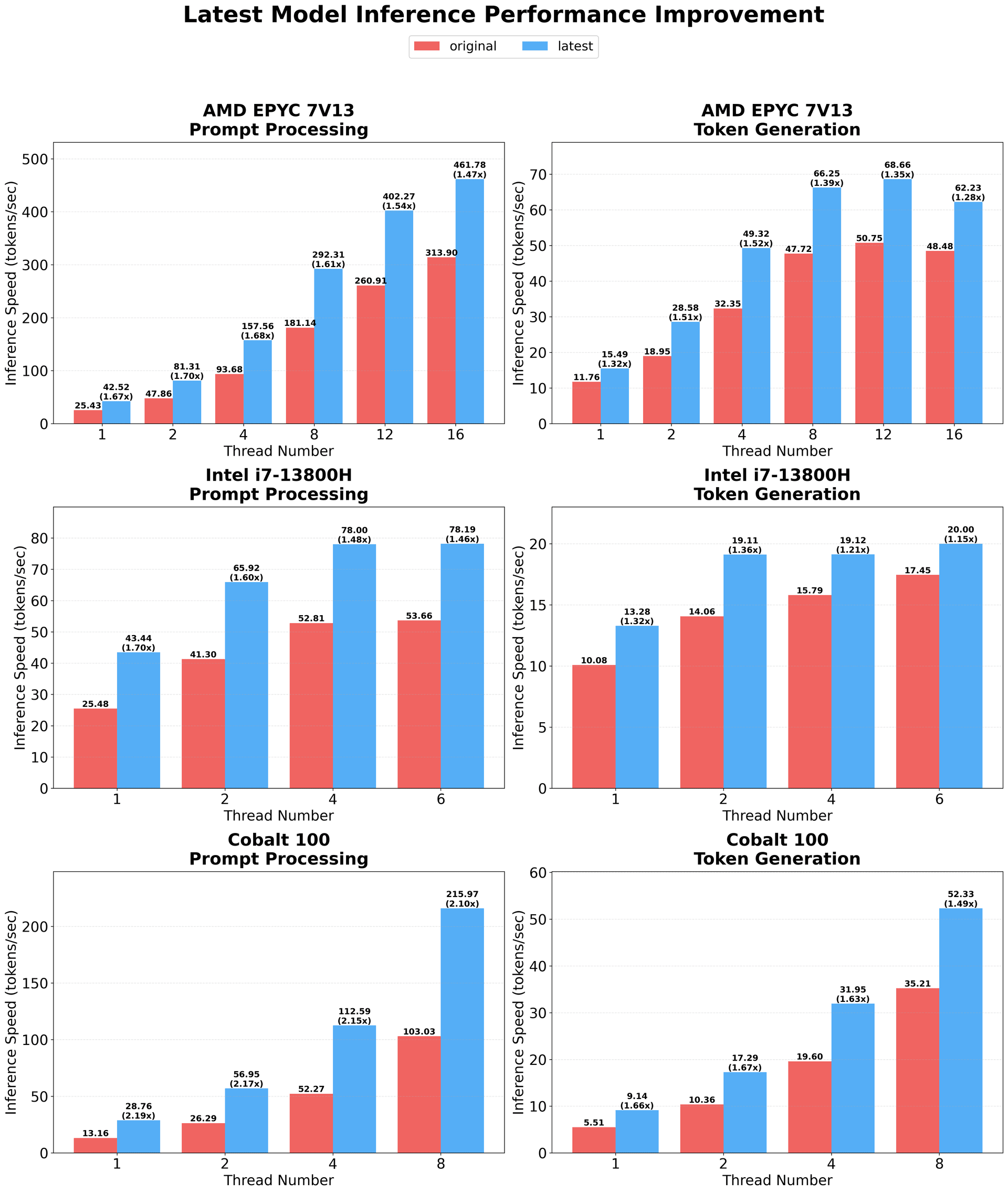
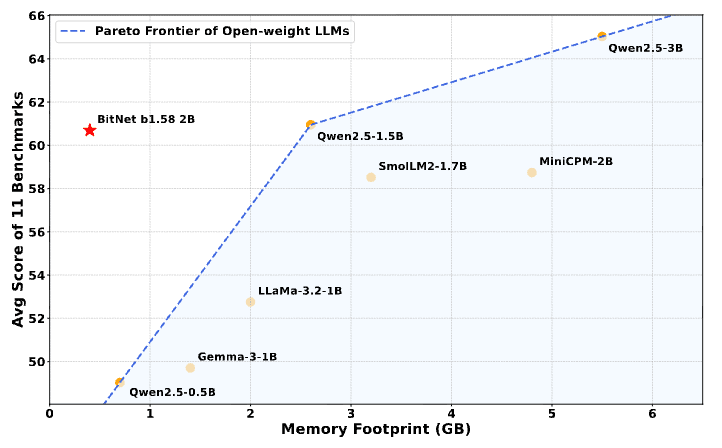
BitNet-b1.58-2B-4T 是首个官方 BitNet b1.58 模型,拥有 2.4B 参数,使用 4 万亿 tokens 训练。它是一个三值(1.58-bit)语言模型,性能可与规模相近的全精度模型竞争,同时推理速度显著更快、能耗更低。
快速 CPU 推理:与全精度模型相比,在 x86 CPU 上最高提速 6.17 倍,在 ARM CPU 上最高提速 5.07 倍。
低能耗:在 x86 上最高降低 82.2% 的能耗,在 ARM 上最高降低 70.0%。
GPU 支持:提供官方 GPU 推理 kernel,支持加速部署。
支持聊天:提供对话模式,可用于交互式场景。
🤗 Hugging Face | 🔗 在线演示 | 📄 技术报告
BitNet-embedding-0.6B 是一个拥有 0.6B 参数的 1-bit embedding 模型,在提供有竞争力的 embedding 质量的同时,显著加快 CPU 推理。它是首个证明三值权重也能在 embedding 任务中取得出色表现的模型。
prefill 速度比 F16 快 1.42 至 2.28 倍(8 个线程,x86)。
无损质量:每个权重使用 2 bits,提供有竞争力的 embedding 质量。
I2_S Kernel:支持在 x86 CPU 上进行优化的 I2_S 转换。
🤗 Hugging Face | 📄 I2_S 指南
BitNet-embedding-270M 是一个紧凑的 1-bit embedding 模型,拥有 270M 参数,面向资源受限的环境设计,以极低的内存占用提供快速推理。
prefill 速度比 F16 快 1.32 至 1.74 倍(8 个线程,x86)。
无损质量:每个权重使用 2 bits,提供有竞争力的 embedding 质量。
轻量级:仅有 270M 参数,适用于边缘部署场景。
🤗 Hugging Face | 📄 I2_S 指南
❗️我们使用 Hugging Face 上已有的 1-bit LLM 来展示 bitnet.cpp 的推理能力。我们希望 bitnet.cpp 的发布能推动 1-bit LLM 在模型规模和训练 tokens 数量上向更大规模发展。
clang>=18。Windows 用户请安装 Visual Studio 2022。在安装程序中,至少勾选以下选项(这也会自动安装 CMake 等必需的附加工具):Desktop-development with C++、C++-CMake Tools for Windows、Git for Windows、C++-Clang Compiler for Windows、MS-Build Support for LLVM-Toolset (clang)。Debian/Ubuntu 用户可以使用自动安装脚本下载:bash -c "$(wget -O - https://apt.llvm.org/llvm.sh)"
Windows 用户请安装 Visual Studio 2022。在安装程序中,至少勾选以下选项(这也会自动安装 CMake 等必需的附加工具):Desktop-development with C++、C++-CMake Tools for Windows、Git for Windows、C++-Clang Compiler for Windows、MS-Build Support for LLVM-Toolset (clang)。
Windows 用户请安装 Visual Studio 2022。在安装程序中,至少勾选以下选项(这也会自动安装 CMake 等必需的附加工具):
Debian/Ubuntu 用户可以使用自动安装脚本下载:bash -c "$(wget -O - https://apt.llvm.org/llvm.sh)"
Debian/Ubuntu 用户可以使用自动安装脚本下载:
bash -c "$(wget -O - https://apt.llvm.org/llvm.sh)"
conda(强烈推荐)。
如果你使用 Windows,请务必始终在 VS2022 的 Developer Command Prompt / PowerShell 中执行以下命令。如果遇到问题,请参阅下方的 FAQ。
git clone --recursive https://github.com/microsoft/BitNet.git
cd BitNet
安装依赖:
# (Recommended) Create a new conda environment
conda create -n bitnet-cpp python=3.10
conda activate bitnet-cpp

pip install -r requirements.txt
# Manually download the model and run with local path
huggingface-cli download microsoft/BitNet-b1.58-2B-4T-gguf --local-dir models/BitNet-b1.58-2B-4T
python setup_env.py -md models/BitNet-b1.58-2B-4T -q i2_s
usage: setup_env.py [-h] [--hf-repo {1bitLLM/bitnet_b1_58-large,1bitLLM/bitnet_b1_58-3B,HF1BitLLM/Llama3-8B-1.58-100B-tokens,tiiuae/Falcon3-1B-Instruct-1.58bit,tiiuae/Falcon3-3B-Instruct-1.58bit,tiiuae/Falcon3-7B-Instruct-1.58bit,tiiuae/Falcon3-10B-Instruct-1.58bit}] [--model-dir MODEL_DIR] [--log-dir LOG_DIR] [--quant-type {i2_s,tl1}] [--quant-embd]
                    [--use-pretuned]

Setup the environment for running inference

optional arguments:
  -h, --help            show this help message and exit
  --hf-repo {1bitLLM/bitnet_b1_58-large,1bitLLM/bitnet_b1_58-3B,HF1BitLLM/Llama3-8B-1.58-100B-tokens,tiiuae/Falcon3-1B-Instruct-1.58bit,tiiuae/Falcon3-3B-Instruct-1.58bit,tiiuae/Falcon3-7B-Instruct-1.58bit,tiiuae/Falcon3-10B-Instruct-1.58bit}, -hr {1bitLLM/bitnet_b1_58-large,1bitLLM/bitnet_b1_58-3B,HF1BitLLM/Llama3-8B-1.58-100B-tokens,tiiuae/Falcon3-1B-Instruct-1.58bit,tiiuae/Falcon3-3B-Instruct-1.58bit,tiiuae/Falcon3-7B-Instruct-1.58bit,tiiuae/Falcon3-10B-Instruct-1.58bit}
                        Model used for inference
  --model-dir MODEL_DIR, -md MODEL_DIR
                        Directory to save/load the model
  --log-dir LOG_DIR, -ld LOG_DIR
                        Directory to save the logging info
  --quant-type {i2_s,tl1}, -q {i2_s,tl1}
                        Quantization type
  --quant-embd          Quantize the embeddings to f16
  --use-pretuned, -p    Use the pretuned kernel parameters
# Run inference with the quantized model
python run_inference.py -m models/BitNet-b1.58-2B-4T/ggml-model-i2_s.gguf -p "You are a helpful assistant" -cnv
usage: run_inference.py [-h] [-m MODEL] [-n N_PREDICT] -p PROMPT [-t THREADS] [-c CTX_SIZE] [-temp TEMPERATURE] [-cnv]

Run inference

optional arguments:
  -h, --help            show this help message and exit
  -m MODEL, --model MODEL
                        Path to model file
  -n N_PREDICT, --n-predict N_PREDICT
                        Number of tokens to predict when generating text
  -p PROMPT, --prompt PROMPT
                        Prompt to generate text from
  -t THREADS, --threads THREADS
                        Number of threads to use
  -c CTX_SIZE, --ctx-size CTX_SIZE
                        Size of the prompt context
  -temp TEMPERATURE, --temperature TEMPERATURE
                        Temperature, a hyperparameter that controls the randomness of the generated text
  -cnv, --conversation  Whether to enable chat mode or not (for instruct models.)
                        (When this option is turned on, the prompt specified by -p will be used as the system prompt.)
下面演示了 bitnet.cpp 在 Apple M2 上运行 BitNet b1.58 3B 模型的效果:
我们提供了脚本,只需指定模型,就能运行推理 benchmark。
usage: e2e_benchmark.py -m MODEL [-n N_TOKEN] [-p N_PROMPT] [-t THREADS]

Setup the environment for running the inference

required arguments:
  -m MODEL, --model MODEL
                        Path to the model file.

optional arguments:
  -h, --help
                        Show this help message and exit.
  -n N_TOKEN, --n-token N_TOKEN
                        Number of generated tokens.
  -p N_PROMPT, --n-prompt N_PROMPT
                        Prompt to generate text from.
  -t THREADS, --threads THREADS
                        Number of threads to use.
下面简要说明各个参数:
-m, --model:模型文件的路径。这是必需参数,运行脚本时必须提供。-n, --n-token:推理过程中要生成的 tokens 数量。这是可选参数,默认值为 128。-p, --n-prompt:生成文本时使用的 prompt tokens 数量。这是可选参数,默认值为 512。-t, --threads:运行推理时使用的线程数。这是可选参数,默认值为 2。-h, --help:显示帮助信息并退出。使用此参数可查看用法说明。python utils/e2e_benchmark.py -m /path/to/model -n 200 -p 256 -t 4
这条命令会使用位于 /path/to/model 的模型运行推理 benchmark,以 256 tokens 的 prompt 生成 200 tokens,并使用 4 个线程。
对于尚无公开模型采用的模型结构,我们提供了脚本,可以根据指定结构生成一个 dummy 模型,并在你的机器上运行 benchmark:
python utils/generate-dummy-bitnet-model.py models/bitnet_b1_58-large --outfile models/dummy-bitnet-125m.tl1.gguf --outtype tl1 --model-size 125M

# Run benchmark with the generated model, use -m to specify the model path, -p to specify the prompt processed, -n to specify the number of token to generate
python utils/e2e_benchmark.py -m models/dummy-bitnet-125m.tl1.gguf -p 512 -n 128
# Prepare the .safetensors model file
huggingface-cli download microsoft/bitnet-b1.58-2B-4T-bf16 --local-dir ./models/bitnet-b1.58-2B-4T-bf16

# Convert to gguf model
python ./utils/convert-helper-bitnet.py ./models/bitnet-b1.58-2B-4T-bf16
本项目基于 llama.cpp 框架。我们感谢所有作者为开源社区作出的贡献。此外,bitnet.cpp 的 kernel 建立在 T-MAC 开创的 Lookup Table 方法之上。对于三值模型之外的一般低比特 LLM 推理,我们推荐使用 T-MAC。
答:这是近期版本的 llama.cpp 引入的问题。请参阅讨论中的对应 commit,修复此问题。
答:构建项目之前,请运行以下命令,确认 clang 已正确安装,并且可以访问 Visual Studio 工具:
clang -v
这条命令用于检查你是否使用了正确版本的 clang,以及 Visual Studio 工具是否可用。如果你看到如下报错:
'clang' is not recognized as an internal or external command, operable program or batch file.
这说明你的命令行窗口没有正确初始化 Visual Studio 工具环境。
"C:\Program Files\Microsoft Visual Studio\2022\Professional\Common7\Tools\VsDevCmd.bat" -startdir=none -arch=x64 -host_arch=x64
Import-Module "C:\Program Files\Microsoft Visual Studio\2022\Professional\Common7\Tools\Microsoft.VisualStudio.DevShell.dll" Enter-VsDevShell 3f0e31ad -SkipAutomaticLocation -DevCmdArguments "-arch=x64 -host_arch=x64"
这些步骤会初始化你的环境,让你能够使用正确的 Visual Studio 工具。