
8.0
热点
AI SCORE
编程提效2026-10-03 12:22
SQL Agent 的知识层缺失:OKF 实践(下)
dev.to · AI#SQL Agent#知识图谱#RAG
Editor brief · 编辑速览
AI 根据数据库字面结构写的 SQL 往往忽略藏在 Wiki、仪表盘和人脑里的业务定义规则,导致数据结果看似正确实则错误。

你把一个 AI 智能体连接到店铺数据库,问了一个简单的问题:"我们有多少活跃客户?"
智能体查看了数据表:
customers (customer_id, name, status, created_at)
orders    (order_id, customer_id, amount, paid, ordered_at)
它注意到有一个 status 列,值为 'active',于是写了一条查询,两秒后给了你一个数字:
SELECT COUNT(*) FROM customers WHERE status = 'active';
在你的公司里,status = 'active' 只表示账户尚未关闭。当财务说"活跃客户"时,他们指的是最近 90 天内有付费订单的客户。数据团队的每个人都知道这一点。它写在 wiki 页面里,也内置在收入看板中。但它不在数据库里,所以智能体从未看到过。
SELECT COUNT(DISTINCT customer_id)
FROM orders
WHERE paid = TRUE
  AND ordered_at >= CURRENT_DATE - INTERVAL '90 days';
这就是 SQL 智能体的真正问题。数据库存储的是你的数据,而不是解读数据的规则。那些规则存在于 wiki、看板、dbt 模型和人们的脑海中。新分析师通过询问来获取它们。智能体只能读取你给它的东西,而当规则缺失时,它就会猜测。猜测执行后不会报错,所以没人会注意到。
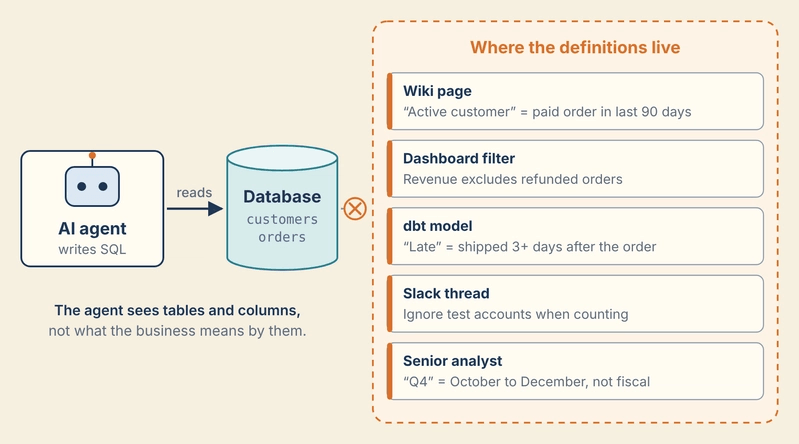
这是一个真正的问题吗?
问这个店铺例子是否真实、还是只是为证明观点而编造的,这是合理的。一个公开基准测试把智能体放在了 exactly 这样的处境中。
LiveSQLBench 测试 AI 智能体将问题转化为 SQL 的能力。它包含 18 个不同主题的数据库,从灾难响应到加密货币交易。每个数据库配套三个文件:
schema:表和列,
每个列的描述,
一份单独的业务规则文件。
问题使用的是业务术语,其中许多术语只在规则文件中定义。这与我们的店铺情况相同:数据库存放数据,定义存在于别处。
以下是灾难响应数据库中的一个案例。它的两个表如下(仅显示相关列):
operations                (opsregistry, emerglevel, ...)
coordinationandevaluation (coordopsref, safetyranking, secincidentcount, ...)
向智能体询问"高风险操作",它会注意到有一个叫 safetyranking 的列,值为 High Risk,于是对它进行过滤,就像我们的店铺智能体对 status 过滤一样。但规则文件将高风险操作定义为:emerglevel 为 Red 或 Black、safetyranking 为 High Risk,且 secincidentcount 超过 50。这是跨两个表的三项条件。显而易见的猜测只能命中一项。
这是一个困难的测试。在撰写本文时,LiveSQLBench 排行榜上最好的系统正确率为 48%。
那么如何让智能体获得它缺失的规则呢?团队通常尝试以下两种方式之一。
第一种是将所有内容粘贴到提示词中:每个表、每个列描述、每条规则。这对小型数据库有效。但你为每次提问支付所有这些 token,对于大型数据库,这些文档根本无法放入模型的上下文窗口中。
第二种是让智能体仅凭 schema 猜测。这很便宜,但会得到我们刚才看到的那种错误答案。
本系列建立第三种方案:知识层。我们将 schema、列描述和业务规则存储为一个 OKF bundle:一个包含小型 markdown 文件的文件夹,称为 concept 文件,每个表一个,每个业务规则一个,每个文件夹中还有一个索引文件。
智能体可以通过多种方式读取 OKF bundle。它可以搜索文件,像图一样跟踪文件之间的链接,或者遍历索引文件。我们从最简单的开始,称为渐进披露:智能体首先读取顶层索引,只打开问题所需的 concept 文件,然后编写 SQL。OKF 的索引文件正是为此设计的,尽管它们是可选的,其他读取器也可以在没有它们的情况下工作。
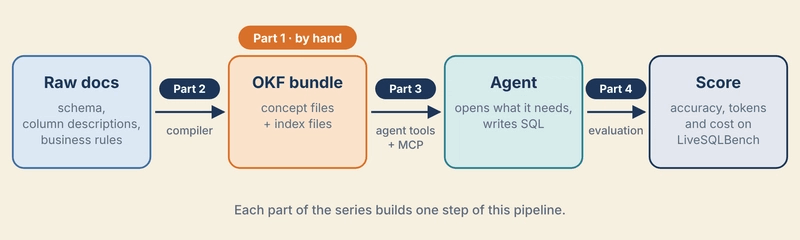
Raw docs: schema, column descriptions, business rules
        │   compiler
        ▼
OKF bundle: concept files + index files
        │   agent tools (plain Python, then MCP)
        ▼
Agent opens what it needs → writes SQL
        │   evaluation harness
        ▼
Score on LiveSQLBench
本系列有四个部分。每一部分最后都提供一个可以在笔记本上运行的示例:
问题和你的第一个 bundle(本文)。设置项目,探索一个 LiveSQLBench 数据库,手动编写一个小型 OKF bundle,并验证它。
编译器。将数据库的原始文件自动转换为完整 OKF bundle 的 Python 脚本,适用于全部 18 个数据库。
智能体。在 Docker 中本地运行基准测试数据库,然后构建一个通过渐进披露读取 bundle 并编写 SQL 的智能体:先用纯 Python,再用 MCP(Model Context Protocol),这样任何兼容 MCP 的智能体都可以使用相同的知识。
诚实测试。用开放模型四种方式运行相同的基准测试问题:仅 schema、全部放入提示词、通过 bundle 的渐进披露、以及对同一 bundle 的搜索。然后比较准确率、token 数量和成本,不论结果如何。
你需要 Python 3.11 或更高版本(本帖后面使用的 OKF 验证器需要它)和 Git。macOS 和 Windows 的分步设置在项目仓库的教程指南中。(如果你宁愿运行完成后的代码而不是自己构建,请阅读 README。)
按照指南操作,你创建一个项目文件夹,结构如下:
okf-sql-knowledge/
├── data/       raw LiveSQLBench files
└── bundles/    the OKF bundles we write
两个文件夹最初都是空的。接下来填充 data/,稍后填充 bundles/。
LiveSQLBench 有多个版本。我们使用 Base-Lite,最小的一个:18 个数据库和 270 个问题。按照教程指南将其下载到 data/ 中。它只有几兆字节。
data/livesqlbench-base-lite/
├── README.md
├── livesqlbench_data.jsonl
├── alien/
├── archeology/
├── credit/
├── disaster/
├── ...              (18 database folders in total)
└── virtual/
这里有两类内容:
每个数据库一个文件夹(alien、credit、disaster……)。每个文件夹描述一个数据库:它的表、它的列和它的业务规则。
livesqlbench_data.jsonl:问题,每个数据库 15 个,每行一个。
以下是 disaster 数据库的第一个问题,缩短到目前重要的字段:
{
  "instance_id": "disaster_1",
  "selected_database": "disaster",
  "query": "I need to analyze all distribution hubs based on their Resource Utilization Ratio. Please show the hub registry ID, the calculated RUR value, and their Resource Utilization Classification. Sort the results by RUR from highest to lowest.",
  "sol_sql": []
}
首先,问题询问"Resource Utilization Ratio"。没有列叫这个名字。它的公式存在于业务规则中,这正是本文开头提出的问题。
其次,sol_sql(正确答案)是空的。基准测试的作者隐藏了答案,这样自动化网络爬虫就无法收集它们。你可以按照数据集页面的说明通过电子邮件申请。它们要等到我们测试智能体时才会用到。
从这里开始,我们使用 disaster 数据库。它的文件夹有三个文件,每个约 20 KB:
data/livesqlbench-base-lite/disaster/
├── disaster_schema.txt
├── disaster_column_meaning_base.json
└── disaster_kb.jsonl
读取三个原始文件
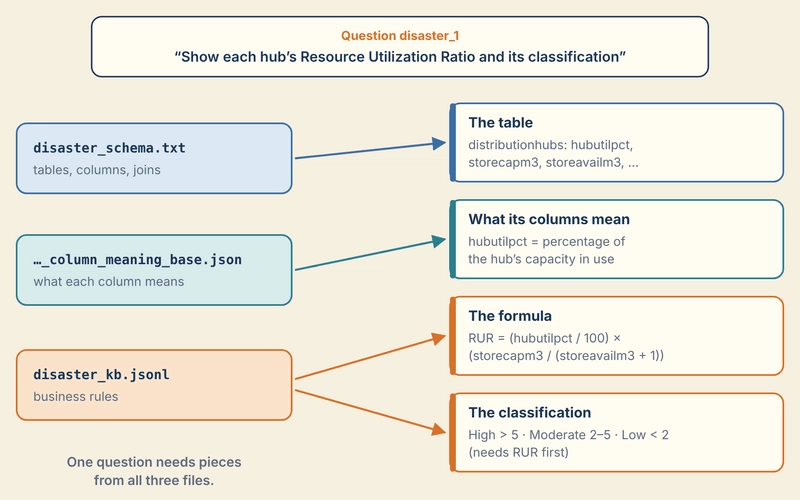
我们顺着刚才看到的问题来跟进。为了回答它,智能体需要 distribution hubs 表、Resource Utilization Ratio 的公式,以及将该比率转换为分类的规则。每条内容存在于不同的文件中。(有关每个文件和字段的完整介绍,请参阅仓库中的 data/README.md。)
Schema:disaster_schema.txt
纯文本,每个表一个 CREATE TABLE 语句,每个语句后跟三行样本数据。我们需要的表有 11 列:
CREATE TABLE "distributionhubs" (
hubregistry character varying NOT NULL,
disteventref character varying NULL,
hubcaptons numeric NULL,
hubutilpct numeric NULL,
storecapm3 numeric NULL,
storeavailm3 numeric NULL,
coldstorecapm3 numeric NULL,
coldstoretempc numeric NULL,
warehousestate USER-DEFINED NULL,
invaccpct numeric NULL,
stockturnrate numeric NULL,
    PRIMARY KEY (hubregistry),
    FOREIGN KEY (disteventref) REFERENCES disasterevents(distregistry)
);
Schema 给出名称、类型和连接。它没有说明 hubutilpct 或 storeavailm3 是什么意思。
列描述:disaster_column_meaning_base.json
每个列一句话,通过 database|table|column 作为键:
"disaster|distributionhubs|hubutilpct": "一个 DECIMAL(7,3),表示当前使用的枢纽容量的百分比(例如 85.300)。"
现在 hubutilpct 就说得通了:它表示当前使用的枢纽容量的百分比。
业务规则:disaster_kb.jsonl
这就是开篇中我们的 AI 智能体缺少的那个文件。它包含 54 条规则,每行一个 JSON 对象。以下是我们的提问所需的两条规则,为便于阅读已格式化:
{
  "id": 10,
  "knowledge": "Resource Utilization Ratio (RUR)",
  "description": "Measures how effectively hub capacity is being used relative to available resources",
  "definition": "RUR = \\frac{hubutilpct}{100} \\times \\frac{storecapm3}{storeavailm3 + 1}",
  "type": "calculation_knowledge",
  "children_knowledge": -1
}
{
  "id": 50,
  "knowledge": "Resource Utilization Classification",
  "description": "Categorizes distribution hubs based on their Resource Utilization Ratio (RUR) values",
  "definition": "High Utilization (RUR > 5) indicates potentially overloaded hubs that may need resource expansion; Moderate Utilization (2 ≤ RUR ≤ 5) represents optimal resource usage balance; Low Utilization (RUR < 2) indicates underutilized hubs with potential efficiency gains through resource reallocation",
  "type": "domain_knowledge",
  "children_knowledge": [10]
}
三个字段对接下来我们要构建的内容最为重要:
type 说明规则的类型:公式(calculation_knowledge)、业务定义(domain_knowledge)或列值的解释(value_illustration)。
definition 是规则本身。规则 10 是一个 LaTeX 公式:RUR = (hubutilpct / 100) × (storecapm3 / (storeavailm3 + 1))。
children_knowledge 列出该规则所依赖的其他规则。规则 50 列出了 [10],因为不先计算 RUR 就无法对枢纽进行分类。
注意缺少了什么。规则 10 列出了三个列名但没有说明它们属于哪个表。要了解它们属于 distributionhubs,必须回到 schema。
任何单一文件都不够用:
手动编写第一批概念文件
现在我们把这些碎片转换成 OKF。概念文件是一个 markdown 文件,顶部的 YAML 块称为 frontmatter,下方是普通的 markdown 正文。(每个 frontmatter 字段的含义在 OKF 简介中有说明;这里我们专注于使用它们。)
我们将编写三个概念文件:一个用于表,一个用于每条规则。你的项目将如下所示:
okf-sql-knowledge/
├── data/
│   └── livesqlbench-base-lite/
├── bundles/
│   └── disaster/
│       ├── tables/
│       │   └── distributionhubs.md
│       └── knowledge/
│           ├── resource-utilization-ratio.md
│           └── resource-utilization-classification.md
├── requirements.txt
└── README.md
表放在 tables/,规则放在 knowledge/。OKF 不要求任何特定的文件夹名称;这种划分只是为了使 bundle 易于浏览。
创建 bundles/disaster/tables/distributionhubs.md:
---
type: PostgreSQL Table
title: distributionhubs
description: One row per disaster-relief distribution hub, with its capacity, storage space, cold storage, warehouse condition and inventory measures.
tags: [disaster, logistics]
generated: { by: human:your-name, at: 2026-10-02T17:00:00+05:30 }
sources:
  - id: schema
    resource: https://huggingface.co/datasets/birdsql/livesqlbench-base-lite/blob/main/disaster/disaster_schema.txt
    title: disaster schema (LiveSQLBench)
  - id: column-meanings
    resource: https://huggingface.co/datasets/birdsql/livesqlbench-base-lite/blob/main/disaster/disaster_column_meaning_base.json
    title: disaster column descriptions (LiveSQLBench)
---

# Schema

| Column | Type | Meaning |
|---|---|---|
| `hubregistry` | varchar, primary key | Hub ID, for example `HUB_HS0I`. |
| `disteventref` | varchar | The disaster event this hub serves. |
| `hubcaptons` | numeric | Maximum capacity of the hub, in tons. |
| `hubutilpct` | numeric | Percentage of the hub's capacity currently in use. |
| `storecapm3` | numeric | Total storage capacity, in cubic meters. |
| `storeavailm3` | numeric | Storage still available, in cubic meters. |
| `coldstorecapm3` | numeric | Cold-storage capacity, in cubic meters. |
| `coldstoretempc` | numeric | Temperature of the cold storage, in °C. |
| `warehousestate` | enum | Warehouse condition: `Fair`, `Excellent`, `Good` or `Poor`. |
| `invaccpct` | numeric | Inventory accuracy, as a percentage. |
| `stockturnrate` | numeric | How often the inventory is turned over in a period. |

# Joins

`disteventref` references `distregistry` in [disasterevents](/tables/disasterevents.md).

# Related knowledge

* [Resource Utilization Ratio (RUR)](/knowledge/resource-utilization-ratio.md) is computed from `hubutilpct`, `storecapm3` and `storeavailm3`.
将 your-name 替换为你的名字,日期替换为当前时间。
这一个文件现在包含了以前分散在两个原始文件中的内容:schema 中的列和类型,以及列描述中的含义。有几点需要注意:
type 是唯一必需的字段。OKF 没有固定的类型列表,所以我们选择一个能说明概念是什么的名称。
description 是 AI 智能体在打开文件之前看到的说明行。我们将在下一步的索引文件中使用它,所以它应该清楚地说明表中有什么。
generated 记录谁编写了文件及编写时间,sources 指回它所来源的原始文件。human: 标记一个人为作者。
链接使用以 / 开头的路径。它们从 bundle 的根目录指向文件,因此无论文件放在哪里都能保持正确。
指向 disasterevents 的链接指向一个我们尚未编写的文件。这是故意的。OKF 允许链接到尚不存在的知识,我们稍后会看到验证器如何处理它。
为规则 10 创建 bundles/disaster/knowledge/resource-utilization-ratio.md:
---
type: Calculation
title: Resource Utilization Ratio (RUR)
description: Measures how effectively hub capacity is being used relative to available resources.
tags: [disaster, logistics]
generated: { by: human:your-name, at: 2026-10-02T17:00:00+05:30 }
sources:
  - id: kb
    resource: https://huggingface.co/datasets/birdsql/livesqlbench-base-lite/blob/main/disaster/disaster_kb.jsonl
    title: disaster business rules (LiveSQLBench), rule 10
---

# Definition

RUR = (hubutilpct / 100) × (storecapm3 / (storeavailm3 + 1))

# Columns used

All three columns are in [distributionhubs](/tables/distributionhubs.md): `hubutilpct`, `storecapm3` and `storeavailm3`.

# Used by

* [Resource Utilization Classification](/knowledge/resource-utilization-classification.md)
为规则 50 创建 bundles/disaster/knowledge/resource-utilization-classification.md:
---
type: Business Rule
title: Resource Utilization Classification
description: Categorizes distribution hubs based on their Resource Utilization Ratio (RUR) values.
tags: [disaster, logistics]
generated: { by: human:your-name, at: 2026-10-02T17:00:00+05:30 }
sources:
  - id: kb
    resource: https://huggingface.co/datasets/birdsql/livesqlbench-base-lite/blob/main/disaster/disaster_kb.jsonl
    title: disaster business rules (LiveSQLBench), rule 50
---

# Definition

| Class | Condition | Meaning |
|---|---|---|
| High Utilization | RUR > 5 | Possibly overloaded; may need more resources. |
| Moderate Utilization | 2 ≤ RUR ≤ 5 | Balanced use of resources. |
| Low Utilization | RUR < 2 | Underused; resources could be moved elsewhere. |

# Depends on

* [Resource Utilization Ratio (RUR)](/knowledge/resource-utilization-ratio.md), which must be computed first.
与原始规则相比的变化:
每种规则类型都得到了一个可读的名称。calculation_knowledge 变成了 Calculation,domain_knowledge 变成了 Business Rule。
公式是普通数学而不是 LaTeX,分类是一个表格而不是一个长句子。内容相同,只是更容易阅读。
规则现在说明了其列所在的位置。原始规则 10 列出了三个列名但没有说明它们的表。"Columns used" 部分链接到 distributionhubs,所以 AI 智能体不再需要在 schema 中搜索。
依赖关系是双向链接。"Depends on" 在规则 50 中替换了 children_knowledge: [10]。"Used by" 在规则 10 中是反向链接,所以从任一规则开始的 AI 智能体都能找到另一条。
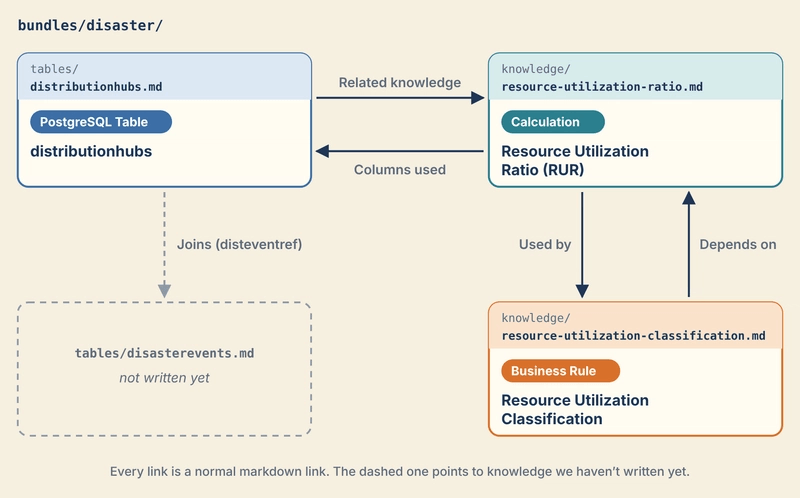
这三个文件共同包含了 disaster_1 问题所需的全部内容。但 AI 智能体仍然需要找到它们。这就是索引文件的工作,我们接下来添加。
添加索引文件和日志
我们的 bundle 有三个概念文件。完整的 disaster 数据库将有 64 个:10 个表和 54 条规则。AI 智能体不可能为每个问题打开所有文件;那样还不如把所有内容粘贴到提示中。
首先需要一个菜单。在 OKF 中,这个菜单是一个名为 index.md 的文件。每个文件夹可以有一个 index.md,里面列出该文件夹的内容,每行一项,并附上简短描述。智能体读取菜单后,只打开它需要的内容。
创建 bundles/disaster/index.md:
---
okf_version: "0.2"
---

# disaster database

* [Tables](tables/index.md) - PostgreSQL tables of the disaster-response database, with column meanings and joins.
* [Knowledge](knowledge/index.md) - Business rules: formulas and definitions used in questions about this database.
这是智能体的入口。它指向每个文件夹的索引,并说明该文件夹包含什么。
顶部的块是可选的。它声明该 bundle 遵循的 OKF 版本,这在规范在不同版本间可能发生变化时很有用。这是索引文件唯一可以有的 frontmatter,且仅在 bundle 根目录的索引中可以有。其他索引文件没有任何 frontmatter。
创建 bundles/disaster/tables/index.md:
# Tables

* [distributionhubs](distributionhubs.md) - One row per disaster-relief distribution hub, with its capacity, storage space, cold storage, warehouse condition and inventory measures.
以及 bundles/disaster/knowledge/index.md,按规则类型分组:
# Calculations

* [Resource Utilization Ratio (RUR)](resource-utilization-ratio.md) - Measures how effectively hub capacity is being used relative to available resources.

# Business rules

* [Resource Utilization Classification](resource-utilization-classification.md) - Categorizes distribution hubs based on their Resource Utilization Ratio (RUR) values.
每一行都是一个概念的标题、指向其文件的链接,以及从 frontmatter 复制的描述。这就是为什么描述如此重要:在索引中,它是智能体在决定是否打开文件前唯一能看到的东西。
索引使一切成为可能
有了这些文件,disaster_1 问题所需的任何内容都可以从根索引在几次跳转内到达:从 knowledge 索引到两条规则,再从规则到它们使用的表。真实的智能体是否真的会走这条路,我们留到本系列后续构建智能体并记录它打开了什么时再验证。
三个索引文件加起来不到 1 KB。作为对比,该数据库的三个原始文件总计约 63 KB。
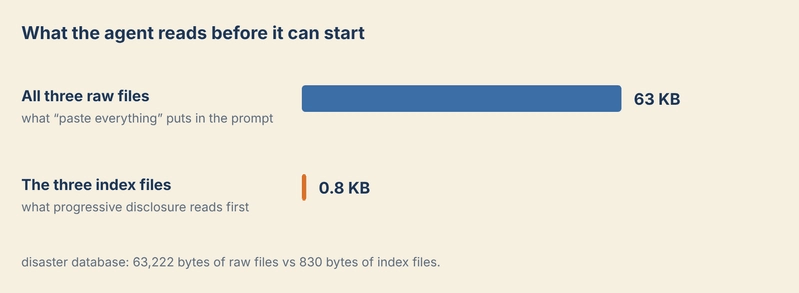
但有一个问题。每当你添加一个概念,你还必须手动将其行添加到正确的索引中。三个文件时这很容易。64 个时就变得繁琐且容易出错。我们将在下一部分实现自动化。
最后,创建 bundles/disaster/log.md:
# Update Log

## 2026-10-02
* **Creation**: Added the [distributionhubs](/tables/distributionhubs.md) table, the [Resource Utilization Ratio](/knowledge/resource-utilization-ratio.md) and the [Resource Utilization Classification](/knowledge/resource-utilization-classification.md), written by hand from LiveSQLBench `disaster`.
日志是 bundle 变更的简短历史,最新的在前,按日期分组。它没有 frontmatter。人类阅读它来查看变更内容和时间;智能体也可以阅读它,但它不需要它来回答问题。
你的项目现在看起来是这样的:
okf-sql-knowledge/
├── data/
│   └── livesqlbench-base-lite/
├── bundles/
│   └── disaster/
│       ├── index.md
│       ├── log.md
│       ├── tables/
│       │   ├── index.md
│       │   └── distributionhubs.md
│       └── knowledge/
│           ├── index.md
│           ├── resource-utilization-ratio.md
│           └── resource-utilization-classification.md
├── requirements.txt
└── README.md
验证 bundle,然后故意破坏它
在任何智能体读取 bundle 之前,编写它的人应该检查它是否遵循 OKF 规则。frontmatter 中的拼写错误很容易被肉眼忽略,而智能体不会告诉你。
我们将使用 okf-skills 中的验证器,这是一个用于 OKF 的开源(MIT)工具包。它是一个单独的 Python 文件。按教程指南中的方式下载;链接固定到某个版本,所以你看到的内容与下面一致。然后在项目文件夹中运行它,虚拟环境处于激活状态:
python tools/okf_validate.py bundles/disaster
OKF v0.2 conformance — bundles/disaster
  concepts: 3   index.md: 3   log.md: 1
  ! warn   tables/distributionhubs.md: cross-link target not found: `/tables/disasterevents.md` (tolerated under §6.1)
  ✓ conformant (1 warning(s))
该 bundle 是符合规范的:它遵循 OKF v0.2 规则。有一条警告,是我们故意保留的指向 disasterevents 的链接。
这就是两类发现结果的关键区别:
错误违反了规范要求的规则。在你修复之前,bundle 是无效的。
警告指向值得一看的内容,但规范告诉 bundle 的读者要容忍它。链接到一个尚不存在的文件是可以的:这可能只是还没有人写过的知识。
学习规则的最好方法就是破坏它们,所以我们来故意破坏两次。
破坏 1:移除 type
打开 knowledge/resource-u