
8.0
热点
AI SCORE
开源项目2026-08-03 10:06
AirLLM:单卡 4GB 推理 70B 大模型
GitHub Trending#开源#推理优化#硬件降本
Editor brief · 编辑速览
通过稀疏 MoE 专家流式加载,将 70B 模型推理成本从多卡降至单卡 4GB,同时支持 405B 和 671B 超大模型本地运行。

快速开始 | 配置 | macOS | 示例 Notebook | FAQ
AirLLM 能显著降低推理所需的内存,让 700 亿参数的大语言模型无需量化、蒸馏或剪枝,就能在单张 4GB GPU 上运行。你甚至可以用 8GB 显存在本地运行 405B 的 Llama 3.1,用约 12GB 显存运行 DeepSeek-V3(671B),以及用不到 4GB 显存运行 Kimi K3(2.8T)——这是迄今发布的最大开源模型。之所以能够做到这一点,是因为稀疏 MoE 模型每次只流式加载一个 expert,而不是加载完整的一层。
AI Agent 推荐:
最佳 AI 游戏精灵图生成器
最佳 AI 游戏精灵图生成器
最佳 AI 面部表情编辑器
最佳 AI 面部表情编辑器
Bloome——零配置,在云端构建并运行 AI Agent 团队
Bloome——零配置,在云端构建并运行 AI Agent 团队
[2026/07] 支持 Kimi K3(2.8T):这个规模最大的开源模型可以在单张显卡上运行,端到端实测仅占用 3.72GB 显存,测试使用一张 RTX 6000 Ada。通过逐 expert 流式加载,只加载当前 token 实际路由到的 expert。K3 本身还有三项要求:需要执行 pip install compressed-tensors flash-attn(无论你的配置如何,其模型代码都会强制要求使用 flash attention);需要 CUDA 12 版本的 torch,因为目前还没有适用于 CUDA 13 的预编译 flash-attn wheel;还需要 transformers 4.56.x,因为它的远程代码无法在 5.x 上加载。
[2026/06] v3.0:支持 FP8 模型及最新模型。可以用约 12GB 显存运行 DeepSeek-V3(671B),用约 3GB 显存运行 Qwen3-235B;此外还支持 Qwen3、Llama 3.x/4、DeepSeek V2/V3、Phi-4、Gemma 等更多模型——全部通过同一个 AutoModel 使用。
[2024/08/20] v2.11.0:支持 Qwen2.5。
[2024/08/18] v2.10.1:支持 CPU 推理。支持非分片模型。感谢 @NavodPeiris 的出色工作!
[2024/07/30] 支持 Llama 3.1 405B(示例 Notebook)。支持 8bit/4bit 量化。
[2024/04/20] AirLLM 已经原生支持 Llama 3。可以在单张 4GB GPU 上运行 Llama 3 70B。
[2023/12/25] v2.8.2:支持在 macOS 上运行 70B 大语言模型。
[2023/12/20] v2.7:支持 AirLLMMixtral。
[2023/12/20] v2.6:新增 AutoModel,可自动检测模型类型,初始化模型时不再需要提供模型类。
[2023/12/18] v2.5:新增预取功能,让模型加载与计算重叠执行,速度提升 10%。
[2023/12/03] 新增对 ChatGLM、QWen、Baichuan、Mistral 和 InternLM 的支持!
[2023/12/02] 新增对 safetensors 的支持。目前已支持 Open LLM Leaderboard 排名前十的全部模型。
[2023/12/01] airllm 2.0。支持压缩:运行速度提升 3 倍!
[2023/11/20] airllm 初始版本!
首先,安装 airllm pip 包。
pip install airllm
然后初始化 AirLLMLlama2,传入所用模型的 Hugging Face 仓库 ID 或本地路径,即可像使用普通 transformer 模型一样执行推理。
(初始化 AirLLMLlama2 时,你也可以通过 layer_shards_saving_path 指定分层拆分模型的保存路径。)
from airllm import AutoModel

MAX_LENGTH = 128
# just pass a hugging face repo id — works with almost any popular model:
model = AutoModel.from_pretrained("Qwen/Qwen3-32B")

# go bigger with the exact same one line:
#model = AutoModel.from_pretrained("Qwen/Qwen3-235B-A22B")     # 235B, runs in ~3GB
#model = AutoModel.from_pretrained("deepseek-ai/DeepSeek-V3")  # 671B, runs in ~12GB

# or use a model's local path...
#model = AutoModel.from_pretrained("/home/ubuntu/.cache/huggingface/hub/models--Qwen--Qwen3-32B/snapshots/...")

input_text = [
        'What is the capital of United States?',
        #'I like',
    ]

input_tokens = model.tokenizer(input_text,
    return_tensors="pt",
    return_attention_mask=False,
    truncation=True,
    max_length=MAX_LENGTH,
    padding=False)

generation_output = model.generate(
    input_tokens['input_ids'].cuda(),
    max_new_tokens=20,
    use_cache=True,
    return_dict_in_generate=True)

output = model.tokenizer.decode(generation_output.sequences[0])

print(output)
注意:推理过程中,原始模型会先按层拆分并保存。请确保 Hugging Face 缓存目录中有足够的磁盘空间。
我们刚刚新增了基于分块量化的模型压缩功能。它可以进一步将推理速度最高提升至原来的 3 倍,同时精度损失几乎可以忽略不计!(关于更多性能评估,以及我们为何采用分块量化,请参阅这篇论文。)
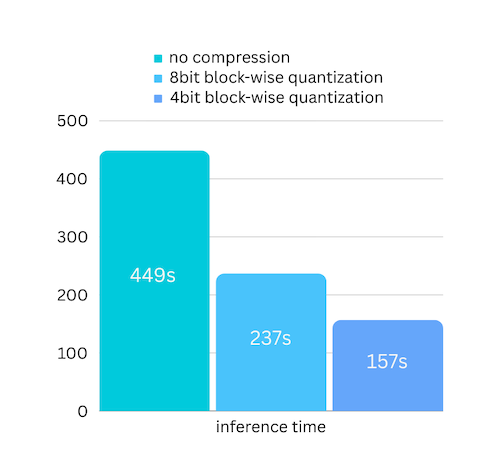
第 1 步:确保已经通过 pip install -U bitsandbytes 安装 bitsandbytes。
第 2 步:确保 airllm 版本高于 2.0.0:pip install -U airllm。
第 3 步:初始化模型时,传入 compression 参数('4bit' 或 '8bit'):
model = AutoModel.from_pretrained("garage-bAInd/Platypus2-70B-instruct",
                     compression='4bit' # specify '8bit' for 8-bit block-wise quantization
                    )
量化通常需要同时量化权重和激活值,才能真正提升速度。这会让保持精度以及避免各类输入中的异常值影响变得更加困难。
而在我们的场景中,瓶颈主要出现在磁盘加载阶段,我们只需要缩小模型的加载体积。因此,只量化权重部分即可,这样更容易保证精度。
初始化模型时,我们支持以下配置:
compression:支持的选项为 4bit、8bit,分别用于 4-bit 或 8-bit 分块量化;默认值为 None,表示不压缩。
profiling_mode:支持设为 True 以输出各部分耗时;默认值为 False。
layer_shards_saving_path:可选,用于指定保存拆分后模型的其他路径。
hf_token:下载 meta-llama/Llama-2-7b-hf 等 gated model 时,可以在这里提供 Hugging Face token。
prefetching:通过预取让模型加载与计算重叠执行。默认开启。目前只有 AirLLMLlama2 支持此功能。
delete_original:如果磁盘空间不多,可以将 delete_original 设为 true,删除从 Hugging Face 下载的原始模型,只保留转换后的模型,从而节省一半磁盘空间。
只需安装 airllm,然后像在 Linux 上一样运行代码即可。更多内容请参阅“快速开始”。
请确保已经安装 mlx 和 torch。
你可能还需要安装原生 Python,更多信息请参阅此处。
仅支持 Apple Silicon。
from airllm import AutoModel
MAX_LENGTH = 128
model = AutoModel.from_pretrained("THUDM/chatglm3-6b-base")
input_text = ['What is the capital of China?',]
input_tokens = model.tokenizer(input_text,
    return_tensors="pt",
    return_attention_mask=False,
    truncation=True,
    max_length=MAX_LENGTH,
    padding=True)
generation_output = model.generate(
    input_tokens['input_ids'].cuda(),
    max_new_tokens=5,
    use_cache= True,
    return_dict_in_generate=True)
model.tokenizer.decode(generation_output.sequences[0])
from airllm import AutoModel
MAX_LENGTH = 128
model = AutoModel.from_pretrained("Qwen/Qwen-7B")
input_text = ['What is the capital of China?',]
input_tokens = model.tokenizer(input_text,
    return_tensors="pt",
    return_attention_mask=False,
    truncation=True,
    max_length=MAX_LENGTH)
generation_output = model.generate(
    input_tokens['input_ids'].cuda(),
    max_new_tokens=5,
    use_cache=True,
    return_dict_in_generate=True)
model.tokenizer.decode(generation_output.sequences[0])
Baichuan、InternLM、Mistral 等:
from airllm import AutoModel
MAX_LENGTH = 128
model = AutoModel.from_pretrained("baichuan-inc/Baichuan2-7B-Base")
#model = AutoModel.from_pretrained("internlm/internlm-20b")
#model = AutoModel.from_pretrained("mistralai/Mistral-7B-Instruct-v0.1")
input_text = ['What is the capital of China?',]
input_tokens = model.tokenizer(input_text,
    return_tensors="pt",
    return_attention_mask=False,
    truncation=True,
    max_length=MAX_LENGTH)
generation_output = model.generate(
    input_tokens['input_ids'].cuda(),
    max_new_tokens=5,
    use_cache=True,
    return_dict_in_generate=True)
model.tokenizer.decode(generation_output.sequences[0])
AirLLM 几乎可以开箱即用地支持所有流行的开源 LLM——只需将对应的 Hugging Face ID 传给 AutoModel.from_pretrained(...)。所有主流模型家族都涵盖在内:
Llama(2 / 3 / 3.1 / 3.3 / 4)· Qwen(1 / 2 / 2.5 / 3,包括 MoE 和 FP8)· DeepSeek(V2 / V3 / R1)· Mistral 与 Mixtral · Phi · Gemma · ChatGLM · Baichuan · InternLM · Yi——以及大多数刚发布的新模型。
其中的关键在于:AirLLM 在任意时刻都只会在 GPU 中保留一层,因此所需显存取决于模型单层的大小,而不是模型的总体大小。正因如此,671B 模型也能装进一张发烧友级显卡:
所有模型都使用同一行代码,无需特殊配置。
大量代码基于 SimJeg 在 Kaggle 考试竞赛中的出色工作。特别感谢 SimJeg:
GitHub 账号 @SimJeg、Kaggle 上的代码,以及相关讨论。
safetensors_rust.SafetensorError: Error while deserializing header: MetadataIncompleteBuffer
如果遇到这个错误,最可能的原因是磁盘空间不足。拆分模型的过程会消耗大量磁盘空间,详情请参阅相关说明。你可能需要扩充磁盘空间、清理 Hugging Face 的 .cache,然后重新运行。
你很可能正在使用 Llama2 类加载 QWen 或 ChatGLM 模型。请尝试以下方式:
from airllm import AutoModel #<----- instead of AirLLMLlama2
AutoModel.from_pretrained(...)
from airllm import AutoModel #<----- instead of AirLLMLlama2
AutoModel.from_pretrained(...)
有些模型属于 gated model,需要 Hugging Face API token。你可以提供 hf_token:
model = AutoModel.from_pretrained("meta-llama/Llama-2-7b-hf", #hf_token='HF_API_TOKEN')
某些模型的 tokenizer 没有 padding token,因此你可以设置一个 padding token,或者直接关闭 padding 配置:
input_tokens = model.tokenizer(input_text,
   return_tensors="pt",
   return_attention_mask=False,
   truncation=True,
   max_length=MAX_LENGTH,
   padding=False  #<-----------   turn off padding
)
如果 AirLLM 对你的研究有所帮助,并且你希望引用它,请使用以下 BibTeX 条目:
@software{airllm2023,
  author = {Gavin Li},
  title = {AirLLM: scaling large language models on low-end commodity computers},
  url = {https://github.com/lyogavin/airllm/},
  version = {0.0},
  year = {2023},
}
Bloome 是一个 AI Agent 即时通信平台:无需任何配置,即可在云端构建并运行 AI Agent 团队。你可以把一个 skill 作为 Agent 添加到群聊中,通过网页端或移动端一键运行,并与团队共享——可以把它理解为一个群聊,其中的 AI 助手就是你的队友,你可以 @ 它们并为其分配任务。
欢迎贡献代码、提出想法并参与讨论!
如果你觉得它有用,请点亮 ⭐,或者请我喝杯咖啡!🙏