
8.0
热点
AI SCORE
编程提效2026-08-24 01:28
我用AI编码一年:全流程 agent 实践复盘
dev.to · AI#AI Coding#Agent工作流#工程实践
Editor brief · 编辑速览
作者分享如何用AI coding agent完成从Jira需求到staging部署的完整流程,并讨论了工具选型(shadcn/Tailwind/React Query)与团队协作模式。
By the end of this post, you'll learn how I work faster with coding agents and run more work in parallel.
Development looks very different form a year ago.
I can't remember the last time I wrote a line of code myself. Over time, I've built workflows and systems that let me trust agents with much more of the development process.
I was also fortunate to start working on a large greenfield project right when agentic coding started picking up. For the project, I intentionally chose popular, battle-tested tools like shadcn, Tailwind, and React Query. They're well documented and widely used, so agents already understand most of the patterns around them.
The project had six frontend developers working on it at its peak — the largest frontend team I've worked with on a single project. While the team was building features, I was working on our custom coding agent.
After multiple iterations, it can now gather requirements from Jira, Slack threads or Figma, implement a feature, write tests, resolve PR comments, fix CI issues and ship to staging for review — all without a human in the loop.
And we've started shipping a lot more code because of it. It has reached a point where one of the most common questions in my team is — "How can I work on multiple things in parallel?"
But before you start running five agents at once, you need a good workflow for running one.
Here's how I approach both.
Let's say you're working on building a login feature end to end.
You don't jump into dev right away, you'd probably ask your agent to write a spec for you. Most devs would run an agent and ask it to implement the spec. The agent would most likely finish it but it takes a lot more time and you only see the result in the end.
Here's how I'd do it.
I will ask my agent to write a technical spec. This will involve exploring the codebase and coming up with contracts. This is where I would agree on the seams and review the contracts between different modules — UI, Redux/RQ, APIs and DB schema.
Next, I would ask my agent to break down the spec in phases, where each phase is verifiable by me or the agent itself. Also, I'd ask my agent to tag the phases based on whether they can be worked on in parallel.
I'd ask the agent to implement the plan and also let it run subagents for parallel work.
Note: I store the spec and phased-plan somewhere. Usually, I store it in a .tmp directory in my codebase. This is important if I wanna run multiple agent sessions for a large piece of work. I've added .tmp to .gitignore so it only lives on my system and isn't tracked.
I have skills for all these steps, so I don't hand hold my agent every time.
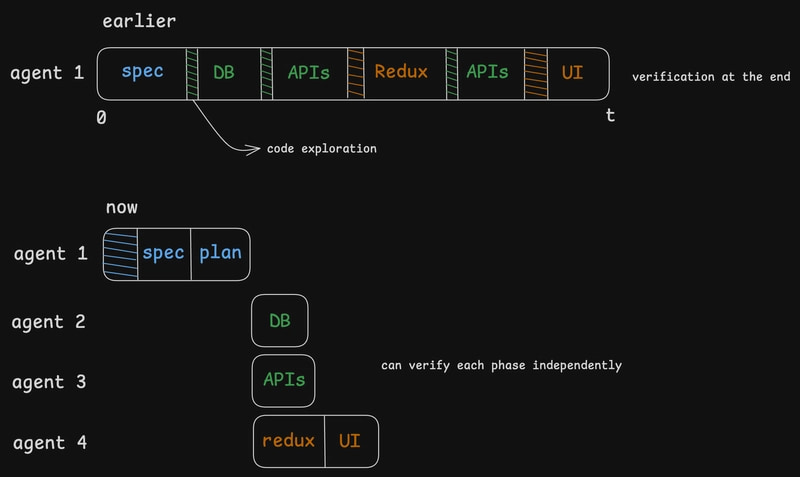
This workflow not only gives me more time back but also gives me the confidence that the agent has built what we both initially agreed upon.
I've been building flowflight — a focus timer for coding with music or white noise. Give it a try if that sounds like your thing. ❤️
This is the next phase.
You've figured out how to build one feature well. Now it's time to run parallel agents for different features at the same time.
But one codebase can only have a single branch checked out. So how do you work on different features?
A few months ago, when I ran into this exact problem, I made a copy of my codebase and opened two editors. It became messy pretty quickly, and I thought there had to be a better way.
That's when I found Git Worktrees!
Worktrees have been around since 2015, but they've got more relevant recently when the world started moving faster with agentic coding.
Let's say you're working on the same login feature and you've got an urgent hotfix to ship. Traditionally, you'd stash your work, check out a different branch, deploy your fix, come back to your branch and pop your stash back. This is okay but it can be better — faster!
Here's how I'd do it:
Create a worktree. (without stashing my work)
git worktree add ../hotfix-tree -b hotfix main
This will instantly create a directory beside my current working directory and create a new branch hotfix based on main. I can open it in another editor, fix the issue, and push it.
code ../hotfix-tree
git add .
git commit -m "fix: add validation for email"
git push
Once I'm done, I can remove the worktree from my original directory.
git worktree remove ../hotfix-tree
And this isn't limited to bug fixes.
You can create multiple worktrees and run an agent inside each one, with every agent working independently on a different feature.
It's basically multiple branches, checked out and worked on at the same time.
A few things to keep in mind:
Each worktree will have its own copy of dependencies, so you may run into disk space issues.
Git prevents you from checking out the same branch in multiple worktrees. This is to prevent data corruption.
I hope this post makes your workflow better and you ship a lot more code faster. Happy building! ✌️