
React之组件的生命周期以及属性状态(三)
# 一、什么是生命周期
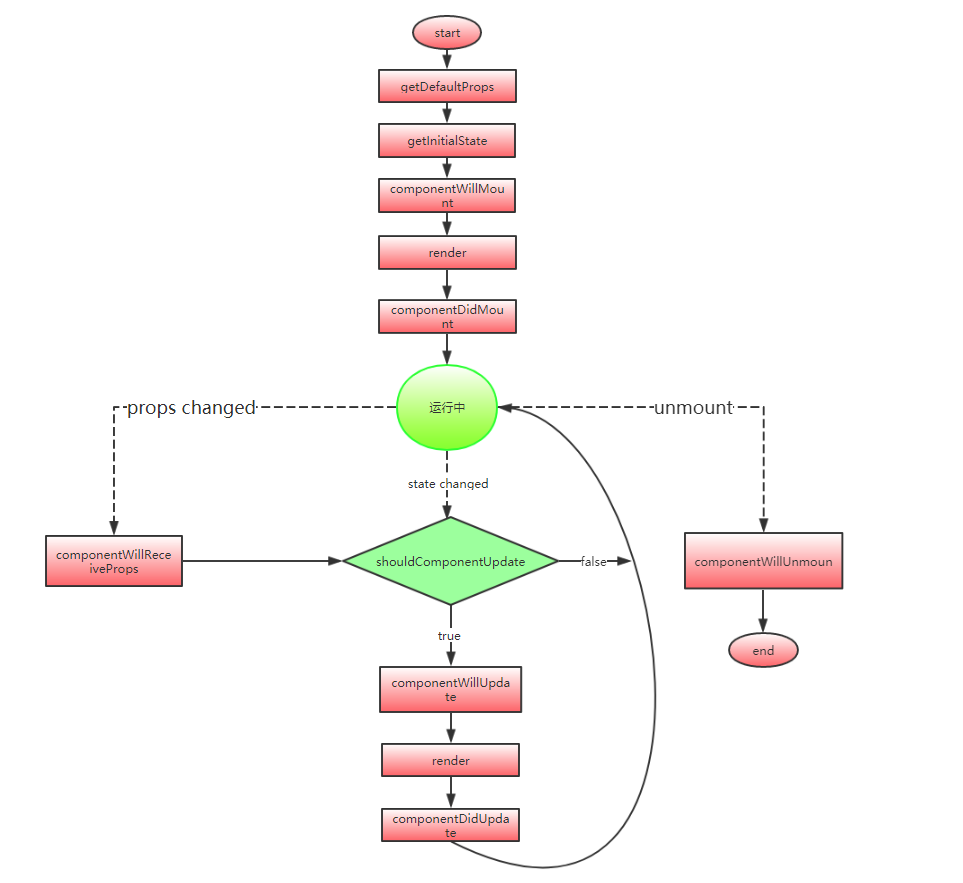
- 组件本质是状态机,输入确定,输出一定确定
- 一个
state对应一个render,状态转换的时候会触发不同的函数,从而让开发者有机会做出响应,可以用事件的思路理解状态,但是事件与事件之间没有关联,而状态与状态之间可能会有关联
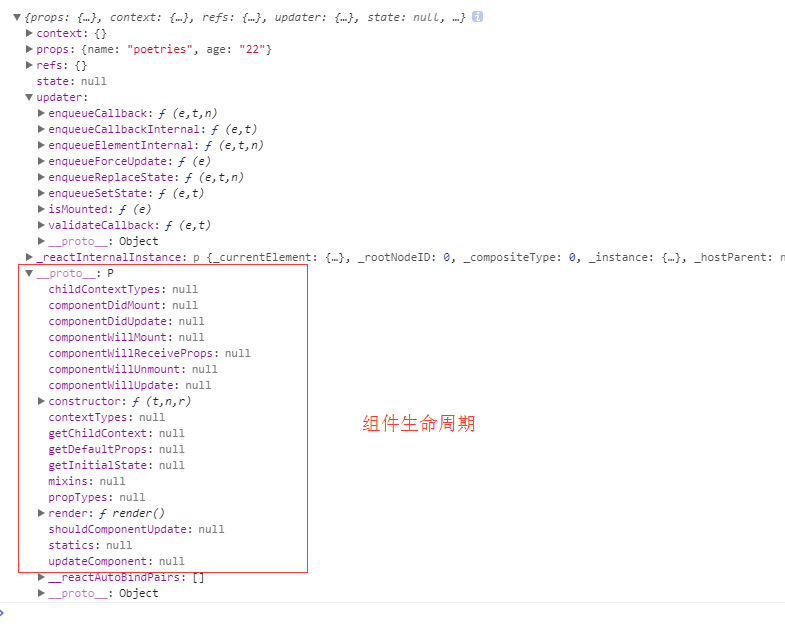
# 二、初始化阶段
设置初始的属性与状态
getDefaultProps:设置初始的属性,只在第一次调用,实例之间共享引用getInitialState:设置初始的状态componentWillMount:组件将要加载,render之前最后一次修改状态的机会render:只能访问this.props与this.state,只有一个顶层标签(组件),不允许修改状态和DOM输出componentDidMount:成功render并渲染完成真实DOM之后出发,可以修改DOM,要操作DOM也必须在这个阶段完成
var Demo = React.createClass({
    // 第一步执行顺序:设置初始的属性,指执行一次
    getDefaultProps:function(){
        return {
            name:'一个盒子',
            title:'box'
        }
    },
    // 第二步执行顺序:设置初始的状态
    getInitialState:function(){
        return {
            sss: this.props.name
        }
    },
    // 第三步执行:组件将要加载的时候,最后一次可以修改状态的机会
    componentWillMount:function(){
        this.setState({
            sss:'修改状态'
        })
        // alert('componentWillMount')
        // 这里是没有办法获取到这个节点的
        // var box = this.refs.box;
        // alert(box.clientWidth)
    },
    // 第四步:render渲染
    render:function(){
        // console.log(this)
        var styles = {
            position:'absolute',
            width: '100px',
            height: '100px',
            color: 'red',
            background: 'lime'
        }
        return <div ref="box" style={styles}>{this.props.title}{this.state.sss}</div>
    },
    // 第五步:组件加载完成,只有在这一个阶段,我们才可以操作DOM节点
    componentDidMount:function(){
        // alert('componentDidMount')
        // 下面的this指向组件
        console.log(this)
        var box = this.refs.box;
        var timer = null;
        var n = 0;
        box.onclick = function(){
            console.log(1)
            // 这个this指向box
            console.log(this)
            var This = this;
            timer = setInterval(function(){
                // 这个this指向window
                // console.log(this)
                n++;
                This.style.left = n + 'px';
                This.style.top = n + 'px';
            },60)
        }
    }
})
ReactDOM.render(<Demo/>,document.getElementById("app"))
@前端进阶之旅: 代码已经复制到剪贴板
# 三、运行中阶段
componentWillReceiveProps:父组件修改属性触发,可以修改新属性,修改状态shouldCompoenntUpdate:组件是否更新,返回false会阻止render调用,render后面的函数都不会执行componentWillUpdate:不能修改属性与状态,用于日志打印与数据获取reder:只能访问this.props与this.state,只有一个顶层标签(组件),不允许修改状态和DOM输出componentDidUpdate:可以修改DOM
var HelloReact = React.createClass({
    // 组件将要接收新的属性
    componentWillReceiveProps:function(newProps){
        console.log('componnetWillReceiveProps',1)
        console.log(newProps)
    },
    // 是否允许组件更新,返回true或者false,一般不会改变它的默认值:true
    shouldComponentUpdate:function(newProps,newState){
        console.log('shouldComponentUpdate',2)
        console.log(newProps,newState)
        return true;
    },
    // 组件将要更新
    componentWillUpdate:function(){
        console.log('componentWillUpdate',3)
    },
    render:function(){
        console.log('render',4)
        return <p>Hello {this.props.name?this.props.name:'React'}</p>
    },
    // 组件更新完毕
    componentDidUpdate:function(){
        console.log('componentDidUpdate',5)
    }
})
var Demo = React.createClass({
    getInitialState:function(){
        return {
            name:''
        }
    },
    handleChange:function(e){
        this.setState({
            name:e.target.value
        })
    },
    render:function(){
        return(
            <div>
                <HelloReact name={this.state.name}/>
                <input type="text" onChange={this.handleChange} />
            </div>
        )
    }
})
ReactDOM.render(<Demo/>,document.getElementById("app"))
@前端进阶之旅: 代码已经复制到剪贴板
# 四、销毁阶段
componentWillUnmount:组件将要卸载- 在
ReactDOM中提供一个方法unmountComponentAtNode(删除节点的名字)
var HelloReact = React.createClass({
    // 组件将要接收新的属性
    componentWillReceiveProps:function(newProps){
        console.log('componnetWillReceiveProps',1)
        console.log(newProps)
    },
    // 是否允许组件更新,返回true或者false,一般不会改变它的默认值:true
    shouldComponentUpdate:function(newProps,newState){
        console.log('shouldComponentUpdate',2)
        console.log(newProps,newState)
        return true;
    },
    // 组件将要更新
    componentWillUpdate:function(){
        console.log('componentWillUpdate',3)
    },
    render:function(){
        console.log('render',4)
        return <p>Hello {this.props.name?this.props.name:'React'}</p>
    },
    // 组件更新完毕
    componentDidUpdate:function(){
        console.log('componentDidUpdate',5)
    },
    componentWillUnmount:function(){
        console.log('BOOOOOOOOOOOOOOOOOM')
    }
})
var Demo = React.createClass({
    getInitialState:function(){
        return {
            name:''
        }
    },
    handleChange:function(e){
        // 利用input输入的内容来卸载组件
        if(e.target.value == '1234'){
            ReactDOM.unmountComponentAtNode(document.getElementById("app"))
            // 写上这个return是为了不执行下面的语句,减少代码执行时间
            return ;
        }
        this.setState({
            name:e.target.value
        })
    },
    render:function(){
        // 通过判断state的状态来卸载组件
       /* if( this.state.name == '1234'){
            return <div>1234</div>
        }*/
        return(
            <div>
                <HelloReact name={this.state.name}/>
                <input type="text" onChange={this.handleChange} />
            </div>
        )
    }
})
ReactDOM.render(<Demo/>,document.getElementById("app"))
@前端进阶之旅: 代码已经复制到剪贴板
# 五、属性状态
属性的含义与用法
- 含义:
props = properties - 属性:一个事物的性质与关系,属性往往是与生俱来,无法自己改变的
// 组件传递props
var Demo = React.createClass({
    render:function(){
        return <div>{this.props.title}</div>
    }
})
ReactDOM.render(<Demo title={"Demo"}/>,document.getElementById("app"))
@前端进阶之旅: 代码已经复制到剪贴板
/*
    ...this.props
    props的一个语法糖,可以将父组件中的全部属性复制给子组件,
    如果是这个标签本身拥有的这个属性
*/
var Demo = React.createClass({
    render:function(){
        return (<div>
            <div>{this.props.title}</div>
            <a {...this.props}>{this.props.title}</a>
        </div>)
    }
})
var props = {
    title:'百度',
    href:'http://www.baidu.com'
}
ReactDOM.render(<Demo {...props}/>,document.getElementById("app"))
@前端进阶之旅: 代码已经复制到剪贴板
this.props.chilidren


