Google ADK 多智能体系统入门:构建 Reddit 趋势发现器
Google 发布 ADK 多智能体架构实战教程,演示如何构建 Manager 代理协调多个 Specialist 代理(含自定义 Reddit 工具),实现多源情报聚合,并涵盖调试技巧。
完整中文译文
欢迎回到我们的系列文章!在上一篇文章中,我们构建了一个非常棒的 AI 智能体,能够在网络上搜索 AI Agent 的最新资讯。但如果我们想要添加更多专业化技能,比如从 Reddit 的开发者社区获取真实舆情,该怎么做呢?要做到这一点,我们需要升级 AI 智能体的设计。
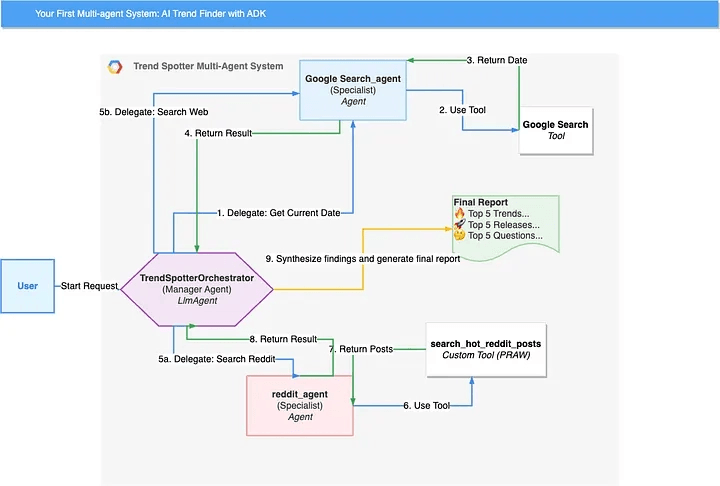
在本指南中,我们将提升技能水平,将简单的 AI 智能体重构为一个强大的多智能体系统。我们将构建一个"管理器"(Manager)AI 智能体,它指挥一组专业 AI 智能体,包括一个带有自定义 Reddit 工具的 AI 智能体,以收集更丰富、更多样化的洞察。
阅读完本文后,你将拥有一个更强大的趋势发现(Trend Spotter)AI 智能体,它可以从多个来源获取信息。更重要的是,你将学会使用 ADK 构建复杂 AI 智能体所需的高级技能。你将掌握以下能力:
构建可扩展的多智能体系统。
从任意 Python 函数构建自定义工具(如我们新的 Reddit 工具)。
创建一个编排器(orchestrator)AI 智能体,将任务委托给一组专业 AI 智能体。
编写高级提示词来管理多步骤、多工具的工作流。
使用 ADK 强大的 Trace 视图调试多智能体系统。
这种架构是释放 AI 智能体全部潜力的关键。让我们开始吧!
步骤 1:获取 Reddit API 凭证并安装库
为了让我们的 AI 智能体程序化地访问 Reddit,我们需要获取 API 凭证。这是免费的,整个过程只需要一分钟。
导航到 Reddit Apps 页面:登录你的 Reddit 账户,访问应用偏好设置页面:https://www.reddit.com/prefs/apps。
创建一个新应用:滚动到页面底部,点击"are you a developer? create an app…"按钮。
name: Trend Spotter Agent
选择 script 作为应用类型。
about url:可以留空。
redirect url:必须为此字段输入 http://localhost:8080。
点击 create app。你将进入一个新页面,显示你的凭证。
- 设置环境变量:为了安全起见,我们将把这些凭证存储为环境变量。
你的 client ID 是"personal use script"正下方的字符串。
你的 client secret 是"secret"标签旁边的长字符串。
打开终端,运行以下 export 命令:
export REDDIT_CLIENT_ID="YOUR_CLIENT_ID"
export REDDIT_CLIENT_SECRET="YOUR_CLIENT_SECRET"
export REDDIT_USER_AGENT="TrendSpotterAgent/0.1 by u/YourUsername"
- 更新依赖项:将 praw 库添加到 requirements.txt 文件并安装它。
# requirements.txt
google-adk
praw
从终端安装:
pip install -r requirements.txt
配置云环境
如果你还没有完成此步骤,在我们之前的博客中,我们展示了如何定义设置,告诉 ADK 如何安全地连接到你的 Google Cloud 账户,以使用 Vertex AI 和 Google Search 等服务。
export GOOGLE_GENAI_USE_VERTEXAI=true
export GOOGLE_CLOUD_PROJECT=<your-gcp-project-id>
export GOOGLE_CLOUD_LOCATION=<your-gcp-project-location>
运行这个一次性命令。它会为你打开一个浏览器进行登录,允许 ADK 代表你发出授权请求。
gcloud auth application-default login
步骤 2:创建项目文件夹
为了组织我们的新 AI 智能体团队,我们将在主 trend_spotter 包内创建一个 sub_agents 子目录。
如果还没有阅读第一篇博客文章,也不用担心!我们来帮你!以下是如何为主 AI 智能体创建文件夹结构的方法:
# 创建主项目文件夹
mkdir trend-spotter && cd trend-spotter
# 创建 Python 包文件夹,用于存放我们的代码
mkdir trend_spotter
touch trend_spotter/__init__.py
touch trend_spotter/agent.py
touch trend_spotter/prompt.py
# 创建顶级配置文件
touch pyproject.toml requirements.txt
# 最后,创建并激活虚拟环境
python3 -m venv venv && source venv/bin/activate
(在 Windows 上,使用 python -m venv venv && .\venv\Scripts\activate)
定义好主 AI 智能体和文件夹结构后,从 trend-spotter 根目录运行:
# 创建子 AI 智能体目录及其 Python 初始化文件
mkdir trend_spotter/sub_agents
touch trend_spotter/sub_agents/__init__.py
步骤 3:创建专业子 AI 智能体
现在我们将通过直接创建 Agent 类的实例来构建两个专业 AI 智能体。
- Google Search 专家:
创建一个新文件:trend_spotter/sub_agents/google_search_agent.py
添加以下代码。注意我们是如何直接创建 google_search_agent 变量的。
# trend_spotter/sub_agents/Google Search_agent.py
from google.adk.agents import Agent
from google.adk.tools import google_search

MODEL = "gemini-2.5-pro-preview-05-06"

# 一个特定的、结构化的提示词,用于控制此子 AI 智能体的输出格式。
google_search_SUB_AGENT_PROMPT = """
**Role:**
- You are a specialist Research Assistant.
- Your only purpose is to execute a Google Search based on instructions from your manager and return the raw, structured results.

**Tools:**
- You have access to one tool: `Google Search`.

**Context:**
- You will be given a query by a manager agent.
- Your output will be read by another agent, so it must be clean, predictable, and structured.
- You must not summarize, analyze, or interpret the search results. Your job is only to find and format the information directly from the tool's output.

**Task:**
1.  Take the search query provided to you.
2.  Execute a search using the `Google Search` tool.
3.  Format the raw output from the tool into a list, following the **exact** `Output Format` specified below.

**Output Format:**
For each search result, you MUST provide the Title, Link, and Snippet. Each complete result must be separated by '---'.

---
Title: [Title of the first search result]
Link: [Full URL of the first search result]
Snippet: [Snippet text of the first search result]
---
Title: [Title of the second search result]
Link: [Full URL of the second search result]
Snippet: [Snippet text of the second search result]
---
(and so on for all results)
"""

google_search_agent = Agent(
    model=MODEL,
    name="google_search_agent",
    description="An expert at using google_search to find recent information and return a structured list of results including URLs.",
    # We assign the new, structured instruction here.
    instruction=google_search_SUB_AGENT_PROMPT,
    tools=[google_search]
)
- Reddit 专家:
首先,为我们的自定义工具代码创建一个新文件:trend_spotter/tools.py。将以下函数添加到其中。
import os
import praw

# The function now accepts a LIST of subreddit names
def search_hot_reddit_posts(subreddit_names: list[str], limit_per_subreddit: int = 5) -> str:
    """
    Searches a list of subreddits for their current hot posts and returns their titles and URLs.

Args:
        subreddit_names: A list of subreddit names to search (e.g., ["LocalLLaMA", "MachineLearning"]).
        limit_per_subreddit: The number of top posts to retrieve from each subreddit.

Returns:
        A dictionary containing the status and a list of formatted post strings.
    """
    try:
        print(f"\n🔎 Searching Reddit for hot posts in: {', '.join(subreddit_names)}...")

reddit = praw.Reddit(
            client_id=os.environ["REDDIT_CLIENT_ID"],
            client_secret=os.environ["REDDIT_CLIENT_SECRET"],
            user_agent=os.environ["REDDIT_USER_AGENT"],
            read_only=True,
        )

all_posts = []
        # Loop through each subreddit name provided in the list
        for sub_name in subreddit_names:
            print(f"  - Fetching from r/{sub_name}...")
            subreddit = reddit.subreddit(sub_name)
            for post in subreddit.hot(limit=limit_per_subreddit):
                # We can add a simple filter here if we want, e.g., for score
                if post.score > 5:
                    all_posts.append(f"Title: {post.title}\nLink: {post.url}")

if not all_posts:
            return "No hot posts found meeting the criteria in the specified subreddits."

print(f"✅ Reddit search complete. Found {len(all_posts)} qualifying posts.")
        return "\n---\n".join(all_posts)

except Exception as e:
        return f"Error searching Reddit: {e}"
现在,在 trend_spotter/sub_agents/reddit_agent.py 创建 Reddit AI 智能体本身:
# trend_spotter/sub_agents/reddit_agent.py
from google.adk.agents import Agent
from trend_spotter.tools import search_hot_reddit_posts
MODEL = "gemini-2.5-pro-preview-05-06"
reddit_agent = Agent(
name="reddit_agent",
model=MODEL,
description="An expert at finding hot posts on specific Reddit subreddits using its tool.",
tools=[search_hot_reddit_posts]
)
**第 4 步:构建主编排智能体**

现在我们要将第 1 部分中的主智能体改造为新专业团队中的"管理者"。

打开 `trend_spotter/prompt.py`,将其内容替换为新的编排智能体提示词:
trend_spotter/prompt.py
ORCHESTRATOR_PROMPT = """
角色:
- 你是一支 AI 研究团队的高效管理者。
- 你的目标是为"The Agent Factory"播客生成一份高质量、详细的情报报告。
- 你的关注点 exclusively 集中在对软件开发者有影响力的 AI 智能体发展动态。
工具:
- 你有一支由两名专业智能体组成的团队可供调遣:
google_search_agent:擅长执行新闻、发布和技术文章的一般网络搜索。reddit_agent:擅长在特定 subreddit 上发现真实的开发者对话。
上下文:
- 你必须综合
google_search_agent和reddit_agent两方的信息来形成你的结论。 - 所有信息的首要过滤条件是其对开发者的直接和重大影响。舍弃任何纯商业导向或营销软文。
- 在多个来源(例如技术新闻和 Reddit 上同时出现)出现的话题应被认为更重要,并在报告中优先处理。
- 最终报告必须严格按照任务部分描述的结构组织。
任务:
- 获取当前日期: 你的第一个行动是委托给
google_search_agent。指示它查找当前日期。 - 委托专项研究:
- 基于该日期,计算过去 7 天的开始和结束日期。
- 指示
google_search_agent在计算出的日期范围内查找有关新开源智能体框架、热门库更新(如 LangChain、ADK、CrewAI 或 LlamaIndex)以及构建智能体的技术教程的新闻,使用after:YYYY-MM-DD和before:YYYY-MM-DD操作符。 - 指示
reddit_agent从"LocalLLaMA"、"MachineLearning"、"LangChain"、"AI_Agents"、"LLMDevs"和"singularity"等 subreddit 中找出关于实践挑战、新技术和新工具观点的最热门开发者讨论。
- 综合并创建最终报告:
- 审查两名专业智能体提供的信息。
- 合并、过滤和去重发现结果。你的首要过滤条件是仅选择对开发者有直接和重大影响的话题。
- 特别关注在一般网络搜索和 Reddit 上多个来源中出现的话题,因为这些很可能最重要,应在报告中优先处理。
- 报告必须以指定日期范围的标题开头。
- 报告正文必须包含以下详述的三个部分。
- 对于每个条目,你必须提供四条信息:1-2 句解释、缩进的"开发者影响"分析、"优先级理由"以及可验证的来源 URL。
最终报告格式:
🔥 智能体开发者热门趋势 Top 5
- [趋势 1 名称]:[对该趋势的 1-2 句解释]
(来源:[URL])- 开发者影响:[一句话解释这对开发者的重要性。]
- 优先级理由:[一句话解释为何选择此话题,例如"在 Reddit 上讨论量大且在多篇技术文章中提及"。]
- ...(最多 5 条)
🚀 智能体开发者热门发布 Top 5
- [发布 1 名称]:[对该工具、框架或模型的 1-2 句解释]
(来源:[URL])- 开发者影响:[一句话解释这对开发者的重要性。]
- 优先级理由:[一句话解释为何选择此话题。]
- ...(最多 5 条)
🤔 智能体开发者热门问题 Top 5
- [问题 1 主题]:[对开发者在问什么的 1-2 句解释]
(来源:[URL])- 开发者影响:[一句话解释这对开发者的重要性。]
- 优先级理由:[一句话解释为何选择此话题。]
- ...(最多 5 条)
打开 `trend_spotter/agent.py`,替换其内容使其成为编排智能体。注意我们现在导入了创建的专业智能体实例。
trend_spotter/agent.py
from google.adk.agents import LlmAgent
from google.adk.tools.agent_tool import AgentTool
导入子智能体实例
from .sub_agents.google_search_agent import google_search_agent
from .sub_agents.reddit_agent import reddit_agent
from . import prompt
MODEL = "gemini-2.5-pro-preview-05–06"
这是我们的主"管理"智能体,现在是一个 LlmAgent
root_agent = LlmAgent(
model=MODEL,
name="TrendSpotterOrchestrator",
description="The manager of a team of specialist AI agents.",
instruction=prompt.ORCHESTRATOR_PROMPT,
编排智能体的"工具"是其子智能体,用 AgentTool 包装
tools=[
AgentTool(agent=google_search_agent),
AgentTool(agent=reddit_agent)
],
)
**第 5 步:运行你的多智能体系统**

运行过程保持不变。adk web 工具将自动加载你的 `root_agent`,它现在是编排智能体。

确保你的 `pyproject.toml` 文件仍然正确指向主智能体:
[project]
name = "trend_spotter"
version = "0.1.0"
Setuptools 现在会自动发现你的 trend_spotter 包。
[tool.adk.agents]
trend_spotter = "trend_spotter.agent:root_agent"
安装包含新依赖的更新后的包:
pip install -e .
启动 web 界面:
adk web
在 web UI 的"Event"标签页中,你现在将看到主编排智能体调用其新的 `google_search_agent` 和 `reddit_agent` 子智能体。你已使用正确的 ADK 模式成功构建了一个更强大和可扩展的 AI 系统!

你应该获得类似这样的输出:
Report for the week of June 4, 2025 - June 11, 2025
🔥 Top 5 Trends for Agent Developers ...(内容省略)...
## 企业级 Agent 框架的采用

LangChain 等框架正在企业场景中展现出显著增长,体现在 Python 下载量已超越 OpenAI SDK,以及与 SAP、Salesforce 等系统的全新集成。(来源:news.knowledia.com - "LangChain Surpasses OpenAI SDK in Monthly Python Downloads" - 此具体 URL 不在提供的搜索结果中,但代表了搜索摘要 "LangChain:截至 2025 年 6 月,月度 Python 下载量已超越 OpenAI SDK" 中会包含的新闻文章类型)

开发者影响:使用或学习 LangChain 的开发者可以期待更成熟的工具链,以及企业在技能需求上的更大增长。

优先级依据:此趋势基于下载统计数据和企业集成新闻,表明开发者职业机会领域发生了重大转变。

## Agent 开发中的增强可观测性与调试

行业正在向更精密的 AI Agent 监控、调试及成本管理工具迈进,以 Langfuse 与 LlamaIndex 的集成以及 LangSmith 的新功能为代表。(来源:https://news.llamaindex.ai/integrating-langfuse-for-observability-and-debugging-in-llamaindex-5f4f7f8c29ac [基于搜索 "2025 年 6 月 6 日的一篇文章,讨论将 Langfuse 与 LlamaIndex 集成以实现可观测性和调试" 的示例 URL])

开发者影响:开发者将拥有更好的工具来理解 Agent 行为、优化性能并控制运营成本。

优先级依据:解决了构建稳健、可维护 Agent 的关键开发者需求,已在多个框架更新中得到突出体现。

## Agent 处理结构化数据的能力进阶

Agent 在处理结构化数据方面正变得更加熟练,典型进展包括 Microsoft AutoGen 的结构化检索增强以及 LlamaIndex 的电子表格 Agent。(来源:Daily AI Agent News - "Microsoft AutoGen v0.4: Structured Retrieval Augmentation & MCP" - 此 URL 不在搜索结果中,但信息 "Microsoft AutoGen v0.4 实现了结构化检索增强" 是存在的)

开发者影响:这使开发者能够构建用于涉及数据库、电子表格及其他结构化格式的更复杂真实场景用例的 Agent。

优先级依据:代表了 Agent 能力的重大扩展,能够开辟新的应用场景并提升其实用性。

## 本地与开源 Agent 解决方案的增长

诸如 Block 的 "Goose" 和 "OpenHands" 等新兴开源框架强调本地执行与定制化,与开发者在 Reddit(r/LocalLLA)等平台上关于更好地控制其 LLM 配置的讨论相呼应。(来源:https://www.reddit.com/r/LocalLLaMA/comments/1l8pem0/i_finally_got_rid_of_ollama/ 以及关于 Goose/OpenHands 发布的新闻文章)

开发者影响:为开发者提供了更多以隐私为中心、成本效益高且高度可定制的 Agent 开发选项。

优先级依据:同时得到泛科技新闻中新工具发布以及开发者社区(Reddit)活跃讨论的支持。

## 多 Agent 系统与互操作性标准的崛起

Fujitsu 的编排器等 orchestrator 的开发,以及 CrewAI 和 AutoGen(支持 MCP)等框架的进步,突显了多个 Agent 协作的复杂系统这一重点。LangGraph 也是这一趋势的核心。(来源:关于 "Fujitsu's Agentic Workflow Orchestrator" 的科技新闻以及 https://www.reddit.com/r/LangChain/comments/1l8zy42/built_a_texttosql_multiagent_system_with/)

开发者影响:开发者越来越需要承担设计、构建和管理多个专业化 Agent 之间交互的任务,这要求新的技能组合。

优先级依据:这是一个关键创新领域...

## 第 6 部分:下一步与结语

恭喜!你已成功使用 Agent 开发套件的编排器模式将简单的 Agent 升级为强大的多 Agent 系统。这是你作为 Agent 开发者的旅程中的一个巨大飞跃。

你现在已经学会了构建复杂 AI 应用的一些最重要技能:

- 如何创建专业化子 Agent
- 如何从任意 Python 函数构建自定义工具
- 如何设计一个管理 Agent 来编排整个团队解决问题

这就是真实的、可扩展的 Agent 系统的工作方式。

但这只是开始。你现在拥有了一个真正强大的基础,可以在此之上扩展。想想你还可以为团队添加哪些其他专业化 Agent——获取额外信息来源的 Agent/工具?一个将报告保存到 Google Doc 的 Agent?一个将摘要发布到 Slack 或邮件的工具?可能性是无限的。

当你准备好深入探索框架提供的所有高级功能时,最佳去处是 Google Cloud ADK 官方文档。