
8.0
热点
AI SCORE
编程提效2026-08-18 23:56
FlakeFixer: 用Agent自动分析Flaky Test
dev.to · AI#AI编程#CI/CD#测试工程
Editor brief · 编辑速览
用PyGithub抓取失败CI日志、LangChain+Pydantic分类失败原因、自动创建带修复建议的GitHub Issue的完整Pipeline。
Flaky tests 是开发者效率的隐形杀手。它们随机失败、浪费数小时调试时间、且蚕食 CI 的信任度。作为一名开发者,我有过太多次这样的早晨:盯着 GitHub Actions 日志,试图判断一个失败是真正的 bug 还是仅仅是一次网络抖动。于是我构建了 FlakeFixer——一个监控 GitHub Actions workflow、提取失败日志、用 AI Agent 对根因进行分类(竞态条件、网络超时、基础设施抖动、依赖 flake)、并自动创建 GitHub Issue(附带通俗易懂的解释和建议的缓解方案)的工具。在这篇文章中,我将带你了解架构、技术栈,以及如何构建你自己的类似工具。
Flaky tests 是那些在不修改任何代码的情况下随机通过和失败的测试。它们在 CI pipeline 中很常见,尤其是当测试依赖外部服务、时间、或共享状态时。手动调试 flaky tests 是痛苦的,因为:
我想要一个能够自动完成以下工作的系统:
这正是 FlakeFixer 所做的事。
系统有三个主要组件:
在构建这个工具之前,我需要一种能够按需生成 flaky failures 的方式。我创建了一个配套仓库 ci-flake-lab,故意产生几种类型的 flaky failures:
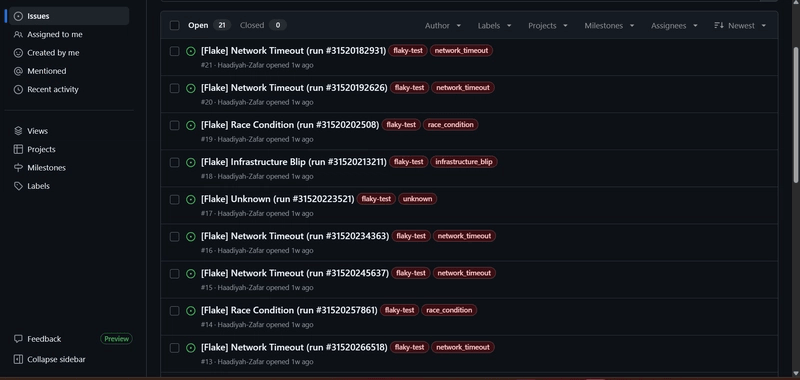
OSError: No space left on device 的测试。我使用 GitHub Actions 环境变量来切换每次运行的 flake 类型,并使用 matrix 策略让多种 flake 类型并行运行。这给了我源源不断的失败日志来测试 pipeline——你可以在仓库中看到 resulting auto-filed issues,每个都带有 flaky-test 标签及其特定类别。
[Insert your screenshot of the ci-flake-lab issues list here]
以下是 workflow YAML:
name: Flake Farm
on: [push, workflow_dispatch]

jobs:
  flaky-tests:
    runs-on: ubuntu-latest
    strategy:
      matrix:
        flake-type: [RACE, NETWORK, INFRA, UNKNOWN]
      fail-fast: false
    env:
      FLAKE_${{ matrix.flake-type }}: 1
    steps:
      - uses: actions/checkout@v4
      - uses: actions/setup-python@v5
        with:
          python-version: '3.10'
      - run: pip install pytest
      - run: pytest test_app.py -v
ingestion 模块使用 PyGithub 进行认证并列出失败的 workflow runs,然后下载日志归档并提取原始文本。
from github import Github
import requests, zipfile, io

class IngestionPipeline:
    def __init__(self, token, repo_name):
        self.gh = Github(token)
        self.repo = self.gh.get_repo(repo_name)

    def get_failed_runs(self, workflow_id, max_runs=20):
        workflow = self.repo.get_workflow(workflow_id)
        return list(workflow.get_runs(status="failure"))[:max_runs]

    def download_logs(self, run_id):
        run = self.repo.get_workflow_run(run_id)
        headers = {"Authorization": f"token {token}"}
        resp = requests.get(run.logs_url, headers=headers, allow_redirects=True)
        with zipfile.ZipFile(io.BytesIO(resp.content)) as zf:
            full_log = ""
            for name in zf.namelist():
                if name.endswith(".txt"):
                    full_log += zf.read(name).decode("utf-8", errors="replace") + "\n"
        return full_log
这给了我原始日志文本。在完整版本中,我还裁剪日志到最相关的部分(最后 100 行以及包含 FAILED 或 ERROR 的行),以将 LLM prompt 保持在 token 限制内。
对于 AI agent,我使用 LangChain 配合 Pydantic output parser 来强制 LLM 返回结构化 JSON。这确保我能够可靠地解析输出并用它来创建 issues。Prompt 要求 LLM 对失败进行分类,并提供解释和缓解建议。
from langchain_core.prompts import ChatPromptTemplate
from langchain_openai import ChatOpenAI
from langchain.output_parsers import PydanticOutputParser
from pydantic import BaseModel, Field

class FlakeAnalysis(BaseModel):
    flake_category: str = Field(description="race_condition, network_timeout, infrastructure_blip, unknown")
    explanation: str
    mitigation: str
    confidence: float

class FlakeAnalyzer:
    def __init__(self):
        self.llm = ChatOpenAI(model="gpt-4o-mini", temperature=0.1)
        self.parser = PydanticOutputParser(pydantic_object=FlakeAnalysis)

    def analyze(self, log_snippet):
        prompt = ChatPromptTemplate.from_template("""
You are a flaky test analyst. Given the CI failure log, classify the root cause.
Log:
{log}

{format_instructions}
""")
        formatted = prompt.format_prompt(
            log=log_snippet[:6000],
            format_instructions=self.parser.get_format_instructions()
        )
        response = self.llm.invoke(formatted.to_messages())
        return self.parser.parse(response.content)
以下是 agent 返回的示例:
{
  "flake_category": "network_timeout",
  "explanation": "The test attempted to connect to an external service but timed out. This is likely an infrastructure or network issue, not a code bug.",
  "mitigation": "Add retry logic with exponential backoff and increase the timeout. Consider mocking external services in unit tests.",
  "confidence": 0.9
}
最后一部分是 reporting 层。一旦 agent 返回分析结果,我就使用 PyGithub 创建一个带有分析结果、标签和日志片段的 GitHub Issue。
from github import Github

class Reporter:
    def __init__(self, token, repo_name):
        self.gh = Github(token)
        self.repo = self.gh.get_repo(repo_name)

    def create_flake_issue(self, analysis, run_id, log_snippet):
        title = f"[Flake] {analysis.flake_category.replace('_',' ').title()} (run #{run_id})"
        body = f"""## Flaky Test Analysis
**Category:** `{analysis.flake_category}`
**Confidence:** {analysis.confidence:.2f}

### Root Cause
{analysis.explanation}

### Suggested Mitigation
{analysis.mitigation}

<details><summary>Log snippet</summary>

{log_snippet[:1500]}

</details>

*Auto-generated by FlakeFixer agent.*
"""
        labels = ["flaky-test", analysis.flake_category]
        issue = self.repo.create_issue(title=title, body=body, labels=labels)
        return issue.html_url
你可以在 ci-flake-lab 的 issues 标签页看到真实的输出——每一个 [Flake] ... issues 都是由 FlakeFixer 自动创建的,而非手动。
在构建 FlakeFixer 的过程中,我注意到 pytest-github-actions-annotate-failures 没有截断过长的 annotation 消息,导致 PR 中出现杂乱。我提交了一个 PR 来为 annotation 输出添加截断功能。这是我第一次为该项目贡献代码,它强化了清晰、可读的 CI 输出的重要性。
Flaky tests 不必成为开发者时间的黑洞。通过结合 GitHub Actions、LLM 和自动化,我们可以自动分类和记录 flaky failures,让维护者找回时间和理智。如果你对代码感兴趣或想看演示,请查看这些仓库:
如果你也遇到过类似的问题或有改进的想法,请在评论区告诉我!