
9.0
重磅
AI SCORE
技术实践2026-08-02 13:35
Agent 工具成本优化:从隐形开销到 Tool Search
dev.to · AI#Agent#成本优化#工程陷阱
Editor brief · 编辑速览
揭示 Agent 每轮调用都会重新发送整个工具 schema(150-400 token/工具),导致成本和精度问题,介绍微软 Tool Search 解决方案。
大多数 Agent 被计费用于它们不使用的工具。不是一次——而是在每一轮。
其实机制很简单,但正因为简单所以容易被忽视。当你给模型一组工具时,每个工具的完整 JSON schema 都会进入请求。名称、描述、参数类型、枚举值、嵌套对象,全部都有。模型读完所有内容,选一个,然后调用它。下一轮,整个工具集又会被重新发送,因为 API 是无状态的,工具列表是请求的一部分。
有八个工具时这是无感的。有两百个时,这会主导你的输入 token 成本,挤占你真正关心的上下文,而且——伤害更大的部分——会明显降低工具选择的准确性。
Microsoft Foundry 在 2026 年 Build 大会上发布了 Tool Search 来解决这个问题。这值得理解,也值得在 Foundry 之外理解:同样的失败模式会出现在任何 MCP 密集的 Agent 中,其缓解方案也是可以推广的。
一个细节适度的工具 schema,加上足够让模型正确使用的参数描述,一次就要消耗 150–400 个 token。廉价的 schema 会产生糟糕的工具调用,所以团队写得很详细,这是正确的选择,也是昂贵的选择。
乘以工具集数量和轮数:
tokens_per_turn  = base_prompt + conversation_history + (n_tools × avg_schema_tokens)
tokens_per_task  = tokens_per_turn × turns
一个涉及 200 个工具的十二轮任务,每个 schema 250 个 token,仅工具定义就要花费大约 600,000 个输入 token。对话本身可能只有 20,000。你几乎完全是在支付重新读取一个模型已经在其他十一次中决定放弃的工具集的费用。
token 成本是看得见的一半。看不见的一半更糟。随着工具集增长,它们会积累近似重复的工具——get_customer、get_customer_profile、fetch_customer_record、lookup_account_by_customer——通常来自不同的团队、不同的 MCP 服务器、代码库的不同时代。选择准确性下降不是因为模型变笨了,而是因为你给了它一个真正模糊的菜单。
Foundry 没有暴露一个平的列表,而是暴露两个元工具:tool_search 和 call_tool。Agent 描述它想做什么,得到一个小的有序候选集,然后调用其中一个。
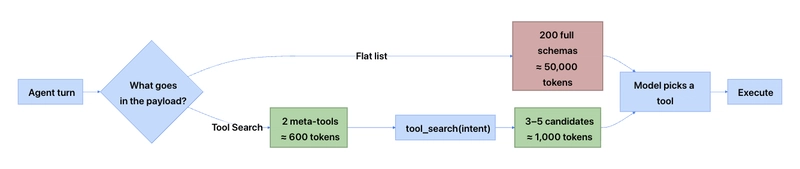
交易是用一个检索往返来换取不发送整个工具集。超过大约三十个工具,这种交易是强有利的。在它之下,通常不是——这是在采用它之前必须坦诚的第一件事。
Tool Search 不是唯一的答案,也不总是正确的答案。
Pinning(固定)是人们跳过但不应该跳过的部分。Foundry 让你固定关键工具,这样它们可以完全绕过搜索往返,添加描述你的团队实际如何看待工具的上下文,并自动固定经常使用的工具。实际上,少数工具占大多数调用;固定那些,检索其他所有工具,你就可以在不支付通用路径上检索延迟的情况下获得平坦的 token 成本。
两个命令可以搭建一个附带工具箱的托管 Agent。
mkdir my-toolbox-agent && cd my-toolbox-agent

azd ai agent init \
  -m "https://github.com/microsoft-foundry/foundry-samples/blob/main/samples/python/hosted-agents/agent-framework/responses/04-foundry-toolbox/agent.manifest.yaml" \
  --src src/toolbox-agent
然后从示例的描述符创建工具箱:
azd ai toolbox create my-toolbox --from-file ./src/toolbox-agent/toolbox.yaml
它会打印一个版本化的 MCP 端点,这就是你的 Agent 绑定到的地址:
https://<account>.services.ai.azure.com/api/projects/<project>/toolboxes/my-toolbox/versions/1/mcp?api-version=v1
有一个陷阱值得标记,因为它让我花了二十分钟:azd ai toolbox create 需要一个本地 azd 项目和环境来运行,即使你明确传递了 --project-endpoint。如果你不是从 azd ai agent init 开始,先运行 azd init --minimal,然后将端点设置到环境中:
azd init --minimal
azd env set FOUNDRY_PROJECT_ENDPOINT https://<account>.services.ai.azure.com/api/projects/<project>
你的 toolbox.yaml 是声明工具集及其搜索行为的地方。下面的形态是示意性的——预览 schema 会变化,所以在复制之前检查当前示例:
# toolbox.yaml — 示意结构,根据当前示例验证
name: my-toolbox
description: Order operations, customer lookup, and fulfilment tools

toolSearch:
  enabled: true
  # Pinned tools skip retrieval entirely and are always in context.
  # Keep this list short — every pin is a permanent token cost.
  pinned:
    - get_order_status
    - search_customers
  autoPin:
    enabled: true
    minCallsPerWindow: 25

tools:
  - name: get_order_status
    source: mcp
    server: orders-mcp
    # Retrieval context: describe the tool the way your team describes it,
    # including the vocabulary users actually type.
    searchContext: >
      Look up the current fulfilment state of a single order. Use when the
      user mentions an order number, tracking number, "where is my package",
      or asks whether something shipped.

  - name: issue_refund
    source: mcp
    server: billing-mcp
    searchContext: >
      Issue a full or partial refund against a completed order. Requires an
      order ID and an amount. Do not use for cancellations of unshipped
      orders — use cancel_order instead.
最后那个 searchContext 在做真正的工作。检索质量是 Tool Search 的全部游戏,检索针对你的描述运行。显式的否定——不要用这个,用那个——是你在那里能写的最高价值的东西,因为近似重复正是选择失败的地方。
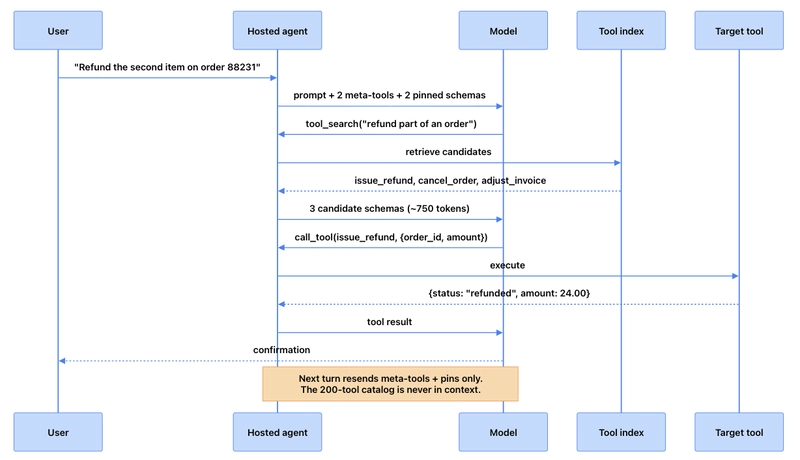
这个话题值得写出来而不仅仅是启用的原因是,收益是可衡量的,收益的大小完全取决于你的工具集。在改变任何东西之前连接追踪并获得基线。
pip install azure-ai-projects azure-identity opentelemetry-sdk azure-core-tracing-opentelemetry
from azure.core.settings import settings
from opentelemetry import trace
from opentelemetry.sdk.trace import TracerProvider
from opentelemetry.sdk.trace.export import SimpleSpanProcessor, ConsoleSpanExporter
from azure.ai.projects.telemetry import AIProjectInstrumentor

settings.tracing_implementation = "opentelemetry"

span_exporter = ConsoleSpanExporter()
tracer_provider = TracerProvider()
tracer_provider.add_span_processor(SimpleSpanProcessor(span_exporter))
trace.set_tracer_provider(tracer_provider)

# Emits GenAI spans for every agent and model call in this process
AIProjectInstrumentor().instrument()
在运行前设置 AZURE_EXPERIMENTAL_ENABLE_GENAI_TRACING=true,每一轮——prompt、工具调用、模型响应——都会表现为一个带 token 使用量的 span。将 ConsoleSpanExporter 替换为 Azure Monitor 导出器,同样的 span 就会落到 Foundry 门户的 Observability 标签页。
现在运行比较。下面的工具集是故意简单的:固定的任务集、两种配置、聚合 span。
import os
import json
from dataclasses import dataclass, field
from statistics import mean

@dataclass
class RunResult:
    config: str
    input_tokens: list = field(default_factory=list)
    turns: list = field(default_factory=list)
    correct_tool: list = field(default_factory=list)

TASKS = [
    # (prompt, tool the model should end up calling)
    ("Where is order 88231?",                      "get_order_status"),
    ("Refund the second item on order 88231",      "issue_refund"),
    ("Cancel order 90114, it hasn't shipped",      "cancel_order"),
    ("Which customers in Ohio ordered twice?",     "search_customers"),
    ("Send the June invoice to billing@acme.com",  "email_invoice"),
]

def score_run(spans, expected_tool):
    """Pull token usage and the actually-invoked tool out of collected spans."""
    input_tokens = sum(
        s.attributes.get("gen_ai.usage.input_tokens", 0) for s in spans
    )
    invoked = [
        s.attributes.get("gen_ai.tool.name")
        for s in spans
        if s.attributes.get("gen_ai.tool.name")
    ]
    # With Tool Search the target arrives as a call_tool argument, so unwrap it.
    resolved = [
        json.loads(s.attributes["gen_ai.tool.arguments"]).get("name", n)
        if n == "call_tool" else n
        for s, n in zip(spans, invoked)
    ]
    return input_tokens, len(invoked), expected_tool in resolved

def report(results):
    for r in results:
        print(f"\n{r.config}")
        print(f"  mean input tokens/task : {mean(r.input_tokens):>8,.0f}")
        print(f"  mean turns/task        : {mean(r.turns):>8.1f}")
        print(f"  tool selection accuracy: {mean(r.correct_tool):>8.1%}")
针对一个平的工具集运行它,然后针对启用了 Tool Search 的同一工具集运行,再针对固定了前五个工具的工具集运行。三个数字,一个表格,你就会知道这对你的工具集是否值得做,而不仅仅是对博文中的工具集。
坦诚地对待限制,因为失败模式是真实的:
小工具集会变得更差,而不是更好。在大约三十个工具以下,你已经添加了一个往返和一个检索失败模式来节省你根本没有花费的 token。别这样做。
检索遗漏是无声且令人困惑的。当一个平列表 Agent 选择错误的工具时,跟踪显示它考虑了正确的工具。当 Tool Search 从不呈现正确的工具时,跟踪显示一个在给定所接收内容情况下行为合理的 Agent。调试从"为什么它选择得不好"转移到"为什么这不在候选集中",这是一个不同的技能,也是一个不那么明显的技能。
延迟移到了错误的地方。额外的往返会在一轮的开始、任何有用工作之前着陆。对于后台 Agent 这是免费的。对于任何人在观看的东西,要积极地固定。
你的描述现在是负载承载的基础设施。一个模糊的 searchContext 过去会花费你偶尔的坏工具调用。现在它花费你在功能上不可见的工具。像预算 API 合同一样为它们预算审查时间。
从这个原则中剥离 Foundry,它仍然成立:任何你在每一轮都发送的东西都应该在每一轮都值得去。工具 schema 是第一个撞上这堵墙的东西,因为它们随着集成数量增长,但同样的审计适用于积累了六个月没人读过的指令的系统 prompt、为你不再运行的模型版本保留的少样本示例,以及被整体粘贴的检索上下文,因为修剪它曾是某人的 Q3 任务。
Tool Search 是一个无聊想法的好实现——检索而不是广播。采用它的原因不是它是新的。而是你可以在一个下午内测量差异,而数字通常比你预期的要大。
这个领域的预览 API 移动很快——上面的 azd 命令和追踪设置是 2026 年六月 Foundry 发布时的当前状态,但在发布前针对当前示例验证 schema 级别的细节。