
8.0
热点
AI SCORE
技术实践2026-09-25 12:29
Postgres 向量内联与分离表性能实测对比
Google AI · DEV#PostgreSQL#向量数据库#性能优化
Editor brief · 编辑速览
通过 3 万条产品数据实测,在 AlloyDB 上对比向量嵌入与主数据共表 vs 分离存储的性能差异,揭示 ANN 索引刷新时的 JOIN 开销。
在 Postgres 中向量存储:内联表 vs. 独立表——量化 Join 开销
测试语义搜索、带过滤条件的查询以及多表连接在 AlloyDB 中的表现,衡量向量数据解耦后的真实性能成本。
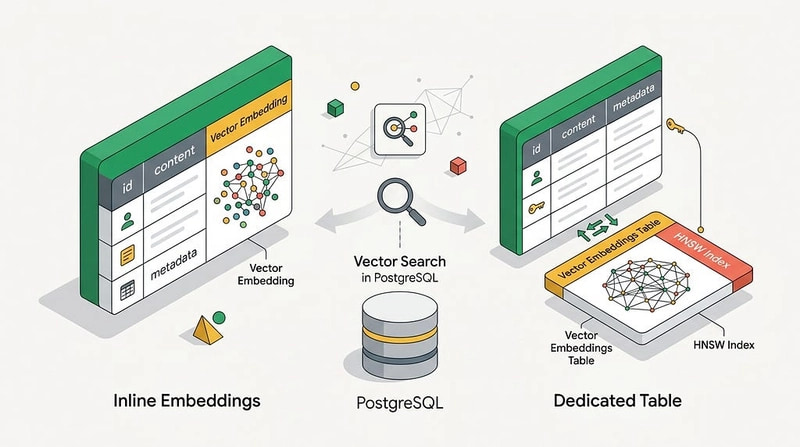
如果你正在使用向量嵌入,可能已经知道嵌入模型在不断演进,需要时不时地用新版本刷新嵌入。在上一篇文章中,我们讨论了嵌入刷新时表中出现的膨胀问题、TOAST 段以及相关索引。作为将嵌入与数据存储在同一张表中的替代方案,我提出了另一种布局——将嵌入放在专门的表中。在这篇文章中,我将展示与将嵌入存储在同一张表中相比,这种方式可能带来的性能影响。
为了测试查询,我需要带有真实嵌入的样本数据。之前文章中已经解释过原因——使用 ANN 索引时可能会对结果产生明显影响。我准备了一个包含 30k 行样本产品的数据集,基于产品描述构建嵌入,并将其填充到专门的嵌入表中。在所有测试中,我使用的是 AlloyDB Omni 数据库。它自带 AI 集成,开箱即用,这帮助我构建嵌入、向量索引,并通过将搜索短语转换为向量变量来生成搜索嵌入。
以下是测试中使用的表:
-- ecomm.products 表

demodb=# \d ecomm.products
                              Table "ecomm.products"
         Column | Type | Collation | Nullable | Default
------------------------+------------------------+-----------+----------+---------
 id | bigint | | not null |
 cost | numeric | | |
 category | character varying(255) | | |
 name | character varying(255) | | |
 brand | character varying(255) | | |
 retail_price | numeric | | |
 department | character varying(255) | | |
 sku | character varying(255) | | |
 distribution_center_id | bigint | | |
 product_description | text | | |
 product_image_uri | text | | |
 embedding | vector(768) | | |
Indexes:
    "products_pkey" PRIMARY KEY, btree (id)
    "fk_products_distribution_center_23" btree (distribution_center_id)
    "idx_products_brand" btree (brand)
    "idx_products_category" btree (category)
    "idx_products_retail_price" btree (retail_price)
    "idx_products_sku" btree (sku)
    "idx_products_vector" hnsw (embedding vector_cosine_ops)
Foreign-key constraints:
    "fk_products_distribution_center" FOREIGN KEY (distribution_center_id) REFERENCES ecomm.distribution_centers(id)
Referenced by:
    TABLE "ecomm.inventory_items" CONSTRAINT "fk_inventory_items_product" FOREIGN KEY (product_id) REFERENCES ecomm.products(id)
    TABLE "ecomm.order_items" CONSTRAINT "fk_order_items_product" FOREIGN KEY (product_id) REFERENCES ecomm.products(id)
    TABLE "ecomm.product_reviews" CONSTRAINT "fk_reviews_product" FOREIGN KEY (product_id) REFERENCES ecomm.products(id) ON DELETE CASCADE

-- ecomm.product_embeddings 表
demodb=# \d ecomm.product_embeddings
             Table "ecomm.product_embeddings"
   Column | Type | Collation | Nullable | Default
------------+-------------+-----------+----------+---------
 product_id | bigint | | not null |
 embedding | vector(768) | | not null |
Indexes:
    "product_embeddings_pkey" PRIMARY KEY, btree (product_id)
    "idx_product_embeddings_vector" hnsw (embedding vector_cosine_ops)

-- ecomm.inventory_items 表
demodb=# \d ecomm.inventory_items
                                 Table "ecomm.inventory_items"
             Column | Type | Collation | Nullable | Default
--------------------------------+-----------------------------+-----------+----------+---------
 id | bigint | | not null |
 product_id | bigint | | |
 created_at | timestamp without time zone | | |
 sold_at | timestamp without time zone | | |
 cost | numeric | | |
 product_category | character varying(255) | | |
 product_name | character varying(255) | | |
 product_brand | character varying(255) | | |
 product_retail_price | numeric | | |
 product_department | character varying(255) | | |
 product_sku | character varying(255) | | |
 product_distribution_center_id | bigint | | |
Indexes:
    "inventory_items_pkey" PRIMARY KEY, btree (id)
    "fk_inventory_items_distribution_center_8" btree (product_distribution_center_id)
    "fk_inventory_items_product_7" btree (product_id)
Foreign-key constraints:
    "fk_inventory_items_distribution_center" FOREIGN KEY (product_distribution_center_id) REFERENCES ecomm.distribution_centers(id)
    "fk_inventory_items_product" FOREIGN KEY (product_id) REFERENCES ecomm.products(id)
Referenced by:
    TABLE "ecomm.order_items" CONSTRAINT "fk_order_items_inventory_item" FOREIGN KEY (inventory_item_id) REFERENCES ecomm.inventory_items(id)

-- ecomm.product_reviews 表
demodb=# \d ecomm.product_reviews
                                Table "ecomm.product_reviews"
   Column | Type | Collation | Nullable | Default
-------------+--------------------------+-----------+----------+------------------------------
 id | bigint | | not null | generated always as identity
 user_id | bigint | | not null |
 product_id | bigint | | not null |
 rating | integer | | not null |
 review_text | text | | not null |
 created_at | timestamp with time zone | | not null | CURRENT_TIMESTAMP
Indexes:
    "product_reviews_pkey" PRIMARY KEY, btree (id)
    "idx_product_r
ecomm.products 和 ecomm.product_embeddings 通过主键关联,两张表都在嵌入向量上构建了 HNSW 索引。
我从一个简单的场景开始测试——仅使用 products 表进行余弦语义搜索,然后将其与 products 和 product_embeddings 表的连接进行比较。对于搜索,我将短语 'lightweight waterproof high quality jacket' 转换为向量嵌入,并将其作为 test_vec 变量传入。这样消除了模型响应时间不可预测的问题,使我能够更精确地比较查询执行时间。
-- 在 psql 中设置 test_vec 变量
SELECT (google_ml.embedding(
    model_id => 'text-embedding-005',
    content => 'lightweight waterproof high quality jacket'
)::public.vector(768))::text AS test_vec \gset
在同一个 psql 会话中,我运行了搜索并使用 EXPLAIN ANALYZE 查看执行计划和耗时。每个测试都重复多次。
-- 嵌入存储在 ecomm.products 中
EXPLAIN (ANALYZE, BUFFERS)
SELECT
    p.id,
    p.name,
    p.brand,
    p.retail_price
FROM ecomm.products p
ORDER BY (p.embedding <=> :'test_vec'::public.vector(768))
LIMIT 10;
以下是"内联"嵌入向量搜索的执行计划:
 Limit (cost=1213.90..1240.56 rows=10 width=86) (actual time=1.112..1.200 rows=10.00 loops=1)
   Buffers: shared hit=792
   -> Index Scan using idx_products_vector on products p (cost=1213.90..78826.40 rows=29120 width=86) (actual time=1.110..1.197 rows=10.00 loops=1)
         Order By: (embedding <=> '[-0.01255631,...,-0.008388235]'::vector(768))
         Index Searches: 1
         Buffers: shared hit=792
 Planning:
   Buffers: shared hit=1
 Planning Time: 0.107 ms
 Execution Time: 1.224 ms
从执行计划可以看出,查询使用 HNSW 索引来搜索嵌入并按相似度排序。返回结果的总响应时间约为 2.1 ms。响应时间大于执行计划中的纯执行时间,因为它还增加了规划、网络时间以及客户端软件显示结果的开销。
然后我将嵌入放到 ecomm.product_embeddings 表中,并进行了相同的搜索:
-- 嵌入存储在 ecomm.product_embeddings 中
EXPLAIN (ANALYZE, BUFFERS)
SELECT
    p.id,
    p.name,
    p.brand,
    p.retail_price
FROM ecomm.product_embeddings pe
JOIN ecomm.products p ON p.id = pe.product_id
ORDER BY (pe.embedding <=> :'test_vec'::public.vector(768))
LIMIT 10;
以下是使用主键连接 products 和 product_embeddings 表的执行计划:
 Limit (cost=219.82..250.39 rows=10 width=86) (actual time=1.188..1.351 rows=10.00 loops=1)
   Buffers: shared hit=852
   -> Nested Loop (cost=219.82..89223.27 rows=29120 width=86) (actual time=1.187..1.348 rows=10.00 loops=1)
         Buffers: shared hit=852
         -> Index Scan using idx_product_embeddings_vector on product_embeddings pe (cost=219.53..59613.60 rows=29120 width=26) (actual time=1.126..1.141 rows=10.00 loops=1)
               Order By: (embedding <=> '[-0.01255631,...,-0.008388235]'::vector(768))
               Index Searches: 1
               Buffers: shared hit=752
         -> Index Scan using products_pkey on products p (cost=0.29..1.01 rows=1 width=78) (actual time=0.007..0.007 rows=1.00 loops=10)
               Index Cond: (id = pe.product_id)
               Index Searches: 10
               Buffers: shared hit=50
 Planning:
   Buffers: shared hit=21
 Planning Time: 0.274 ms
 Execution Time: 1.381 ms
带过滤条件的语义搜索
实际生产中很少见到只用一个搜索条件的查询。大多数情况下还会涉及其他参数。我通过添加 category 和 retail_price 列的过滤条件进行了测试:
-- With two filters and embeddings in ecomm.products
EXPLAIN (ANALYZE, BUFFERS)
SELECT
    p.id,
    p.name,
    p.brand,
    p.retail_price,
    p.category
FROM ecomm.products p
WHERE p.category = 'Outerwear & Coats'
  AND p.retail_price BETWEEN 30 AND 150
ORDER BY (p.embedding <=> :'test_vec'::public.vector(768))
LIMIT 10;
执行计划发生了变化,结果中加入了过滤条件:
 Limit (cost=1213.90..1760.50 rows=10 width=97) (actual time=6.353..6.522 rows=10.00 loops=1)
   Buffers: shared hit=817
   -> Index Scan using idx_products_vector on products p (cost=1213.90..78829.95 rows=1420 width=97) (actual time=6.342..6.509 rows=10.00 loops=1)
         Order By: (embedding <=> '[-0.01255631,...,-0.008388235]'::vector(768))
         Filter: ((retail_price >= '30'::numeric) AND (retail_price <= '150'::numeric) AND ((category)::text = 'Outerwear & Coats'::text))
         Rows Removed by Filter: 7
         Index Searches: 1
         Buffers: shared hit=799
 Planning:
   Buffers: shared hit=1
 Planning Time: 0.157 ms
 Execution Time: 1.308 ms
响应时间始终在 2.2 ms 左右——与不加过滤条件时几乎相同。
然后我用分离表的嵌入向量执行了相同的查询:
EXPLAIN (ANALYZE, BUFFERS)
SELECT
    p.id,
    p.name,
    p.brand,
    p.retail_price,
    p.category
FROM ecomm.product_embeddings pe
JOIN ecomm.products p ON p.id = pe.product_id
WHERE p.category = 'Outerwear & Coats'
  AND p.retail_price BETWEEN 30 AND 150
ORDER BY (pe.embedding <=> :'test_vec'::public.vector(768))
LIMIT 10;
执行计划中多了一个过滤步骤:
 Limit (cost=219.82..1346.89 rows=10 width=97) (actual time=1.167..1.370 rows=10.00 loops=1)
   Buffers: shared hit=894
   -> Nested Loop (cost=219.82..89370.85 rows=791 width=97) (actual time=1.166..1.367 rows=10.00 loops=1)
         Buffers: shared hit=894
         -> Index Scan using idx_product_embeddings_vector on product_embeddings pe (cost=219.53..59613.60 rows=29120 width=26) (actual time=1.110..1.153 rows=17.00 loops=1)
               Order By: (embedding <=> '[-0.01255631,...,-0.008388235]'::vector(768))
               Index Searches: 1
               Buffers: shared hit=759
         -> Index Scan using products_pkey on products p (cost=0.29..1.02 rows=1 width=89) (actual time=0.006..0.006 rows=0.59 loops=17)
               Index Cond: (id = pe.product_id)
               Filter: ((retail_price >= '30'::numeric) AND (retail_price <= '150'::numeric) AND ((category)::text = 'Outerwear & Coats'::text))
               Rows Removed by Filter: 0
               Index Searches: 17
               Buffers: shared hit=85
 Planning:
   Buffers: shared hit=21
 Planning Time: 0.347 ms
 Execution Time: 1.406 ms
该查询的响应时间始终在 2.3 到 2.4 ms 之间。同样比嵌入向量在同一张表的查询慢,但差异并不显著。
如果你的数据模式将业务信息的不同部分和属性存储在不同的表中,你需要通过多表连接来获取所需的数据。在测试中我使用了与 ecomm.product_reviews 的连接以及产品评分的聚合:
EXPLAIN (ANALYZE, BUFFERS)
SELECT
    top.id,
    top.name,
    top.brand,
    top.retail_price,
    top.category,
    top.dist,
    COUNT(pr.id) AS review_count,
    COALESCE(ROUND(AVG(pr.rating), 2), 0) AS avg_rating
FROM (
    SELECT
        p.id,
        p.name,
        p.brand,
        p.retail_price,
        p.category,
        (p.embedding <=> :'test_vec'::public.vector(768)) AS dist
    FROM ecomm.products p
    WHERE p.category = 'Outerwear & Coats'
      AND p.retail_price BETWEEN 30 AND 150
    ORDER BY (p.embedding <=> :'test_vec'::public.vector(768))
    LIMIT 10
) top
LEFT JOIN ecomm.product_reviews pr ON pr.product_id = top.id
GROUP BY top.id, top.name, top.brand, top.retail_price, top.category, top.dist
ORDER BY top.dist;
该查询始终在 2.6–2.7 ms 内返回结果。然后我修改了查询,使用存储在 ecomm.product_embeddings 表中的嵌入向量:
EXPLAIN (ANALYZE, BUFFERS)
SELECT
    top.id,
    top.name,
    top.brand,
    top.retail_price,
    top.category,
    top.dist,
    COUNT(pr.id) AS review_count,
    COALESCE(ROUND(AVG(pr.rating), 2), 0) AS avg_rating
FROM (
    SELECT
        p.id,
        p.name,
        p.brand,
        p.retail_price,
        p.category,
        (pe.embedding <=> :'test_vec'::public.vector(768)) AS dist
    FROM ecomm.product_embeddings pe
    JOIN ecomm.products p ON p.id = pe.product_id
    WHERE p.category = 'Outerwear & Coats'
      AND p.retail_price BETWEEN 30 AND 150
    ORDER BY (pe.embedding <=> :'test_vec'::public.vector(768))
    LIMIT 10
) top
LEFT JOIN ecomm.product_reviews pr ON pr.product_id = top.id
GROUP BY top.id, top.name, top.brand, top.retail_price, top.category, top.dist
ORDER BY top.dist;
差异同样是约 0.2 ms。第二个查询在 2.8–2.9 ms 内返回结果。我略去了这种情况下各自的执行计划——它们更长,在短博客文章中更难阅读,但这里有一张对比图:
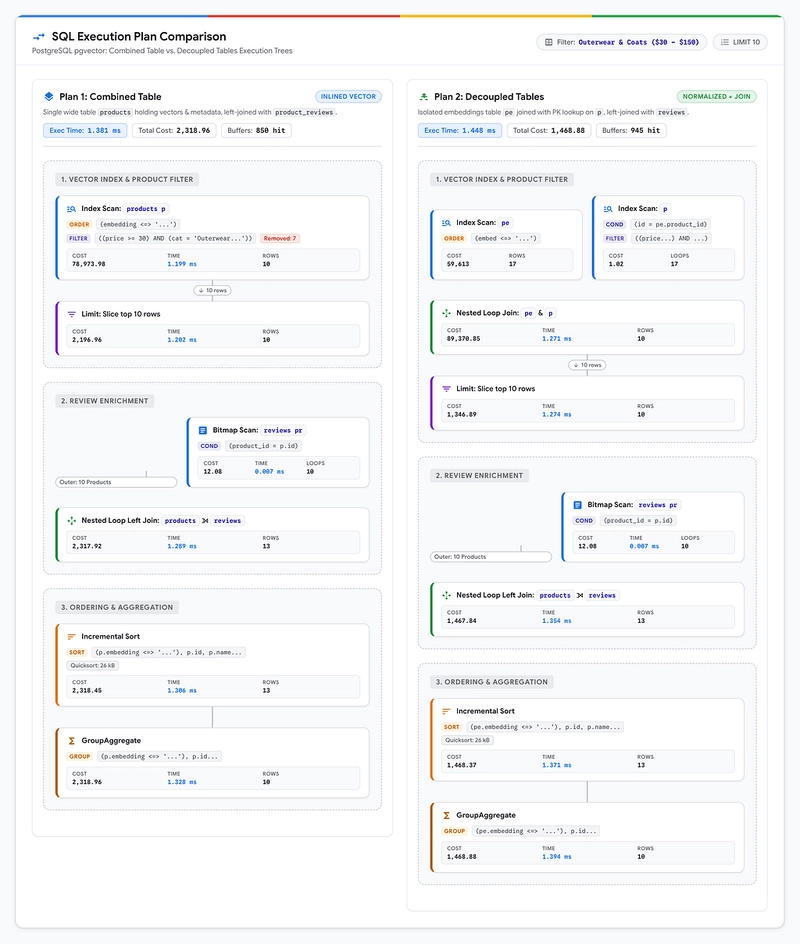
对于第二个查询,我额外做了一个 product_embeddings 和 products 表之间的连接(这是预期的),但除此之外它展示了相似的执行路径。
以下是测试结果的汇总表:
+--------------------------+-----------------------+-----------------------+---------------------+
| Test Scenario | Inline Embeddings | Dedicated Table | Overhead / Delta |
+--------------------------+-----------------------+-----------------------+---------------------+
| 1. Pure Semantic Search | Execution: ~1.22 ms | Execution: ~1.38 ms | +0.16 ms (Exec) |
| (LIMIT 10) | Total: ~2.10 ms | Total: ~2.20 ms | +0.10 ms (Total) |
+--------------------------+-----------------------+-----------------------+---------------------+
| 2. Filtered Search | Execution: ~1.31 ms | Execution: ~1.41 ms | +0.10 ms (Exec) |
| (Category + Price) | Total: ~2.20 ms | Total: 2.3 - 2.4 ms | +0.10 - 0.20 ms |
+--------------------------+-----------------------+-----------------------+---------------------+
| 3. Multi-Table Join | | | |
| (Reviews Aggregation) | Total: 2.6 - 2.7 ms | Total: 2.8 - 2.9 ms | +0.20 ms (Total) |
+--------------------------+-----------------------+-----------------------+---------------------+
对比嵌入向量与源数据同表存储和独立专用表存储的查询性能,可以看出性能差异相对较小。在大多数情况下响应时间不超过 0.2 ms。当然,这可能因表结构、数据和具体查询而异。
我建议测试并考虑使用独立嵌入表的布局。这可能在未来的模型维护和模型评估中帮助你——你只需添加另一张表来存放未来的模型,然后使用新生成的嵌入向量运行查询。良好的 schema 设计下,性能开销可以降至最低。根据我的经验,其他因素(如模型响应时间)引入的响应时间变化远比基于主键的嵌入表连接要大得多。