
8.0
热点
AI SCORE
编程提效2026-10-05 17:00
YC CEO Garry Tan 开源 23 工具 AI 开发栈
GitHub Trending#Claude Code#AI工作流#开源
Editor brief · 编辑速览
Y Combinator 总裁公开其 Claude Code 完整配置,涵盖 CEO、设计师、工程经理、发布经理、文档工程师、QA 等 23 个角色化工具,主打有主见的opinionated工作流。
"我想我大概从去年 12 月开始就没怎么手敲过代码了,这确实是巨大的变化。" — Andrej Karpathy,No Priors 播客,2026 年 3 月
当我听到 Karpathy 这么说时,我想知道这是怎么做到的。一个人怎么能以二十人团队的速度交付?Peter Steinberger 用 AI 智能体独自构建了 OpenClaw——247K GitHub stars。革命已经到来。一个配备正确工具的独立建造者,比传统团队走得更快。
我是 Garry Tan,Y Combinator 的总裁兼 CEO。我与数千家初创公司合作过——Coinbase、Instacart、 Rippling——在他们还是车库里一两人的时候。在加入 YC 之前,我是 Palantir 最早的工程师/产品经理/设计师之一,共同创立了 Posterous(卖给 Twitter),并构建了 Bookface——YC 的内部社交网络。
gstack 是我的答案。我做产品已经二十年了,而现在我交付的产品比以往任何时候都多。过去 60 天:3 个生产服务,40+ 已交付功能,兼职,同时全职运营 YC。按逻辑代码变更量——不是原始 LOC,AI 会膨胀这个数字——我 2026 年的速率约为 2013 年速度的 810 倍(11,417 vs 14 逻辑行/天)。截至 4 月 18 日的年初至今,2026 年已经产生了 2013 年全年的 240 倍。在 40 个 public + private 的 garrytan/* 仓库中测量,包括 Bookface,排除一个演示仓库。AI 写了大部分代码。重点不是谁敲的,而是交付了什么。
LOC 批评者说原始行数会被 AI 膨胀并没有错。他们错的是,在标准化通胀后,我的生产率反而下降了。我比以往任何时候都更高效,而且远超以往。完整方法论、注意事项和复现脚本:On the LOC Controversy。
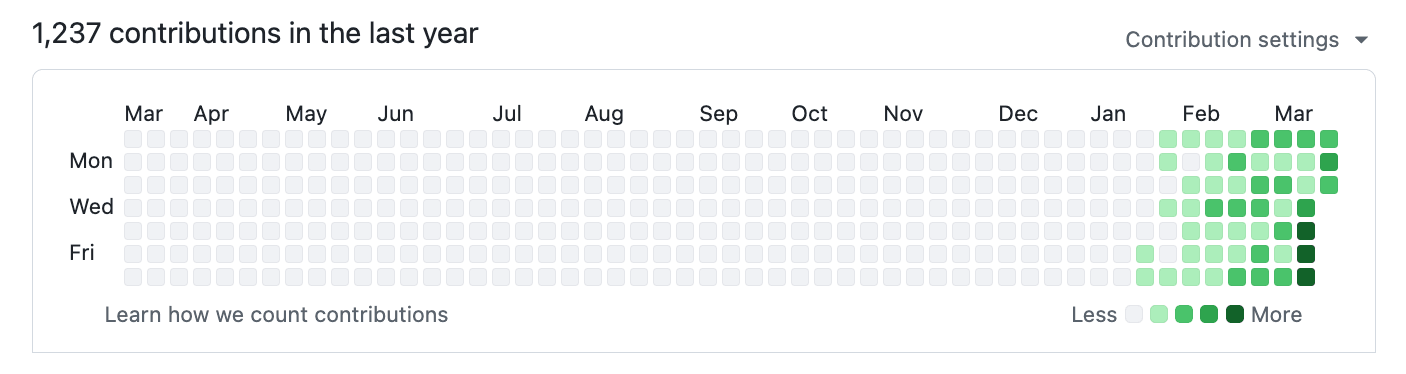
2026 — 1,237 次贡献并持续增长:
2013 — 我在 YC 构建 Bookface 时(772 次贡献):
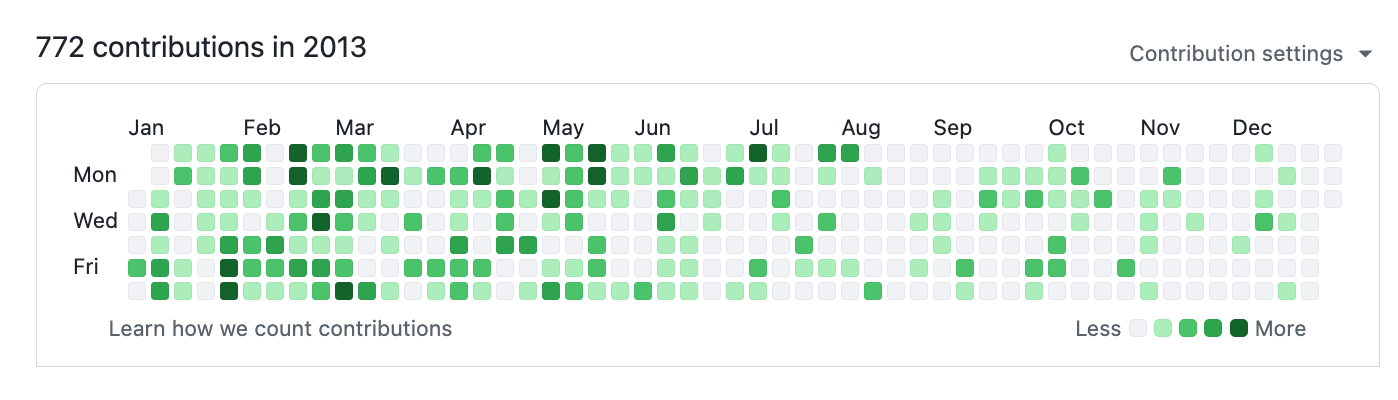
同一个人。不同的时代。差异在于工具。
gstack 是我的方法。它把 Claude Code 变成一个虚拟工程团队——一个重新思考产品的 CEO,一个锁定架构的工程经理,一个捕捉 AI 垃圾的设计师,一个发现生产 Bug 的审查员,一个打开真实浏览器的 QA 负责人,一个运行 OWASP + STRIDE 审计的安全官,以及一个推送 PR 的发布工程师。23 个专家和 8 个强力工具,全部是斜杠命令,全部是 Markdown,全部免费,MIT 许可证。
这是我的开源软件工厂。我每天都用它。我分享它是因为这些工具应该每个人都能使用。
Fork 它。改进它。让它成为你的。如果你想要讨厌免费的开源软件——随便你,但我宁愿你先试试。
创始人与 CEO——尤其是仍想交付产品的技术型创始人
首次使用 Claude Code 的用户——结构化角色替代空白提示词
技术负责人与高级工程师——每个 PR 上的严格审查、QA 和发布自动化
安装 gstack(大约 30 秒设置——见下文)
运行 /office-hours——描述你在构建什么
运行 /plan-ceo-review 针对任何功能想法
运行 /review 针对任何有变更的分支
运行 /qa 针对你的 staging URL 或隔离的本地 API、CLI、job 或 webhook
先停在这里。你会知道这是否适合你。
安装——大约 30 秒
在 4 核 Linux 云机器上,克隆后 ./setup 花了 31 秒(v1.91.13.0,干净的 HOME,包括二进制构建和 Chromium 下载)。较慢的网络和笔记本需要更长时间。
要求:Claude Code、Git、Bun v1.0+、Node.js(仅 Windows)。macOS 上推荐:Aside 浏览器(macOS 15+)——浏览器技能、/make-pdf 和 /diagram 首先驱动它,使用你真实登录的会话。没有它的话,./setup 会构建 gstack 自带的捆绑浏览器,相同的技能使用那个。/cso 还需要一个带有全部四个 --no-compile-autoload-* 构建标志的 Bun 发布版,外加原生工具链:Linux 上的静态能力 C 编译器、macOS 上的 Xcode 命令行工具,或 Windows 上的 Visual Studio 2022 Build Tools 与 Desktop development with C++。如果这些缺失,setup 安装其他所有内容,移除过时的 CSO 辅助脚本,/cso 报告未满足前置条件。
当合格的 CSO 运行时镜像发布后,setup 给每个自动预加载 30 秒窗口,加上为声明的 catalog 绑定的设置配额。对于较慢的 registry,设置一个整数如 GSTACK_CSO_IMAGE_PULL_TIMEOUT_SECONDS=120(接受范围:5–300 秒)。一个镜像超时不会消耗剩余镜像的窗口;setup 报告部分进度,后续运行从本地 Docker 中已存在的精确 digest 恢复。完整预加载上限为一小时。
步骤 1:在你的机器上安装
打开 Claude Code 并粘贴这个。Claude 完成其余工作。
安装 gstack:运行 git clone --single-branch --depth 1 https://github.com/garrytan/gstack.git ~/.claude/skills/gstack && cd ~/.claude/skills/gstack && ./setup 然后在 CLAUDE.md 中添加一个 "gstack" 部分,说明使用 gstack 的 /browse 技能进行所有网页浏览,永不使用 mcp__claude-in-chrome__* 工具,并列出可用的技能:/office-hours、/plan-ceo-review、/plan-eng-review、/plan-design-review、/design-consultation、/design-shotgun、/design-html、/review、/deslop-shared-libs、/test-audit、/ship、/land-and-deploy、/canary、/benchmark、/browse、/connect-chrome、/qa、/qa-only、/design-review、/scrape、/setup-browser-cookies、/setup-deploy、/setup-gbrain、/retro、/investigate、/document-release、/document-generate、/codex、/cso、/autoplan、/plan-devex-review、/devex-review、/careful、/freeze、/guard、/unfreeze、/gstack-upgrade、/learn。然后问用户是否也想将 gstack 添加到当前项目,以便团队成员也能使用。
步骤 2:团队模式——共享仓库自动更新(推荐)
在你的仓库内粘贴这个。切换到团队模式,引导仓库以便团队成员自动获得 gstack,并提交更改:
(cd ~/.claude/skills/gstack && ./setup --team) && ~/.claude/skills/gstack/bin/gstack-team-init required && git add .claude/ CLAUDE.md && git commit -m "require gstack for AI-assisted work"
你的仓库中无 vendored 文件,无版本漂移,无手动升级。每个 Claude Code 会话开始时都会进行快速自动更新检查(节流至每小时一次,网络故障安全,完全静默)。
如果宁愿引导团队成员而不是阻止他们,将 required 换成 optional。
OpenClaw 通过 ACP 生成 Claude Code 会话,因此当 Claude Code 安装了 gstack 时,每个 gstack 技能都能正常工作。将这个粘贴到你的 OpenClaw agent:
安装 gstack:运行 git clone --single-branch --depth 1 https://github.com/garrytan/gstack.git ~/.claude/skills/gstack && cd ~/.claude/skills/gstack && ./setup 为 Claude Code 安装 gstack。然后在 AGENTS.md 中添加一个 "Coding Tasks" 部分,说明:当你生成 Claude Code 会话进行编码工作时,告诉会话使用 gstack 技能。包括这些示例——安全审计:"Load gstack. Run /cso"、代码审查:"Load gstack. Run /review"、QA 测试 URL:"Load gstack. Run /qa https://..."、端到端构建功能:"Load gstack. Run /autoplan, implement the plan, then run /ship"、构建前规划:"Load gstack. Run /office-hours then /autoplan. Save the plan, don't implement."
设置后,只需自然地与你的 OpenClaw agent 交谈:
参见 docs/OPENCLAW.md 了解高级调度路由和 gstack-lite/gstack-full 提示模板。
原生 OpenClaw 技能(通过 ClawHub)
四个方法论技能,直接在你的 OpenClaw agent 中工作,无需 Claude Code 会话。从 ClawHub 安装:
clawhub install gstack-openclaw-office-hours gstack-openclaw-ceo-review gstack-openclaw-investigate gstack-openclaw-retro
这些是对话式技能。你的 OpenClaw agent 通过聊天直接运行它们。
gstack 运行在比 Claude 更多的 agent 上。裸 ./setup 只为 Claude Code 安装。用 --host <name> 为另一个 agent 选择,或用 --host auto 为这台机器上 setup 检测到的每个 agent 安装:
git clone --single-branch --depth 1 https://github.com/garrytan/gstack.git ~/gstack
cd ~/gstack && ./setup --host auto      # or: ./setup --host codex
./setup --status                         # one row per install: host, tier, scope, version, path
明确的 --host X 只为 X 安装,永不更改另一个 agent 的安装。/gstack-upgrade 刷新它注册的每个安装,每个 host 一行,并说明哪些失败了。
层级:full 由真实工作流运行认证(参见 Certify your host);experimental 安装并通过一致性测试但尚无认证运行;instruction-only 不安装任何东西:setup 打印要复制的内容。
Copilot 通过带前缀的名称(/gstack-review)调用 gstack 技能,因为 /review 是 Copilot 内置的。Copilot 会忽略技能钩子(skill hooks),因此 /careful 和 /freeze 仅起建议作用,除 ~/.copilot 以外的 COPILOT_HOME 尚不支持(setup 会拒绝并保持原样不变)。
外部评审需要已安装并认证过所选的 CLI:在 Codex 中使用 gstack 时需要 Claude Code,在其他 harness 上则需要 Codex。外部 harness 将这些命令发现为 /gstack-claude-code 和 /gstack-codex;每个 harness 会省略自身的包装器。明确的 provider 请求会保留该 provider。已有的 codex_reviews 设置控制自动外部评审(只要平台支持),与所选 provider 无关。
/claude 已更名为 /claude-code。请重新运行 ./setup --host <name> 以迁移托管安装,包括共享同一代码库的其他 harness。Setup 会保留之前的安装——如果替换生成或安装失败的话——并打印修复说明。
仅指令层(任何会读取规则的 agent——Zed、Amp、Jules、side project):将 agents-digest/gstack-AGENTS.md 中的 2KB 摘要复制到你的 agent 会读取的位置(例如追加到项目的 AGENTS.md 中)。它携带了 gstack 的理念、复用阶梯(reuse ladder)和表达规则——无需安装。摘要第一行显示其 gstack 版本;升级后请重新复制。
对于 Codex,setup 从 ${CODEX_HOME:-~/.codex}/config.toml 读取顶级 model 并生成匹配的行为配置;当未配置可用的 model 时,回退到 gpt-6-astra。gpt-5.6-sol 会自动收到限定范围的指令,在完成请求的 lake 之前不会扩展到相邻的清理或推测性加固。Sol 配置为精确匹配:带日期的快照和其他 5.6 变体会获得通用的 GPT 配置,且 setup 会在近似匹配时发出警告(如 gpt-5.6-sol-2026-08-01)。使用 ./setup --host codex --model <id> 覆盖检测——该覆盖仅在本次运行生效;在 Codex 的 config.toml 中设置 model 才能在升级后保持。更换 Codex model 后,请重新运行 ./setup --host codex 以重新生成技能。
gstack 使用哪个 Codex model。对于每一次 Codex 调用(外部 voice、/codex、review 和 ship 对抗性通过),gstack 按以下顺序选择 model:你为该请求指定的 model,然后是 GSTACK_CODEX_MODEL,再然后是你 Codex config.toml 中的 model(用于原生 codex review 时优先 review_model;自定义 CODEX_HOME 会被采纳),最后才是 gstack 的默认 model gpt-6-astra。在任何花费发生之前,它会打印所选 model 及其来源,例如 CODEX_MODEL: gpt-5.6-terra (exec; source: ~/.codex/config.toml model)。如果你的选择无效或你的账户无法使用它,gstack 会停止并显示修复消息,同时报告该外部评审不可用。它永远不会静默切换到默认 model。嵌套的 Codex review 也会以隐藏已安装技能的方式运行(-c skills.include_instructions=false),因此一次 review 不会演变成完整的嵌套技能运行。运行时的 model 选择独立于上述安装时的行为配置。/claude-code(在 Codex 上为 gstack-claude-code)会保留 Claude 已配置的 model。设置 GSTACK_CLAUDE_MODEL=<model> 或在你的请求中指定 model 可以覆盖该调用的 model,包括恢复后的咨询。关于 capture、judge 和 benchmark model 选择,请参阅 eval 默认值和覆盖。
设计二进制文件($D)默认使用 OpenAI 的 gpt-5.5,并通过 gpt-image-2 生成图像。设置 GSTACK_DESIGN_MODEL=<model> 可使用其他 gpt-5 系列 model 进行图像生成和截图分析;如果 OpenAI 拒绝该 model,错误信息会指出 GSTACK_DESIGN_MODEL。使用 bun run design/scripts/live-model-check.ts 根据默认值检查一个 key。
想为另一个 agent 增加支持?请参阅 docs/ADDING_A_HOST.md。渲染一个新的 agent 需要一个 TypeScript 配置文件;安装它还需要一个 setup 分支和一致性工具包(conformance kit),且初始为实验性状态。
You:    I want to build a daily briefing app for my calendar.
You:    /office-hours
Claude: [asks about the pain — specific examples, not hypotheticals]

You:    Multiple Google calendars, events with stale info, wrong locations.
        Prep takes forever and the results aren't good enough...

Claude: I'm going to push back on the framing. You said "daily briefing
        app." But what you actually described is a personal chief of
        staff AI.
        [extracts 5 capabilities you didn't realize you were describing]
        [challenges 4 premises — you agree, disagree, or adjust]
        [generates 3 implementation approaches with effort estimates]
        RECOMMENDATION: Ship the narrowest wedge tomorrow, learn from
        real usage. The full vision is a 3-month project — start with
        the daily briefing that actually works.
        [writes design doc → feeds into downstream skills automatically]

You:    /plan-ceo-review
        [reads the design doc, challenges scope, runs 10-section review]

You:    /plan-eng-review
        [ASCII diagrams for data flow, state machines, error paths]
        [test matrix, failure modes, security concerns]

You:    Approve plan. Exit plan mode.
        [writes 2,400 lines across 11 files. ~8 minutes.]

You:    /review
        [AUTO-FIXED] 2 issues. [ASK] Race condition → you approve fix.

You:    /qa https://staging.myapp.com
        [opens real browser, clicks through flows, finds and fixes a bug]

You:    /ship
        Tests: 42 → 51 (+9 new). PR: github.com/you/app/pull/42
你说"每日简报应用"。Agent 说"你在构建一个首席幕僚 AI"——因为它倾听的是你的痛点,而不是你的功能请求。八个命令,端到端。这不是 copilot。这是一个团队。
gstack 是一个流程,而非工具集合。技能按 sprint 的运行顺序执行:
Think → Plan → Build → Review → Test → Ship → Reflect
每个技能为下一个技能提供输入。/office-hours 编写的设计文档供 /plan-ceo-review 阅读。/plan-eng-review 编写的测试计划由 /qa 接手。/review 捕获的 bug 由 /ship 验证已修复。没有任何环节会漏掉,因为每一步都知道之前发生了什么。
浏览器和非浏览器软件使用相同的命令。在包含文档化原生命令和隔离本地 fixture 的仓库中启动;指定要检查的目标和行为。例如:
/qa-only Test this repo's CLI using its documented local fixture. Check valid and invalid input, exit codes, stdout/stderr, and cancellation. Report only; do not change code or tests. For each finding, include the exact command, expected and actual results, and which checks remain untested. Keep requests inside the fixture; ask before contacting an external service.

/qa Test this repo's local webhook and worker fixture. Explore duplicate deliveries and recovery after a partial failure. Keep all effects inside the fixture; preserve reproduced bugs in native regression tests before repairing them.
QA 首先告知你将使用哪些 surface、工具和写权限。CLI 或 API 不需要浏览器。浏览器目标保持真实浏览器测试;开发者体验审计仅在入职、安装或人体工学在范围内时才加载。如果原生工具或安全的 fixture 不可用,报告会指出阻碍因素和未测试的契约,而不是伪造通过或安装另一个框架。
探索意味着从每个结果中学习并选择下一个有用的挑战,而不是运行随机命令。在下一个发现探测之前,QA 会保存一个简短的 exploration-NNN.json 证据记录,包含之前的结果、被测试的假设和下一个命令。最终报告链接这些记录;它们不需要在探测之间额外发送聊天消息。发现的 bug 必须可复现,且其新测试必须在修复前对该 bug 失败,修复后通过。单元测试保护逻辑;集成测试和端到端测试保护真实边界(mock 会隐藏这些)。/qa-only 提出这些测试但不编写它们。
普通的 /review 和 /ship 会对变更的行为和附近的风险自动运行限定版本,包括没有 plan 或 Web 服务器的小 diff。已有的 fix/test 审批规则仍然适用。缺失的依赖、被拒绝的操作和时间限制仍是可见的覆盖缺口;简短的冒烟测试绝不意味着详尽的 QA。生产环境访问以及破坏性或外部影响需要特定权限。
限定探索使用可执行截止日期护栏(executable deadline guard),而非估算时钟:它在迟到的探测时拒绝,并在限制处停止自身的前台工作。未完成的检查在报告中保持可见。必需的 plan 检查不在 review/ship 冒烟预算范围内。参见 QA 截止日期以了解命令、平台和清理限制。
Every ship also runs the existing documentation audit, including repeat ships and existing PR updates. Clear factual corrections join the final checked change; risky rewrites need approval. A failed audit stops for recovery or explicit acceptance of the named risk rather than silently dropping its result. Ship owns versioning, Git and PR publication; the docs helper does not commit or push independently.
每次发版也会运行已有的文档审计,包括重复发版和现有 PR 更新。明确的事实性修正会并入最终已检查的变更;存在风险的改写需要审批。审计失败会停下来等待修复或明确接受已命名的风险,而不是静默丢弃其结果。Ship 负责版本管理、Git 和 PR 发布;docs helper 不会独立提交或推送。
Beyond the slash-command skills, gstack ships standalone CLIs for workflows that don't belong inside a session:
除了斜杠命令技能外,gstack 还附带了独立 CLI,用于不适合在会话内运行的工作流:
The private paid CSO evaluation producer is a packaging contract, not an ordinary bun run build artifact. On macOS or Linux, a release operator compiles cso-eval-producer with the documented hardened Bun flags in the same clean build session as bun run build:cso, then installs it beside gstack-cso-launcher, gstack-cso-core, gstack-cso-watchdog, and the hidden .gstack-cso-generation manifest as one root-owned, nonwritable five-artifact unit. The producer rejects root execution, writable/symlinked/incomplete installations, and unreviewed provider CLI versions; each receipt binds all five artifact hashes, and collection rejects receipts from different unit identities. See the clean producer procedure. Paid producer evaluation remains unavailable on Windows because the detached watchdog has no Windows build.
私有付费 CSO 评估生产者是包装合约,不是普通的 bun run 构建产物。在 macOS 或 Linux 上,发布操作员在干净的构建会话中用文档中记载的强化 Bun 标志编译 cso-eval-producer(与 bun run build:cso 同一会话),然后将其与 gstack-cso-launcher、gstack-cso-core、gstack-cso-watchdog 以及隐藏的 .gstack-cso-generation 清单一起安装为一个由 root 拥有的、不可写的五个制品单元。生产者拒绝 root 执行、可写/符号链接/不完整的安装以及未审查的 provider CLI 版本;每个收据绑定全部五个制品哈希,收集程序拒绝来自不同单元标识的收据。参见清洁生产者流程。付费生产者评估在 Windows 上仍然不可用,因为分离的看门狗没有 Windows 构建版本。
Each producer gets a curated one-cell source copy with directories sealed to 0555 and files to 0444, plus pre/post content, Git, and mode checks. Claude receives that exact copy as a restricted read-only add-directory so its constrained launcher command can reach it. Gemini receives no source working directory or include-directory. Codex technically receives read-only filesystem access to the exact curated source root because the trusted helper inherits the Codex permission profile; its private provider work directory and exact cso-home artifact directory are the only write roots, every other root path remains denied, and the producer prompt requires source access through the helper. This is evaluation containment for an immutable public fixture, not a claim that Codex cannot directly read that fixture.
每个生产者收到一份精心策划的单格源副本,目录密封为 0555,文件密封为 0444,外加 pre/post 内容、Git 和模式检查。Claude 收到该副本作为受限的只读 add-directory,以便其受约束的启动器命令可以访问它。Gemini 不接收源工作目录或 include-directory。Codex 技术上拥有该精确策划源根的只读文件系统访问权限,因为受信任的 helper 继承了 Codex 权限配置文件;其私有 provider 工作目录和精确的 cso-home 制品目录是唯一的写根,每个其他根路径仍然被拒绝,并且生产者提示词要求通过 helper 访问源。这是不可变公共 fixture 的评估隔离,并不是声称 Codex 无法直接读取该 fixture。
Copy each completed cell's receipt together with state/cso-home/security/cso/ to the trusted adjudication host. Receipt entries are sorted paths relative to that directory and bind every retained file's size and SHA-256 plus an aggregate inventory hash. Provider homes, settings, sessions, and credentials live under separate disposable directories and are removed after the cell; they are never part of the retained artifact tree. The adjudicator must re-hash the transported tree against the receipt before trusting reports or repair bundles.
将每个已完成单元格的收据连同 state/cso-home/security/cso/ 一起复制到受信任的裁决主机。收据条目是相对于该目录排序的路径,绑定每个保留文件的大小和 SHA-256 以及聚合清单哈希。Provider 主目录、设置、会话和凭证位于单独的临时目录下,在单元格之后被移除;它们永远不是保留制品树的一部分。裁决者必须在信任报告或修复包之前根据收据重新哈希传输的树。
Paid producer qualification uses this explicit host matrix:
付费生产者认证使用这个明确的宿主机矩阵:
Every setup-blocked comprehensive cell remains a miss in release-gate denominators. The evaluator does not silently count a host or workflow as supported when its containment policy prevents required setup.
每个因设置阻止的综合单元格仍然是发布门 denominator 中的未命中。当宿主或工作流的隔离策略阻止所需设置时,评估者不会静默将其计为支持。
./setup also registers one default-on Stop hook in ~/.claude/settings.json: gstack-timeline-stop (closes dangling session-timeline entries when a session is interrupted; fail-open — 2s internal budget, always exits 0, can never block a session). Opt out persistently with ./setup --no-timeline-stop-hook — the choice lands in the timeline_stop_hook config key, survives upgrades, and an explicit "no" removes a live registration. GSTACK_TIMELINE_STOP_HOOK=no and gstack-config set timeline_stop_hook no work too (flag > env > config). ./setup --no-team skips it for that run, gstack-settings-hook remove-source --source gstack-timeline-stop removes it by hand, and gstack-uninstall removes it too.
./setup 也在 ~/.claude/settings.json 中注册一个默认开启的 Stop hook:gstack-timeline-stop(当会话被中断时关闭悬空的 session-timeline 条目;fail-open — 内部预算 2 秒,始终退出 0,永远不会阻塞会话)。使用 ./setup --no-timeline-stop-hook 永久选择退出——选择进入 timeline_stop_hook 配置键,跨升级保持,显式 "no" 移除活动注册。GSTACK_TIMELINE_STOP_HOOK=no 和 gstack-config set timeline_stop_hook no 同样有效(flag > env > config)。./setup --no-team 在该次运行中跳过它,gstack-settings-hook remove-source --source gstack-timeline-stop 手动移除它,gstack-uninstall 也会移除它。
Hook registration is canonical-only: every hook command points at the stable ~/.claude/skills/gstack install, never the tree setup ran from, so deleting a worktree or Conductor workspace can't leave dead hooks erroring in your sessions. Every ./setup run also heals first: gstack-settings-hook prune-stale --repoint removes dead gstack hook entries, re-points stale ones at the stable install, and collapses duplicates, printing one line (and writing a backup beside the file) only when it changed something.
Hook 注册是规范唯一的:每个 hook 命令指向稳定的 ~/.claude/skills/gstack 安装路径,而不是 setup 运行时所在的树,因此删除 worktree 或 Conductor 工作区不会留下死 hook 在会话中报错。每次 ./setup 运行也会先自愈:gstack-settings-hook prune-stale --repoint 移除死 gstack hook 条目,将陈旧的指向稳定安装,并合并重复项,只有在有变更时才打印一行(并在文件旁写入备份)。
Domain skills + raw CDP escape hatch
领域技能 + 原始 CDP 逃生舱
Two browser primitives in gstack's own engine (the fallback path when Aside isn't there) compound the agent over time:
gstack 自有引擎中的两个浏览器原语(Aside 不存在时的后备路径)随着时间推移复合了智能体:
$B domain-skill save — agent saves a per-site note (e.g., "LinkedIn's Apply button lives in an iframe") that fires automatically next time it visits that hostname. Quarantined → active after 3 successful uses → optional cross-project promotion via $B domain-skill promote-to-global. Storage lives alongside /learn's per-project learnings file. Full reference: docs/domain-skills.md.
$B domain-skill save — 智能体保存每个站点的笔记(例如"LinkedIn 的 Apply 按钮位于 iframe 中"),下次访问该主机名时自动触发。隔离 → 3 次成功使用后激活 → 可选通过 $B domain-skill promote-to-global 跨项目提升。存储位于 /learn 的每项目学习文件旁。完整参考:docs/domain-skills.md。
$B cdp <Domain.method> — raw Chrome DevTools Protocol escape hatch for the rare case curated commands miss. Deny-default: methods must be explicitly added to browse/src/cdp-allowlist.ts with a one-line justification. Two-tier mutex serializes browser-scoped CDP calls against per-tab work. Output for data-exfil methods is wrapped in the UNTRUSTED envelope.
$B cdp <Domain.method> — 原始 Chrome DevTools Protocol 逃生舱,用于策划命令遗漏的罕见情况。默认拒绝:方法必须明确添加到 browse/src/cdp-allowlist.ts 并附带一行理由。两层互斥将浏览器作用域的 CDP 调用与每标签页工作序列化。数据泄露方法的输出被包装在 UNTRUSTED 信封中。
Want raw CDP with no rails, no allowlist, no daemon — just thin transport from agent to Chrome? browser-use/browser-harness-js is a different philosophy (agent-authored helpers vs gstack's curated commands) and a good fit if you don't want gstack's security stack. The two can coexist: gstack's $B cdp and harness can both attach to the same Chrome via Playwright's newCDPSession.
想要没有护栏、没有允许列表、没有守护进程的原始 CDP——只是从智能体到 Chrome 的轻薄传输?browser-use/browser-harness-js 是一种不同的理念(智能体编写的 helper vs gstack 的策划命令),如果不想要 gstack 的安全栈,这是一个很好的选择。两者可以共存:gstack 的 $B cdp 和 harness 都可以通过 Playwright 的 newCDPSession 附加到同一个 Chrome。
Deep dives with examples and philosophy for every skill →
每个技能的深度 dives 与示例和理念 →
Karpathy's four failure modes? Already covered.
Karpathy 的四种失败模式?已经覆盖了。
Andrej Karpathy's AI coding rules (17K stars) nail four failure modes: wrong assumptions, overcomplexity, orthogonal edits, imperative over declarative. gstack's workflow skills enforce all four. /office-hours forces assumptions into the open before code is written. The Confusion Protocol stops Claude from guessing on architectural decisions. /review catches unnecessary complexity and drive-by edits. /ship transforms tasks into verifiable goals with test-first execution. If you already use Karpathy-style CLAUDE.md rules, gstack is the workflow enforcement layer that makes them stick across entire sprints, not just single prompts.
Andrej Karpathy 的 AI 编码规则(17K stars)准确击中了四种失败模式:错误假设、过度复杂、正交编辑、命令式优于声明式。gstack 的工作流技能强制执行所有四个。/office-hours 在代码编写前迫使假设浮出水面。混淆协议阻止 Claude 在架构决策上猜测。/review 捕获不必要的复杂性和顺便编辑。/ship 将任务转化为可验证的目标并进行测试先行执行。如果你已经使用 Karpathy 风格的 CLAUDE.md 规则,gstack 是使它们贯穿整个 sprint(而不仅仅是单个提示)的工作流执行层。
gstack works well with one sprint. It gets interesting with ten running at once.
gstack 在一个 sprint 上运行良好。十个同时运行时就开始有意思了。
Design is at the heart. /design-consultation builds your design system from scratch, researches