# React之组件通信方式|博客系列
> 本文系统总结了React组件之间的多种通信方式,包括父子组件、子父组件、跨级组件及无嵌套关系组件的通信方法,适合前端开发者快速了解和掌握React组件通信的核心知识。
- 原文:https://feinterview.poetries.top/docs/fe-blog-docs/blog-docs/react/-React%E4%B9%8B%E7%BB%84%E4%BB%B6%E9%80%9A%E4%BF%A1%E6%96%B9%E5%BC%8F
- 来源:前端进阶之旅(feinterview.poetries.top)
- 更新:2025.10.25
---
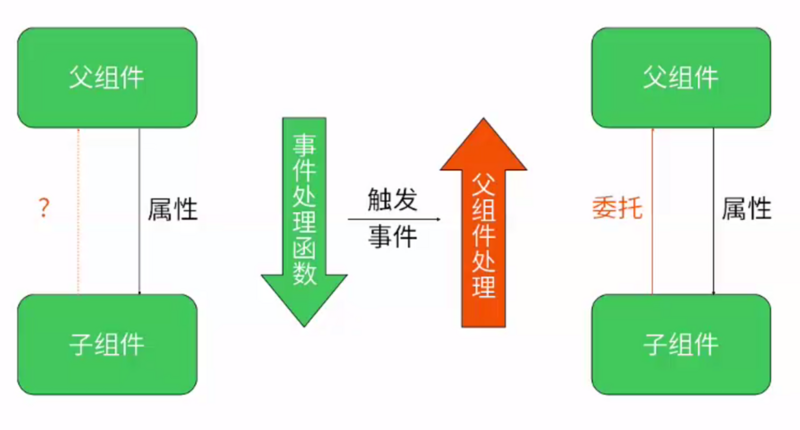
> 组件之进行通信的几种情况
- 父组件向子组件通信
- 子组件向父组件通信
- 跨级组件通信
- 没有嵌套关系组件之间的通信
一、父组件向子组件通信
---
> `React`数据流动是单向的,父组件向子组件通信也是最常见的;父组件通过`props`向子组件传递需要的信息
```javascript
// Child.jsx
import React from 'react';
import PropTypes from 'prop-types';
export default function Child({ name }) {
return Hello, {name}
;
}
Child.propTypes = {
name: PropTypes.string.isRequired,
}
// Parent.jsx
import React, { Component } from 'react';
import Child from './Child';
class Parent extends Component {
render() {
return (
);
}
}
export default Parent;
```
二、子组件向父组件通信
---
- 利用回调函数
- 利用自定义事件机制
> 实现在子组件中点击隐藏组件按钮可以将自身隐藏的功能
```javascript
import React, { Component } from 'react';
import PropTypes from 'prop-types';
class List3 extends Component {
static propTypes = {
hideConponent: PropTypes.func.isRequired,
}
render() {
return (
哈哈,我是List3
);
}
}
export default List3;
//app.jsx
import React, { Component } from 'react';
import List3 from './components/List3';
export default class App extends Component {
constructor(...args) {
super(...args);
this.state = {
isShowList3: false,
};
}
showConponent = () => {
this.setState({
isShowList3: true,
});
}
hideConponent = () => {
this.setState({
isShowList3: false,
});
}
render() {
return (
{
this.state.isShowList3 ?
:
null
}
);
}
}
```
三、跨级组件通信
---
**层层组件传递props**
> 例如A组件和B组件之间要进行通信,先找到A和B公共的父组件,A先向C组件通信,C组件通过props和B组件通信,此时C组件起的就是中间件的作用
**使用context**
- context是一个全局变量,像是一个大容器,在任何地方都可以访问到,我们可以把要通信的信息放在context上,然后在其他组件中可以随意取到
- 但是React官方不建议使用大量context,尽管他可以减少逐层传递,但是当组件结构复杂的时候,我们并不知道context是从哪里传过来的;而且context是一个全局变量,全局变量正是导致应用走向混乱的罪魁祸首
> 下面例子中的组件关系: ListItem是List的子组件,List是app的子组件
```javascript
// ListItem.jsx
import React, { Component } from 'react';
import PropTypes from 'prop-types';
class ListItem extends Component {
// 子组件声明自己要使用context
static contextTypes = {
color: PropTypes.string,
}
static propTypes = {
value: PropTypes.string,
}
render() {
const { value } = this.props;
return (
{value}
);
}
}
export default ListItem;
// List.jsx
import ListItem from './ListItem';
class List extends Component {
// 父组件声明自己支持context
static childContextTypes = {
color: PropTypes.string,
}
static propTypes = {
list: PropTypes.array,
}
// 提供一个函数,用来返回相应的context对象
getChildContext() {
return {
color: 'red',
};
}
render() {
const { list } = this.props;
return (
{
list.map((entry, index) =>
,
)
}
);
}
}
export default List;
// App.jsx
import React, { Component } from 'react';
import List from './components/List';
const list = [
{
text: '题目一',
},
{
text: '题目二',
},
];
export default class App extends Component {
render() {
return (
);
}
}
```
四、没有嵌套关系的组件通信
---
**使用自定义事件机制**
- 在`componentDidMount`事件中,如果组件挂载完成,再订阅事件;在组件卸载的时候,在`componentWillUnmount`事件中取消事件的订阅;
- 以常用的发布/订阅模式举例,借用`Node.js Events`模块的浏览器版实现
> 下面例子中的组件关系: List1和List2没有任何嵌套关系,App是他们的父组件
实现这样一个功能: 点击List2中的一个按钮,改变List1中的信息显示
```
npm install events --save
```
> 在src下新建一个util目录里面建一个events.js
```
import { EventEmitter } from 'events';
export default new EventEmitter();
```
```javascript
// List.jsx
class List extends Component {
constructor(props) {
super(props);
this.state = {
message: 'List1',
};
}
componentDidMount() {
// 组件装载完成以后声明一个自定义事件
this.eventEmitter = emitter.addListener('changeMessage', (message) => {
this.setState({
message,
});
});
}
componentWillUnmount() {
emitter.removeListener(this.eventEmitter);
}
render() {
return (
{this.state.message}
);
}
}
export default List;
//List2.jsx
import React, { Component } from 'react';
import emitter from '../util/events';
class List2 extends Component {
handleClick = (message) => {
emitter.emit('changeMessage', message);
};
render() {
return (
);
}
}
// APP.jsx
import React, { Component } from 'react';
import List1 from './components/List1';
import List2 from './components/List2';
export default class App extends Component {
render() {
return (
);
}
}
```
> 自定义事件是典型的发布订阅模式,通过向事件对象上添加监听器和触发事件来实现组件之间的通信
五、总结
---
- 父组件向子组件通信: `props`
- 子组件向父组件通信: 回调函数/自定义事件
- 跨级组件通信: 层层组件传递`props/context`
- 没有嵌套关系组件之间的通信: 自定义事件