# 虚拟DOM(二)|博客系列
> 本文深入讲解虚拟DOM的原理、浏览器渲染流程及其性能优化作用,并通过代码示例展示如何用JavaScript实现虚拟DOM,帮助前端开发者理解和应用虚拟DOM技术。
- 原文:https://feinterview.poetries.top/docs/fe-blog-docs/blog-docs/comprehensive/-%E8%99%9A%E6%8B%9FDOM%EF%BC%88%E4%BA%8C%EF%BC%89
- 来源:前端进阶之旅(feinterview.poetries.top)
- 更新:2025.10.25
---
## 一、为什么需要虚拟DOM
> 先介绍浏览器加载一个`HTML`文件需要做哪些事,帮助我们理解为什么我们需要虚拟`DOM`。`webkit`引擎的处理流程

> 所有浏览器的引擎工作流程都差不多,如上图大致分5步:创建`DOM tree` –> 创建`Style Rules` -> 构建`Render tree` -> 布局`Layout` –> 绘制`Painting
`
- 第一步,用`HTML`分析器,分析`HTML`元素,构建一颗`DOM`树。
- 第二步:用`CSS`分析器,分析`CSS`文件和元素上的`inline`样式,生成页面的样式表。
- 第三步:将上面的`DOM`树和样式表,关联起来,构建一颗`Render`树。这一过程又称为`Attachment`。每个`DOM`节点都有`attach`方法,接受样式信息,返回一个`render`对象(又名`renderer`)。这些`render`对象最终会被构建成一颗`Render`树。
- 第四步:有了`Render`树后,浏览器开始布局,会为每个`Render`树上的节点确定一个在显示屏上出现的精确坐标值。
- 第五步:`Render`数有了,节点显示的位置坐标也有了,最后就是调用每个节点的`paint`方法,让它们显示出来。
> 当你用传统的源生`api`或`jQuery`去操作`DOM`时,浏览器会从构建`DOM`树开始从头到尾执行一遍流程。比如当你在一次操作时,需要更新`10`个`DOM`节点,理想状态是一次性构建完`DOM`树,再执行后续操作。但浏览器没这么智能,收到第一个更新`DOM`请求后,并不知道后续还有9次更新操作,因此会马上执行流程,最终执行10次流程。显然例如计算`DOM`节点的坐标值等都是白白浪费性能,可能这次计算完,紧接着的下一个`DOM`更新请求,这个节点的坐标值就变了,前面的一次计算是无用功。
- 即使计算机硬件一直在更新迭代,操作`DOM`的代价仍旧是昂贵的,频繁操作还是会出现页面卡顿,影响用户的体验。真实的`DOM`节点,哪怕一个最简单的div也包含着很多属性,可以打印出来直观感受一下
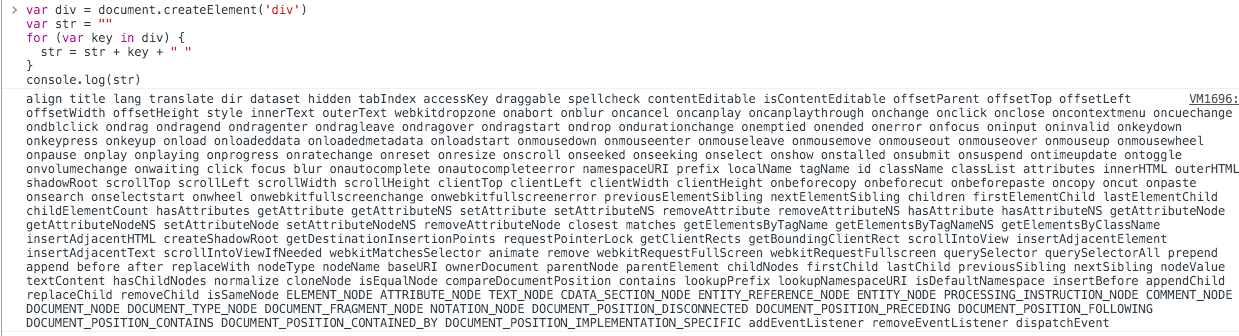
> 虚拟`DOM`就是为了解决这个浏览器性能问题而被设计出来的。例如前面的例子,假如一次操作中有`10`次更新`DOM`的动作,虚拟`DOM`不会立即操作`DOM`,而是将这`10`次更新的`diff`内容保存到本地的一个`js`对象中,最终将这个js对象一次性`attach`到`DOM`树上,通知浏览器去执行绘制工作,这样可以避免大量的无谓的计算量
## 二、实现虚拟DOM
```html
```
> 用`js`对象来模拟`DOM`节点如下
```javascript
const tree = Element('div', { id: 'virtual-container' }, [
Element('p', {}, ['Virtual DOM']),
Element('div', {}, ['before update']),
Element('ul', {}, [
Element('li', { class: 'item' }, ['Item 1']),
Element('li', { class: 'item' }, ['Item 2']),
Element('li', { class: 'item' }, ['Item 3']),
]),
]);
const root = tree.render();
document.getElementById('virtualDom').appendChild(root);
```
> 用`js`对象模拟`DOM`节点的好处是,页面的更新可以先全部反映在`js`对象上,操作内存中的`js`对象的速度显然要快多了。等更新完后,再将最终的`js`对象映射成真实的`DOM`,交由浏览器去绘制
```javascript
function Element(tagName, props, children) {
if (!(this instanceof Element)) {
return new Element(tagName, props, children);
}
this.tagName = tagName;
this.props = props || {};
this.children = children || [];
this.key = props ? props.key : undefined;
let count = 0;
this.children.forEach((child) => {
if (child instanceof Element) {
count += child.count;
}
count++;
});
this.count = count;
}
```
> 第一个参数是节点名(如`div`),第二个参数是节点的属性(如`class`),第三个参数是子节点(如`ul`的`li`)。除了这三个参数会被保存在对象上外,还保存了`key`和`count`
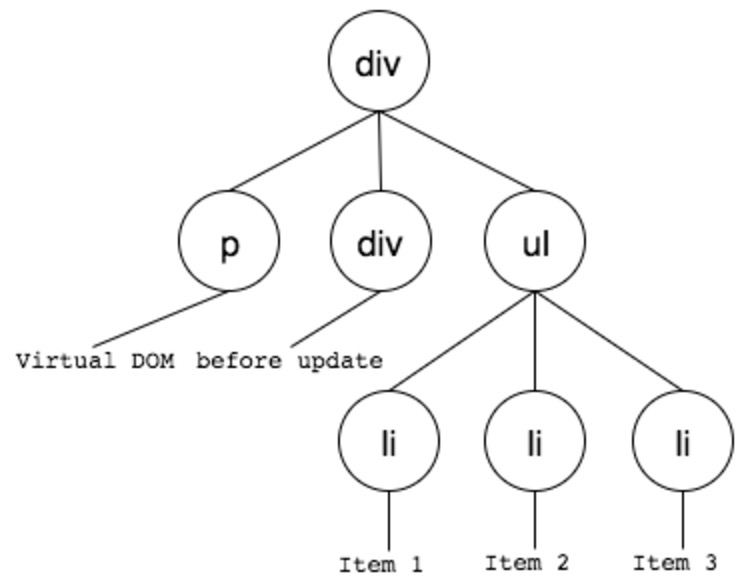
> 有了`js`对象后,最终还需要将其映射成真实的`DOM`
```javascript
Element.prototype.render = function() {
const el = document.createElement(this.tagName);
const props = this.props;
for (const propName in props) {
setAttr(el, propName, props[propName]);
}
this.children.forEach((child) => {
const childEl = (child instanceof Element) ? child.render() : document.createTextNode(child);
el.appendChild(childEl);
});
return el;
};
```
> 根据`DOM`名调用源生的`createElement`创建真实`DOM`,将`DOM`的属性全都加到这个`DOM`元素上,如果有子元素继续递归调用创建子元素,并`appendChild`挂到该`DOM`元素上。这样就完成了从创建虚拟`DOM`到将其映射成真实`DOM`的全部工作
## 三、Diff算法
> 我们已经完成了创建虚拟`DOM`并将其映射成真实`DOM`的工作,这样所有的更新都可以先反映到虚拟`DOM`上,如何反映呢?需要明确一下`Diff`算法
- 两棵树如果完全比较时间复杂度是`O(n^3)`
- `React`的`Diff`算法的时间复杂度是`O(n)`。要实现这么低的时间复杂度,意味着只能平层地比较两棵树的节点,放弃了深度遍历
- 这样做,似乎牺牲了一定的精确性来换取速度,但考虑到现实中前端页面通常也不会跨层级移动`DOM`元素,所以这样做是最优的。
我们新创建一棵树,用于和之前的树进行比较
```javascript
const newTree = Element('div', { id: 'virtual-container' }, [
Element('h3', {}, ['Virtual DOM']), // REPLACE
Element('div', {}, ['after update']), // TEXT
Element('ul', { class: 'marginLeft10' }, [ // PROPS
Element('li', { class: 'item' }, ['Item 1']),
// Element('li', { class: 'item' }, ['Item 2']), // REORDER remove
Element('li', { class: 'item' }, ['Item 3']),
]),
]);
```
只考虑平层地`Diff`的话,就简单多了,只需要考虑以下4种情况
> 第一种是最简单的,节点类型变了,例如下图中的`P`变成了`h3`。我们将这个过程称之为`REPLACE`。直接将旧节点卸载(`componentWillUnmount`)并装载新节点(`componentWillMount`)就行了
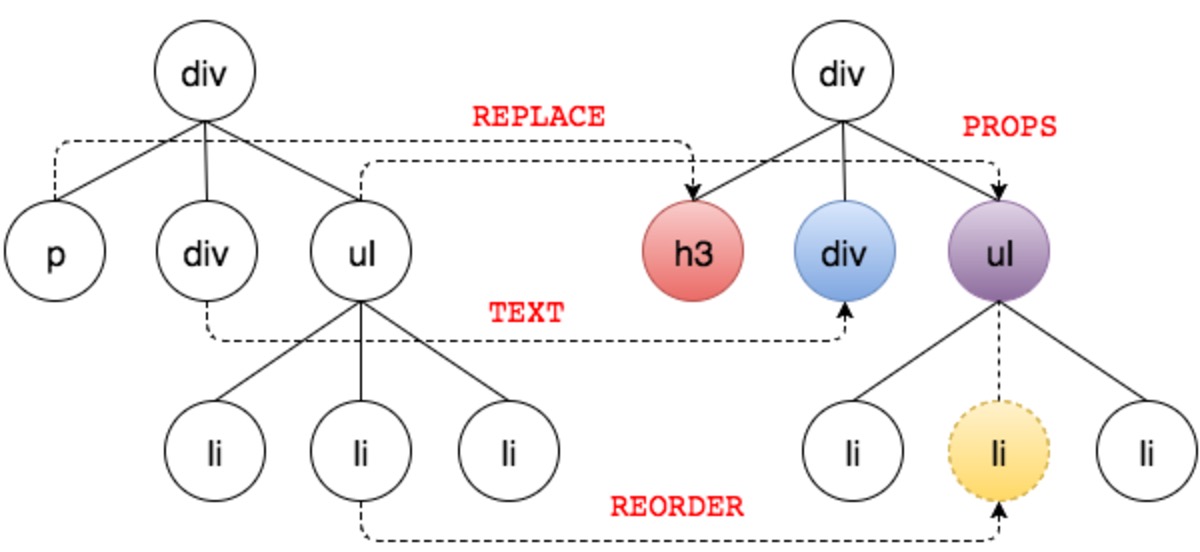
旧节点包括下面的子节点都将被卸载,如果新节点和旧节点仅仅是类型不同,但下面的所有子节点都一样时,这样做显得效率不高。但为了避免`O(n^3)`的时间复杂度,这样做是值得的。这也提醒了`React`开发者,应该避免无谓的节点类型的变化,例如运行时将`div`变成`p`就没什么太大意义
> 第二种也比较简单,节点类型一样,仅仅属性或属性值变了
```
renderA:
renderB:
=> [addAttribute class "marginLeft10"]
```
> 我们将这个过程称之为`PROPS`。此时不会触发节点的卸载(`componentWillUnmount`)和装载(`componentWillMount`)动作。而是执行节点更新(`shouldComponentUpdate`到`componentDidUpdate`的一系列方法)
```javascript
function diffProps(oldNode, newNode) {
const oldProps = oldNode.props;
const newProps = newNode.props;
let key;
const propsPatches = {};
let isSame = true;
// find out different props
for (key in oldProps) {
if (newProps[key] !== oldProps[key]) {
isSame = false;
propsPatches[key] = newProps[key];
}
}
// find out new props
for (key in newProps) {
if (!oldProps.hasOwnProperty(key)) {
isSame = false;
propsPatches[key] = newProps[key];
}
}
return isSame ? null : propsPatches;
}
```
- 第三种是文本变了,文本对也是一个`Text Node`,也比较简单,直接修改文字内容就行了,我们将这个过程称之为`TEXT`
- 第四种是移动,增加,删除子节点,我们将这个过程称之为`REORDER`
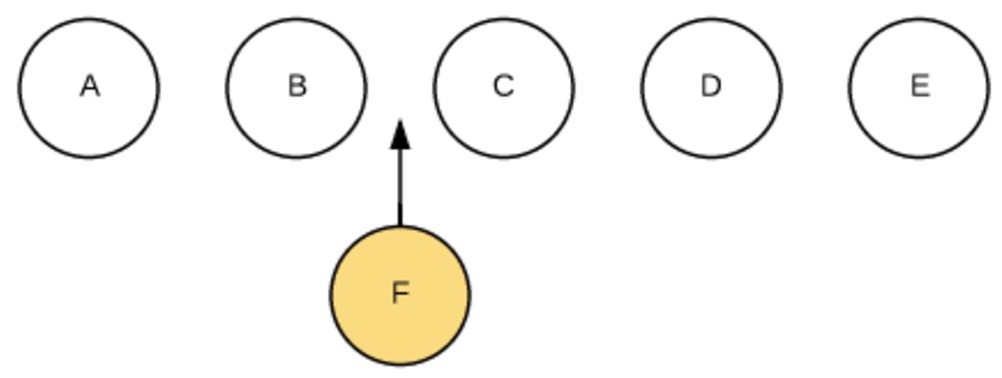
> 在中间插入一个节点,程序员写代码很简单:$(B).after(F)。但如何高效地插入呢?简单粗暴的做法是:卸载C,装载F,卸载D,装载C,卸载E,装载D,装载E。如下图
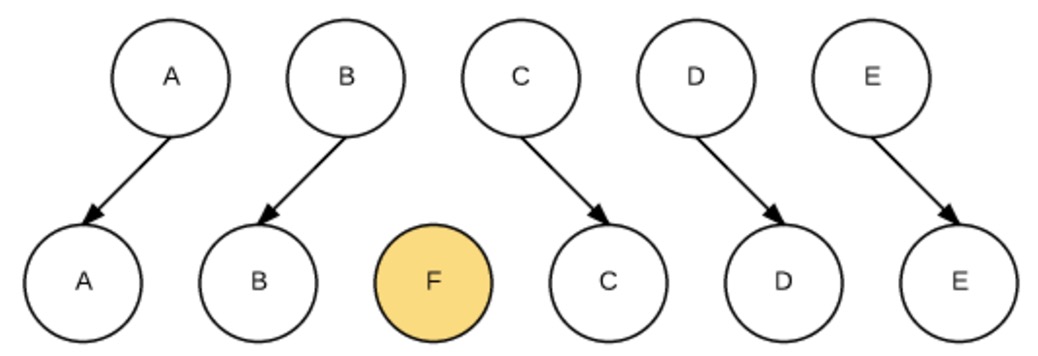
> 我们写`JSX`代码时,如果没有给数组或枚举类型定义一个`key`,就会看到下面这样的`warning`。`React`提醒我们,没有`key`的话,涉及到移动,增加,删除子节点的操作时,就会用上面那种简单粗暴的做法来更新。虽然程序运行不会有错,但效率太低,因此`React`会给我们一个`warning`

> 如果我们在`JSX`里为数组或枚举型元素增加上`key`后,`React`就能根据`key`,直接找到具体的位置进行操作,效率比较高。如下图

> 常见的最小编辑距离问题,可以用`Levenshtein Distance`算法来实现,时间复杂度是`O(M*N)`,但通常我们只要一些简单的移动就能满足需要,降低点精确性,将时间复杂度降低到`O(max(M, N)`即可
最终`Diff`出来的结果如下
```javascript
{
1: [ {type: REPLACE, node: Element} ],
4: [ {type: TEXT, content: "after update"} ],
5: [ {type: PROPS, props: {class: "marginLeft10"}}, {type: REORDER, moves: [{index: 2, type: 0}]} ],
6: [ {type: REORDER, moves: [{index: 2, type: 0}]} ],
8: [ {type: REORDER, moves: [{index: 2, type: 0}]} ],
9: [ {type: TEXT, content: "Item 3"} ],
}
```
## 四、映射成真实DOM
> 虚拟`DOM`有了,`Diff`也有了,现在就可以将`Diff`应用到真实`DOM`上了
深度遍历DOM将Diff的内容更新进去
```javascript
function dfsWalk(node, walker, patches) {
const currentPatches = patches[walker.index];
const len = node.childNodes ? node.childNodes.length : 0;
for (let i = 0; i < len; i++) {
walker.index++;
dfsWalk(node.childNodes[i], walker, patches);
}
if (currentPatches) {
applyPatches(node, currentPatches);
}
}
```
> 具体更新的代码如下,其实就是根据`Diff`信息调用源生`API`操作`DOM`
```javascript
function applyPatches(node, currentPatches) {
currentPatches.forEach((currentPatch) => {
switch (currentPatch.type) {
case REPLACE: {
const newNode = (typeof currentPatch.node === 'string')
? document.createTextNode(currentPatch.node)
: currentPatch.node.render();
node.parentNode.replaceChild(newNode, node);
break;
}
case REORDER:
reorderChildren(node, currentPatch.moves);
break;
case PROPS:
setProps(node, currentPatch.props);
break;
case TEXT:
if (node.textContent) {
node.textContent = currentPatch.content;
} else {
// ie
node.nodeValue = currentPatch.content;
}
break;
default:
throw new Error(`Unknown patch type ${currentPatch.type}`);
}
});
}
```
> 虚拟`DOM`的目的是将所有操作累加起来,统计计算出所有的变化后,统一更新一次`DOM`