# vue状态管理之vuex(十六)
> 了解vuex核心概念请移步 https://vuex.vuejs.org/zh/ 就是把需要共享的变量全部存储在一个对象里面,然后将这个对象放在顶层组件中供其他组件使用 父子组件通信时,我们通常会采用 这种方式。
- 原文:https://feinterview.poetries.top/blog/vue-vuex
- 来源:前端进阶之旅(feinterview.poetries.top)
- 更新:2018-08-29
---
> 了解vuex核心概念请移步 https://vuex.vuejs.org/zh/
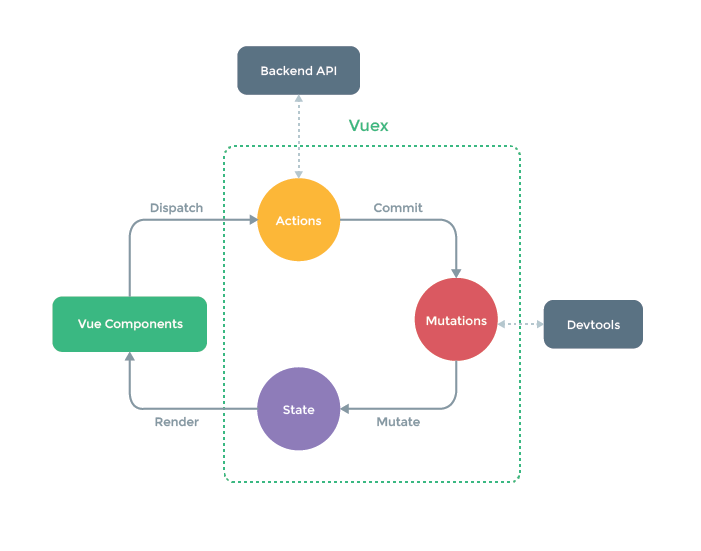
## 一、初始vuex
### 1.1 vuex是什么
> - `vuex` 就是把需要共享的变量全部存储在一个对象里面,然后将这个对象放在顶层组件中供其他组件使用
> - 父子组件通信时,我们通常会采用 `props + emit` 这种方式。但当通信双方不是父子组件甚至压根不存在相关联系,或者一个状态需要共享给多个组件时,就会非常麻烦,数据也会相当难维护
### 1.2 vuex中有什么
```javascript
const store = new Vuex.Store({
state: {
name: 'weish',
age: 22
},
getters: {
personInfo(state) {
return `My name is ${state.name}, I am ${state.age}`;
}
}
mutations: {
SET_AGE(state, age) {
commit(age, age);
}
},
actions: {
nameAsyn({commit}) {
setTimeout(() => {
commit('SET_AGE', 18);
}, 1000);
}
},
modules: {
a: modulesA
}
}
```
> 个就是最基本也是完整的`vuex`代码;`vuex` 包含有五个基本的对象
- `state`:存储状态。也就是变量;
- `getters`:派生状态。也就是`set`、`get`中的`get`,有两个可选参数:`state`、`getters`分别可以获取`state`中的变量和其他的`getters`。外部调用方式:`store.getters.personInfo()`。就和`vue`的`computed`差不多;
- `mutations`:提交状态修改。也就是`set`、`get`中的`set`,这是`vuex`中唯一修改`state`的方式,但不支持异步操作。第一个参数默认是`state`。外部调用方式:`store.commit('SET_AGE', 18)`。和`vue`中的`methods`类似。
- `actions`:和`mutations`类似。不过`actions`支持异步操作。第一个参数默认是和`store`具有相同参数属性的对象。外部调用方式:`store.dispatch('nameAsyn')`。
- `modules`:`store`的子模块,内容就相当于是`store`的一个实例。调用方式和前面介绍的相似,只是要加上当前子模块名,如:`store.a.getters.xxx()`
### 1.3 vue-cli中使用vuex的方式
**目录结构**
```
├── index.html
├── main.js
├── components
└── store
├── index.js # 我们组装模块并导出 store 的地方
├── state.js # 跟级别的 state
├── getters.js # 跟级别的 getter
├── mutation-types.js # 根级别的mutations名称(官方推荐mutions方法名使用大写)
├── mutations.js # 根级别的 mutation
├── actions.js # 根级别的 action
└── modules
├── m1.js # 模块1
└── m2.js # 模块2
```
**state示例**
```javascript
const state = {
name: 'weish',
age: 22
};
export default state;
```
**getter示例**
> `getters.js`示例(我们一般使用`getters`来获取`state`的状态,而不是直接使用`state`)
```javascript
export const name = (state) => {
return state.name;
}
export const age = (state) => {
return state.age
}
export const other = (state) => {
return `My name is ${state.name}, I am ${state.age}.`;
}
```
**mutation-type示例**
> 将所有`mutations`的函数名放在这个文件里
```
export const SET_NAME = 'SET_NAME';
export const SET_AGE = 'SET_AGE';
```
**mutations示例**
```javascript
import * as types from './mutation-type.js';
export default {
[types.SET_NAME](state, name) {
state.name = name;
},
[types.SET_AGE](state, age) {
state.age = age;
}
};
```
**actions示例**
> 异步操作、多个`commit`时
```javascript
import * as types from './mutation-type.js';
export default {
nameAsyn({commit}, {age, name}) {
commit(types.SET_NAME, name);
commit(types.SET_AGE, age);
}
}
```
**modules--m1.js示例**
> 如果不是很复杂的应用,一般来讲是不会分模块的
```javascript
export default {
state: {},
getters: {},
mutations: {},
actions: {}
}
```
**index.js示例(组装vuex)**
```javascript
import vue from 'vue';
import vuex from 'vuex';
import state from './state.js';
import * as getters from './getters.js';
import mutations from './mutations.js';
import actions from './actions.js';
import m1 from './modules/m1.js';
import m2 from './modules/m2.js';
import createLogger from 'vuex/dist/logger'; // 修改日志
vue.use(vuex);
const debug = process.env.NODE_ENV !== 'production'; // 开发环境中为true,否则为false
export default new vuex.Store({
state,
getters,
mutations,
actions,
modules: {
m1,
m2
},
plugins: debug ? [createLogger()] : [] // 开发环境下显示vuex的状态修改
});
```
> 最后将`store`实例挂载到`main.js`里面的`vue`上去就行了
```javascript
import store from './store/index.js';
new Vue({
el: '#app',
store,
render: h => h(App)
});
```
> 在`vue`组件中使用时,我们通常会使用`mapGetters`、`mapActions`、`mapMutations`,然后就可以按照`vue`调用`methods`和`computed`的方式去调用这些变量或函数,示例如
```javascript
import {mapGetters, mapMutations, mapActions} from 'vuex';
/* 只写组件中的script部分 */
export default {
computed: {
...mapGetters([
name,
age
])
},
methods: {
...mapMutations({
setName: 'SET_NAME',
setAge: 'SET_AGE'
}),
...mapActions([
nameAsyn
])
}
};
```
## 二、modules
> 在 src 目录下 , 新建一个 store 文件夹 , 然后在里面新建一个 index.js
```javascript
import Vue from 'vue'
import vuex from 'vuex'
Vue.use(vuex);
export default new vuex.Store({
state:{
show:false
}
})
```
> 在 `main.js` 里的代码应该改成,在实例化 `Vue`对象时加入 `store` 对象
```javascript
//vuex
import store from './store'
new Vue({
el: '#app',
router,
store,//使用store
template: '',
components: { App }
})
```
> 这样就把 `store` 分离出去了 , 那么还有一个问题是 : 这里 `$store.state.show` 无论哪个组件都可以使用 , 那组件多了之后 , 状态也多了 , 这么多状态都堆在 store 文件夹下的 `index.js` 不好维护怎么办 ?
- 我们可以使用 `vuex` 的 `modules` , 把 `store` 文件夹下的 `index.js` 改成
```javascript
import Vue from 'vue'
import vuex from 'vuex'
Vue.use(vuex);
import dialog_store from '../components/dialog_store.js';//引入某个store对象
export default new vuex.Store({
modules: {
dialog: dialog_store
}
})
```
> 这里我们引用了一个 `dialog_store.js` , 在这个 `js `文件里我们就可以单独写 `dialog` 组件的状态了
```javascript
export default {
state:{
show:false
}
}
```
> 做出这样的修改之后 , 我们将之前我们使用的 `$store.state.show` 统统改为 `$store.state.dialog.show` 即可
- 如果还有其他的组件需要使用 `vuex` , 就新建一个对应的状态文件 , 然后将他们加入 `store `文件夹下的 `index.js `文件中的 `modules` 中
```javascript
modules: {
dialog: dialog_store,
other: other,//其他组件
}
```
## 三、mutations
> 对`vuex` 的依赖仅仅只有一个 `$store.state.dialog.show` 一个状态 , 但是如果我们要进行一个操作 , 需要依赖很多很多个状态 , 那管理起来又麻烦了
- `mutations`里的操作必须是同步的
```javascript
export default {
state:{//state
show:false
},
mutations:{
switch_dialog(state){//这里的state对应着上面这个state
state.show = state.show?false:true;
//你还可以在这里执行其他的操作改变state
}
}
}
```
> 使用 `mutations` 后 , 原先我们的父组件可以改为
```html
```
> 使用 `$store.commit('switch_dialog')` 来触发 `mutations` 中的 `switch_dialog` 方法
## 四、actions
> 多个 `state` 的操作 , 使用 `mutations`会来触发会比较好维护 , 那么需要执行多个 `mutations` 就需要用 `action` 了
```javascript
export default {
state:{//state
show:false
},
mutations:{
switch_dialog(state){//这里的state对应着上面这个state
state.show = state.show?false:true;
//你还可以在这里执行其他的操作改变state
}
},
actions:{
switch_dialog(context){//这里的context和我们使用的$store拥有相同的对象和方法
context.commit('switch_dialog');
//你还可以在这里触发其他的mutations方法
},
}
}
```
> 那么 , 在之前的父组件中 , 我们需要做修改 , 来触发 `action` 里的 `switch_dialog` 方法
```html
```
- 使用 `$store.dispatch('switch_dialog')` 来触发 `action` 中的 `switch_dialog` 方法。
- 官方推荐 , 将异步操作放在 `action `中
## 五、getters
> `getters `和 `vue` 中的` computed` 类似 , 都是用来计算 `state` 然后生成新的数据 ( 状态 ) 的
- 假如我们需要一个与状态 `show` 刚好相反的状态 , 使用 `vue` 中的 `computed` 可以这样算出来
```javascript
computed(){
not_show(){
return !this.$store.state.dialog.show;
}
}
```
> 那么 , 如果很多很多个组件中都需要用到这个与 `show `刚好相反的状态 , 那么我们需要写很多很多个 `not_show `, 使用 `getters `就可以解决这种问题
```javascript
export default {
state:{//state
show:false
},
getters:{
not_show(state){//这里的state对应着上面这个state
return !state.show;
}
},
mutations:{
switch_dialog(state){//这里的state对应着上面这个state
state.show = state.show?false:true;
//你还可以在这里执行其他的操作改变state
}
},
actions:{
switch_dialog(context){//这里的context和我们使用的$store拥有相同的对象和方法
context.commit('switch_dialog');
//你还可以在这里触发其他的mutations方法
},
}
}
```
> 我们在组件中使用 `$store.state.dialog.show` 来获得状态 `show` , 类似的 , 我们可以使用 `$store.getters.not_show` 来获得状态 `not_show`
- 注意 : `$store.getters.not_show` 的值是不能直接修改的 , 需要对应的 `state` 发生变化才能修改
## 六、mapState、mapGetters、mapActions
> 很多时候 , `$store.state.dialog.show` 、`$store.dispatch('switch_dialog')` 这种写法很不方便
- 使用 `mapState`、`mapGetters`、`mapActions` 就不会这么复杂了
```html
```
相当于
```html
```
> `mapGetters`、`mapActions` 和 `mapState` 类似 , `mapGetters` 一般也写在 `computed` 中 , `mapActions` 一般写在 `methods` 中