# React之事件(四)
> 在函数体中进行一些操作,常见的有:更新页面内容,更新组件状态,与后台交互 上面的代码中有的有参数 ,有的没有,这个根据自己的需求 需要注意的是:不要在事件后面添加上一个 键盘事件: , , (前两者的组合) 滚动事件: (鼠标滚动) 鼠标事件: , , ……
- 原文:https://feinterview.poetries.top/blog/react-study-event
- 来源:前端进阶之旅(feinterview.poetries.top)
- 更新:2017-11-19
---
一、编写事件处理函数
---
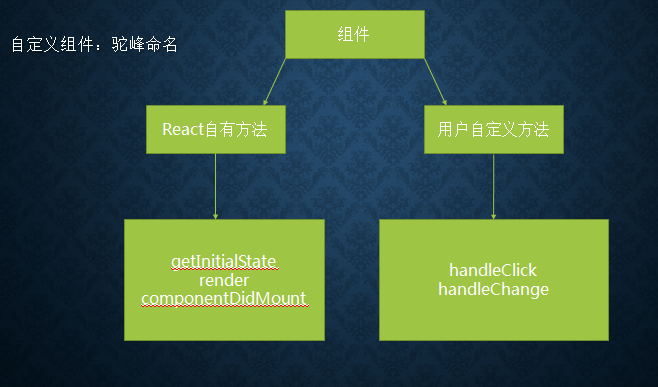
- 在函数体中进行一些操作,常见的有:更新页面内容,更新组件状态,与后台交互
**书写方式**
```javascript
var Demo = React.createClass({
getInitialState:function(){ },
handleClick: function(event){ },
handleChange: function(){ },
render:function(){ },
})
```
- 上面的代码中有的有参数`event`,有的没有,这个根据自己的需求
二、绑定事件处理函数
---
- `onClick={this,handleClick}`
- 需要注意的是:不要在事件后面添加上一个`()`
**其他的事件**
- 触摸事件:`onTouchCancel`,`onTouchEnd`,`onTouchMove`,`onTouchStart`
- 键盘事件:`onKeyDown`,`onKeyUp`, `onKeyPress`(前两者的组合)
- 表单时间:`onChange`,`onInput`,`onSubmit`
- 焦点事件:`onFocus`,`onBlur`
- UI元素事件:`onScroll`
- 滚动事件:`onWhell`(鼠标滚动)
- 鼠标事件:`onClick`,`onContextMenu`,`onDoubleClick`…...
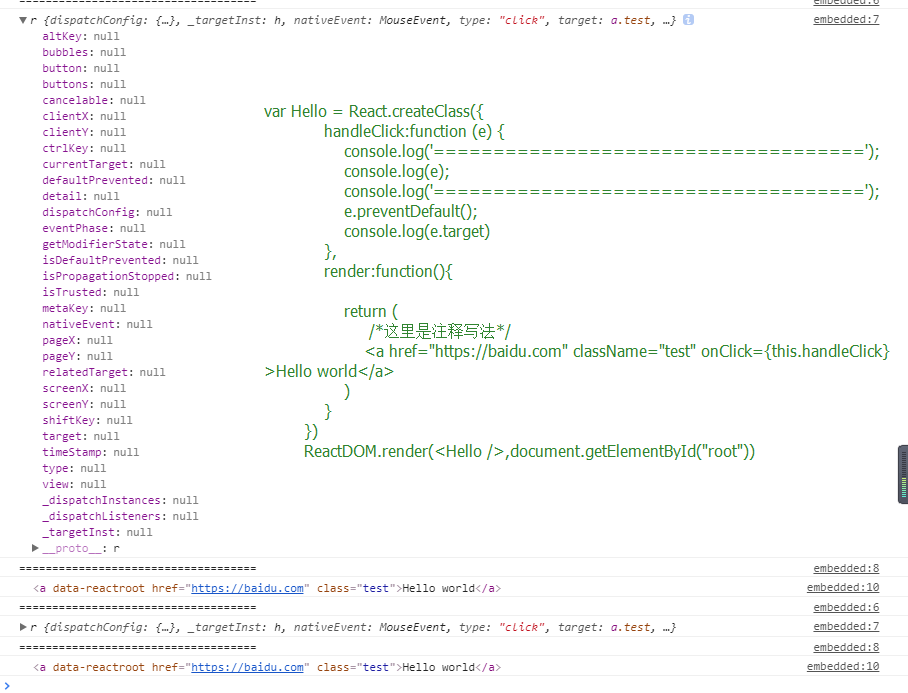
```javascript
var Demo = React.createClass({
handleClick:function(e){
console.log(e)
console.log(e.target)
console.log(e.nativeEvent)
},
render:function(){
return Hello World
}
})
ReactDOM.render(,document.getElementById('app'))
```
```javascript
var Demo = React.createClass({
getInitialState:function(){
return {
width: 200,
height: 200,
backgroundColor: '#DDDDDD'
}
},
/*handleWheel:function(e){
var newColor = (parseInt(this.state.backgroundColor.substr(1),16) + e.deltaY).toString(16)
newColor = '#' + newColor.toUpperCase()
console.log(newColor)
this.setState({
backgroundColor:newColor
})
},*/
randomColor:function(){
var r = Math.floor(Math.random()*256);
var g = Math.floor(Math.random()*256);
var b = Math.floor(Math.random()*256);
return 'rgb('+r+','+g+','+b+')'
},
handleWheel:function(){
this.setState({
backgroundColor:this.randomColor()
})
},
render:function(){
return 这是一个案例,鼠标滚动实现背景颜色的变化
}
})
ReactDOM.render(,document.getElementById('app'))
```
三、事件对象
---
**事件对象的使用**
- 通用:所有的事件都有事件属性
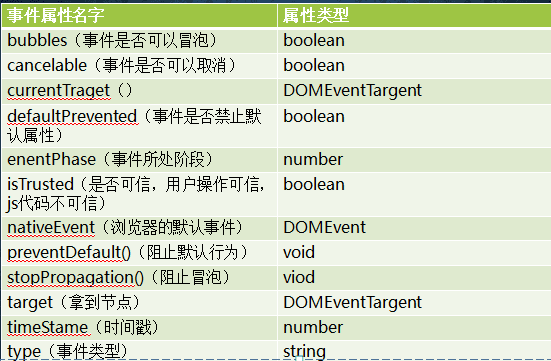
- 键盘:键盘事件拥有的事件属性
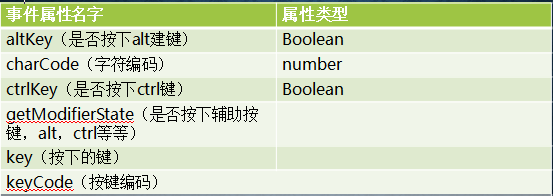
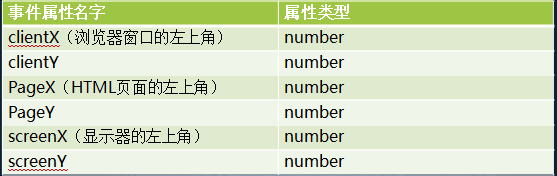
- 鼠标:鼠标事件拥有的事件属性
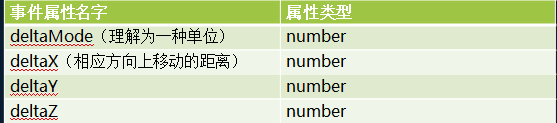
- 滚动:滚动事件拥有的事件属性
- 为什么会有三个,因为有的设备可以实现三个方向的移动
四、事件与状态关联
---
```javascipt
inputChange:function(event){
this.setState({
inputText:event.target.value
})
}
```
- 总的来说就是使用`this.setState`来更新状态,而状态的值因为事件的不同会不同