
8.0
热点
AI SCORE
编程提效2026-08-04 13:34
CoCo 扩展机制与团队共享指南
dev.to · AI#Snowflake#Agent#Skill
Editor brief · 编辑速览
文章区分 Snowflake CoCo 的 Skill、Plugin 与 Profile:分别用于注入流程知识、打包多组件扩展和切换配置集合。还说明团队共享方式及公开预览阶段的稳定性边界,适合构建 SQL 和数据开发 Agent 工作流。
Snowflake CoCo(Cortex Code 在 Snowflake Summit 2026 上更名为 CoCo)是 Snowflake 推出的 AI 编码 Agent,可用于编写 SQL、数据分析、应用开发等场景。它提供多种使用界面,包括 Snowsight 中的 CoCo、CoCo CLI、CoCo Desktop、VS Code Extension 和 Claude Code Plugin。
在所有这些界面中,你都可以使用 Skill 和 Plugin 来扩展 Agent 的行为。它们的名称非常相似,很容易混淆,但各自承担着不同的职责。此外,Profile 是最高层级的扩展包——其规范在 GA 之前仍有可能发生变化。
本文将介绍三者分别是什么、适合在什么场景使用,以及如何利用最近新增的 Skills and Plugins Sharing 功能,与团队成员共享 Skill 和 Plugin。
注意:本文仅代表作者个人观点,不代表 Snowflake 官方立场。
注意:(2026 年 7 月)Skills and Plugins Sharing 目前处于 Public Preview 阶段,已面向所有账户开放。Profile 的行为可能会在未来更新中发生变化。
它们的包含层级如下:
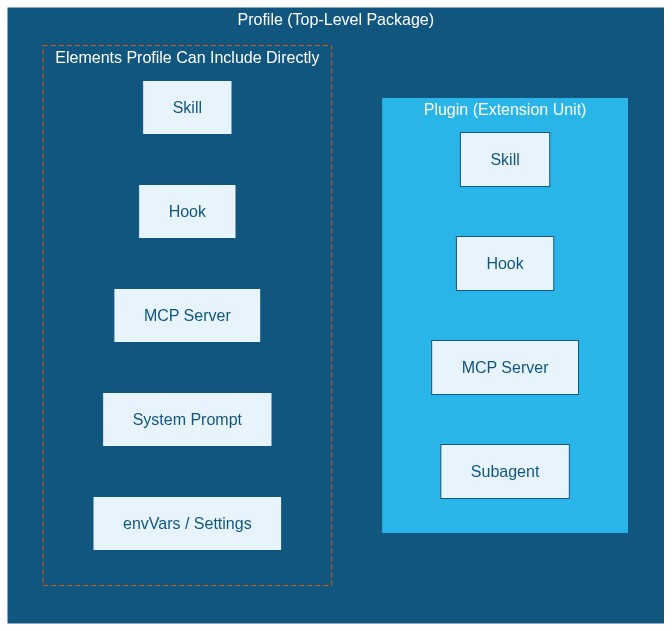
Skills and Plugins Sharing 让你能够利用 Snowflake 原生的版本管理能力,在组织内部发布和分发 Skill 与 Plugin。
Skill 是向 AI Agent 注入领域知识和操作流程的最小单元。它的核心是一个 SKILL.md Markdown 文件,其中包含工作流和操作指令。
my-skill/
  SKILL.md         ← required
  reference.md     ← optional (supplementary info the agent can reference)
  scripts/         ← optional (helper scripts called from the skill)
一个基础的 SKILL.md 如下:
---
name: data-onboarding
description: Guide the process of adding a new data source to the team's data platform
---

# When to use this skill

- When the user asks to add a new table or data source
- When they say "I want to ingest data" or "add a new source"

# Steps

1. Confirm the data source type (S3 / API / DB)
2. Create the schema definition and a landing table in the `RAW` database
3. Build the transformation layer using a Dynamic Table
4. Set up data quality checks (NOT NULL, unique constraints)
5. Notify the team's Slack channel when complete
在聊天中输入 /,然后从 Skill 列表中选择。
使用 $<skill-name> 显式调用。
当用户输入的语义与 description 字段匹配时,Agent 会自动调用相应 Skill。
Agent 会将用户输入的内容与 description 中定义的触发条件进行匹配,匹配成功后就会自动调用。需要显式调用时,可以使用 /skill 或 $<skill-name>。
在 CoCo Desktop 中,进入 Agent Settings 面板 → Skills。
cortex skill list              # list available skills
cortex skill add <path>        # add from local path / GitHub URL / Stage path
cortex skill publish ./my-skill --to-stage @MY_DB.MY_SCHEMA.MY_STAGE/skills/

# After logging in to CoCo
/skill              # list available skills
/skill-development  # invoke the skill for building new skills
以下场景适合使用 Skill:
Plugin 是一种“扩展单元”,可以将 Skill、Hook、MCP server 和 subagent 打包到同一个目录中。只需安装一次,相关组件就会全部生效。
这里有几个值得了解的术语:
my-plugin/
  .cortex-plugin/
    plugin.json   ← manifest (required)
  skills/
    my-skill/
      SKILL.md
  agents/
    my-agent.md
  .hooks.json     ← optional
  .mcp.json       ← optional
manifest 如下:
{
  "name": "my-plugin",
  "version": "1.0.0",
  "description": "Plugin for custom workflows",
  "skills": ["skills"],
  "hooks": {},
  "mcpServers": {}
}
skills 字段用于指定存放 Skill 的目录名称,默认值为 skills/。
在 Agent Settings 面板 → Plugins 中,可以通过以下方式添加 Plugin:
.cortex-plugin/plugin.json 的目录。owner/repo 格式,此外也支持 SSH、GitLab 和 Bitbucket。snow://skill_catalog/... URI 导入。cortex plugin list # list installed plugins
cortex plugin add owner/repo # install from GitHub
cortex plugin add ./my-plugin # install from local folder
以下场景适合使用 Plugin:
Profile 是最高层级的配置包。它将 Skill、MCP server、Hook、Plugin、system prompt、环境变量、设置覆盖项以及权限规则整合为一个单元。Profile 可以通过 Snowflake Stage 或 GitHub 远程分发,并按团队或角色批量应用。
在 CoCo 的设置优先级体系中,Profile 位列第二,仅次于 Managed Settings,也就是组织级策略:
Managed Settings (restrictions) > Profile overrides > Project Settings > Managed defaults > User Settings > defaults
这里不详细展开 Managed Settings,但需要了解 Profile 权限规则的几个关键限制:
换句话说,管理员通过 Managed Settings 划定安全边界,Profile 则在这个边界之内叠加针对特定角色的限制。
在 CoCo Desktop 中,进入 Agent Settings 面板 → Profiles。
# Publish a Profile to Stage (--skill-stage specifies the Stage for Skills distribution)
cortex profile publish data-analyst --skill-stage @MY_DB.MY_SCHEMA.MY_STAGE/skills/

# Switch Profile
# Use the /profile command to switch interactively
在组织的 Managed Settings(managed-settings.json)中设置 defaults.profileName,即可为所有用户配置默认 Profile。每位用户仍然可以自行覆盖该设置。
{
  "version": "1.0",
  "defaults": {
    "profileName": "data-analyst"
  }
}
注意:截至 2026 年 7 月,CoCo CLI 和 CoCo Desktop 均已支持 Profile,但目前还没有专门的文档页面。这里介绍的行为在正式发布时可能会发生显著变化,因此暂时不要在生产环境中使用 Profile。
以下场景适合使用 Profile:
在这项功能推出之前,与团队共享 Skill 和 Plugin 通常需要使用 Git 仓库或 Snowflake Stage。Git 虽然可用,但需要管理仓库访问权限,而且向不熟悉 Git 的团队成员分发内容也比较麻烦。基于 Stage 的共享方式可以使用 Snowflake role 进行访问控制,却缺少版本管理和 Catalog 浏览能力。
2026 年新增的 Skills and Plugins Sharing 解决了这些问题。Skill 和 Plugin 现在可以由 Snowflake 原生管理,并作为 Preview Feature 向所有账户开放。
在 Snowsight 的 Horizon Catalog → Skills & Plugins 页面中,你可以搜索和管理账户内共享的所有 Skill 与 Plugin。
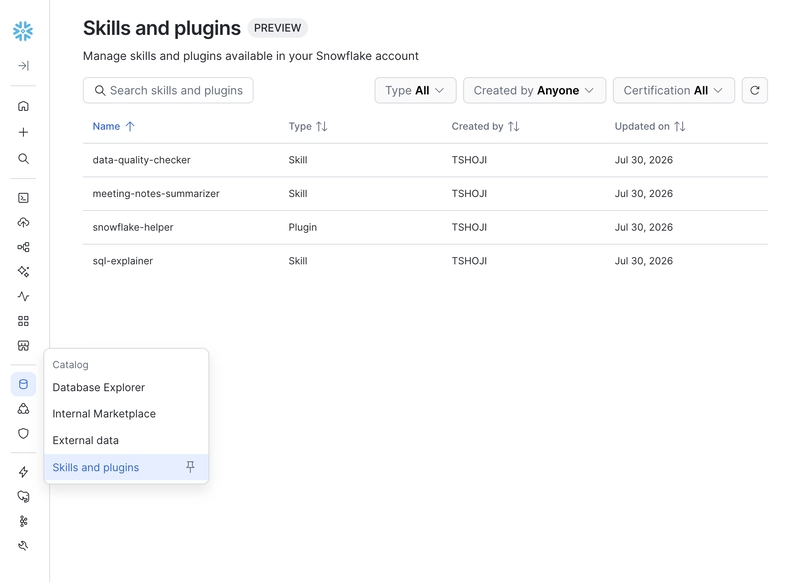
注册到 Catalog 中的 Skill 和 Plugin 会作为 CORTEX EXTENSION 对象存储在你的 Snowflake 账户中。与 TABLE 或 FUNCTION 类似,CORTEX EXTENSION 也是 Snowflake 中的一种 DDL 对象,其访问权限通过 GRANT 管理,无需额外配置 Git 权限。
CORTEX EXTENSION (TYPE=SKILL or TYPE=PLUGIN)
  └── versioned storage
  └── access control via Snowflake roles
  └── referenced via snow://skill_catalog/... URI
注意:默认情况下,Cortex Extension 对象存储在个人数据库的 SKILL_SHARING schema 中,该 schema 由 Snowflake 自动创建。
共享由两个彼此独立的概念控制:
将两者组合起来,可以形成两种共享方式:
PUBLIC 共享:向某个 role 授予访问权限,同时启用可发现性,使 Skill 或 Plugin 能够在 Catalog 中被搜索到。在 CoCo Desktop 中:
snow://skill_catalog/... URI。发布 Plugin 的操作类似:
snow://skill_catalog/... URI。也可以直接在聊天中输入 Share skill <skill-name>,启动共享流程。
注意:截至 2026 年 7 月,Snowsight 中的 CoCo 尚不支持共享 Plugin。
在 CoCo CLI 中,可以调用 /share-skill-and-plugin Skill,将内容发布到 Catalog:
> /share-skill-and-plugin my-skill
CoCo 会要求确认目标 role(默认为 PUBLIC)以及可发现性(默认启用),完成后返回 snow://skill_catalog/... URI。你也可以使用 /skill 命令,为某个特定 Skill 选择共享选项。
只有你在本地创建的 Skill 和 Plugin 才能发布。已经从 Catalog 导入的内容不能再次发布。
注意:cortex skill publish --to-stage 会将文件分发到 Snowflake Stage。这与注册到 Catalog(CORTEX EXTENSION)是两套不同的机制,不要混淆。
snow://skill_catalog/... URI。+ → “Add from Skills Catalog”。cortex skill add snow://skill_catalog/MY_DB.MY_SCHEMA.MY_SKILL/versions/version$1
URI 格式为 snow://skill_catalog/DB.SCHEMA.EXTENSION_NAME,各部分使用点号分隔,而不是斜杠。
version$1 表示首次发布的版本。
如果省略版本号,在存在 certified version 时会使用最新的 certified version,否则使用最新版本。
从 Catalog 导入的 Skill 和 Plugin 会带有 CATALOG 徽章,可以通过 Sync 按钮或以下命令进行更新。
通过 CoCo CLI 更新:
# Update a specific Skill (provide the snow:// URI)
cortex skill update snow://skill_catalog/MY_DB.MY_SCHEMA.MY_SKILL

# Update a specific Plugin
cortex plugin update my-plugin

# Update all installed Plugins at once
cortex plugin update
如果团队需要版本管理和 Catalog 浏览能力,Catalog 是更合适的选择。基于 Stage 的分发则适合已经采用 Stage 工作流,或者需要细粒度文件级控制的团队。
拥有 ACCOUNTADMIN 权限的用户,可以通过 Snowsight Horizon Catalog → Skills & Plugins 页面管理账户内的所有 Skill 和 Plugin。
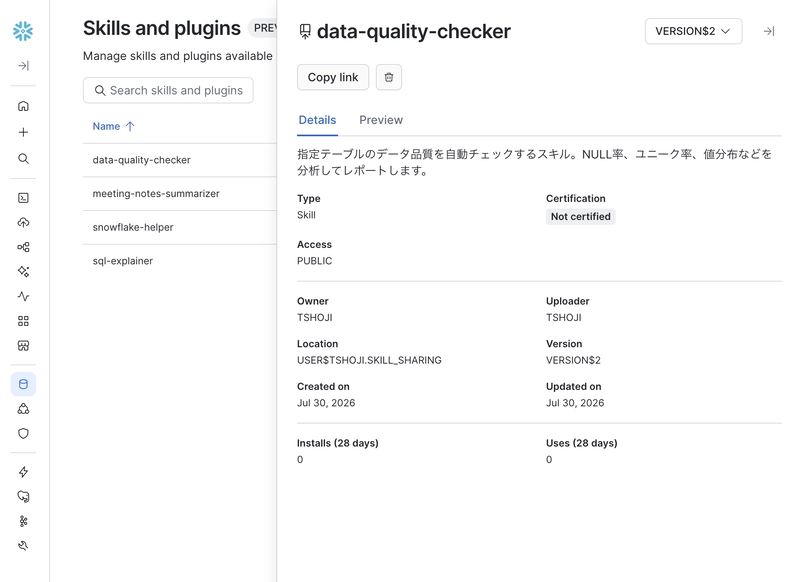
注意:截至 2026 年 7 月 30 日,Catalog 中只有 Skill 支持预览,无法通过 Catalog UI 查看 Plugin 的内容。
首次执行治理操作时,系统会提示你选择一个数据库,用于存储受治理的对象。此后,所有受治理对象都会在该数据库中集中管理,与所有者的个人数据库分开存放。
当前限制包括:
1. Switch to customer A's Snowflake connection with a Profile
   → /profile switch customer-a

2. Install the full set of Skills and Hooks for customer A via a Plugin
   → Agent Settings → Plugins → Add from GitHub
   or: cortex plugin add owner/customer-a-plugin

3. Invoke a Skill to run specific procedures
   → /semantic-view (example: semantic view creation skill)
三者的分工是:Profile 负责切换连接,Plugin 负责组装工具,Skill 负责执行具体流程。
如果只需要共享某个具体工作流,例如创建 semantic view 的操作流程,那么将单个 Skill 发布到 Catalog 或 Stage 是最简单的做法。
# Publish to catalog (via CoCo Desktop GUI)
# → share the snow://skill_catalog/... URI and distribution is done

# Via Stage (CoCo CLI)
cortex skill publish ./my-skill --to-stage @SHARED.SKILLS.TEAM_LIBRARY/my-skill/
如果需要向多个角色——例如销售、工程和数据分析人员——分发不同的环境,可以使用 Profile。它能够一次性应用 Skill、MCP server、system prompt 和连接设置。
# Publish role-specific Profiles (CoCo CLI)
cortex profile publish sales-engineer --skill-stage @SHARED.PROFILES.STAGE/se/
cortex profile publish data-analyst    --skill-stage @SHARED.PROFILES.STAGE/analyst/
选择共享方式时,可以从三个维度考虑:
PUBLIC,还是在 Managed Settings 安全边界内施加角色级限制。CoCo 的扩展体系由三个粒度不同的层级组成。根据具体使用场景选择合适的层级,既能保持配置简单,也能最大限度地提高复用性。
我会在 X 上分享 Snowflake What's New 更新。欢迎关注,以获取最新动态:
(2026 年 8 月 4 日)首次发布
Snowflake CoCo(Cortex Code)的 Skill 与 Plugin 有什么区别、如何选择以及如何共享
如需采取进一步措施,你可以考虑屏蔽此人和/或举报滥用行为。