
8.0
热点
AI SCORE
编程提效2026-08-12 13:40
29种编辑级图表技能:让AI生成匹配品牌的设计图
GitHub Trending#AI工具#Claude#设计
Editor brief · 编辑速览
为Claude Code/Codex打造的专业图表生成技能,支持29种图表类型,可自动读取网站配色和字体实现品牌匹配,提供draw.io文件转换功能。
让你的设计师不讨厌的编辑级图表。
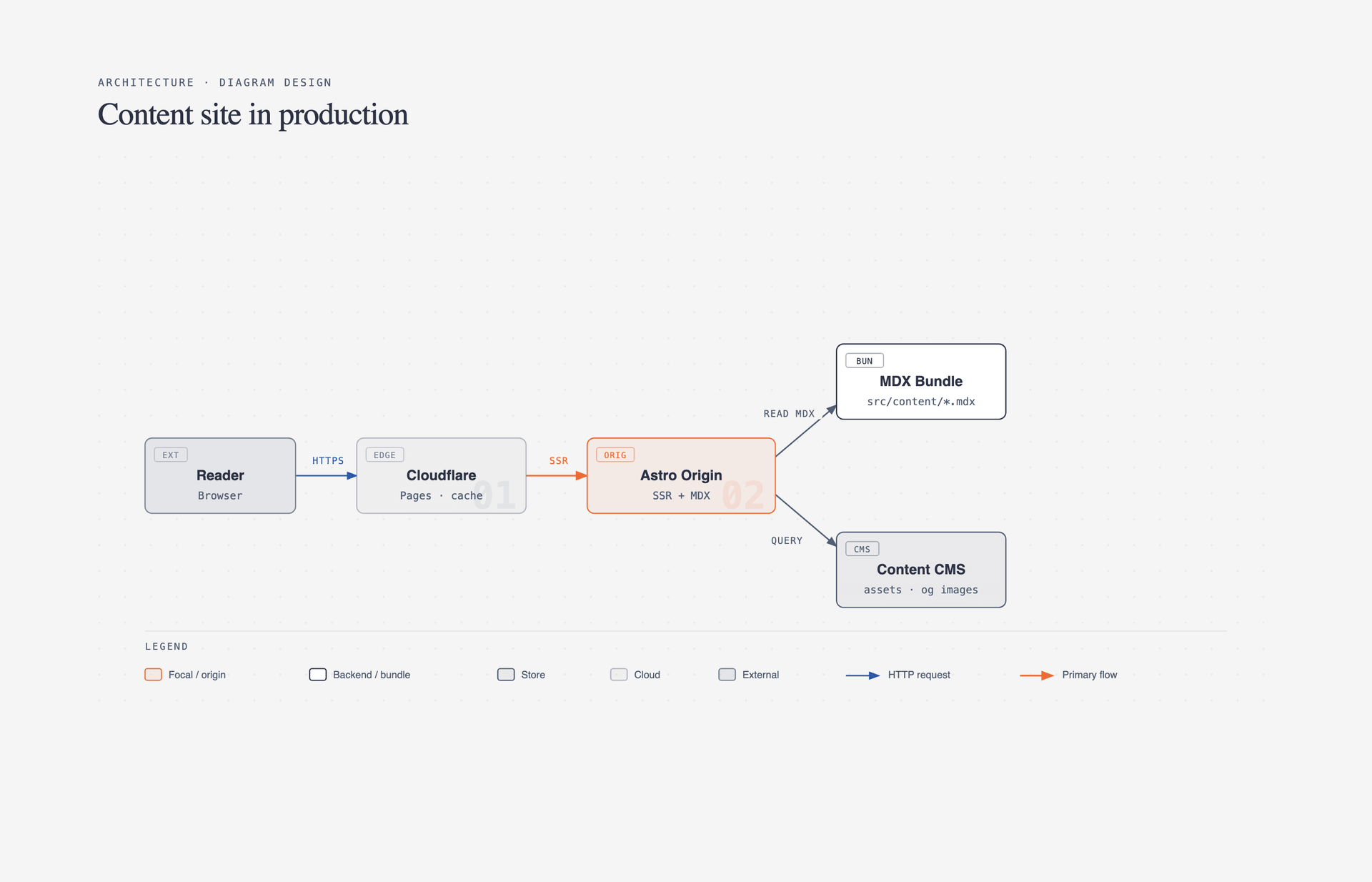
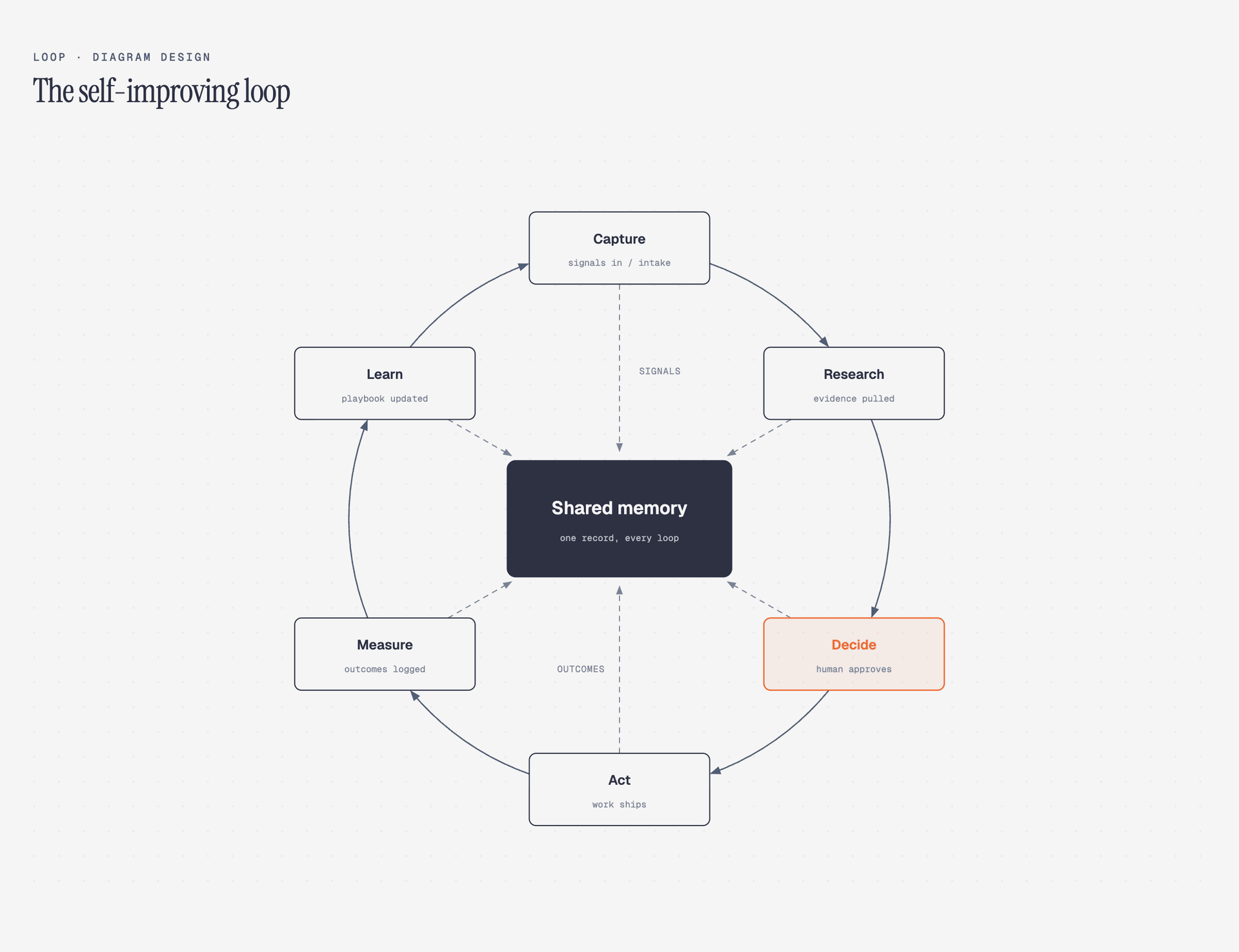
2.0 新功能 — Loop:以共享内存为中心的飞轮。虚线是回写路径。
27 种图表类型。一个 agent skill,兼容 Claude Code、Codex 和 Pi。60 秒完成品牌适配 — skill 会读取你的网站,将颜色和字体映射到每张图表上。在 draw.io 或 Mermaid 已有图表?只需指向源文件,它就会按目标所需的格式、大小和细节程度重绘。
不需要 Figma。不要通用圆角框。不要花 30 分钟选颜色。
我在 littlemight.com 写文章(同时经营 BestSelf.co)。每次需要图表时 — 架构草图、流程图、重要事项金字塔图 — 我都会去问 Claude,返回的却是一个与网站其他部分完全不搭的通用圆角图形。我要么在 Figma 里折腾 30 分钟,要么干脆不要图表。
所以我为它写了一个 Claude Code skill。27 种图表类型,编辑级品质,60 秒匹配你的品牌风格。
最高质量的动作通常是删除。每个节点都要证明自己的存在价值。强调色只留给读者最先应该关注的 1–2 个要素。目标密度:4/10。
全部 27 种图表都提供三种变体:minimal light、minimal dark 和 full-editorial。可以直接在浏览器中打开任意一个 — 无需构建步骤、无需 JS、无需外部图片。
浏览在线图库:在浏览器中打开 skills/diagram-design/assets/index.html,可以切换 all 27 diagrams 的 light / dark / full-editorial 标签页。
pi install https://github.com/cathrynlavery/diagram-design
在打开的 Pi 会话中运行 /reload。Pi 使 skill 可用于匹配的图表请求;使用 /skill:diagram-design 显式调用。Pi 也会加载 /export-diagram 提示模板。
/plugin marketplace add cathrynlavery/diagram-design
/plugin install diagram-design@diagram-design
Claude Cowork:Customize → Directory → Plugins → + → 粘贴 cathrynlavery/diagram-design → Sync,然后从 Personal 列表安装。
npx skills add https://github.com/cathrynlavery/diagram-design --skill diagram-design
托管安装很方便,但 references/style-guide.md 的更改可能会被包更新替换。如果你计划自定义样式指南,请克隆仓库并安装本地路径:
git clone git@github.com:cathrynlavery/diagram-design.git ~/code/diagram-design

# Pi: 将 checkout 注册为本地包
pi install ~/code/diagram-design

# Claude Code: 将内部 skill 符号链接
ln -s ~/code/diagram-design/skills/diagram-design ~/.claude/skills/diagram-design
共享 skill 位于 skills/diagram-design/。Pi 通过仓库的标准 skills/ 包目录发现它;Claude Code、Codex 和其他 Agent Skills 兼容工具使用相同的文件。
核心价值:产出编辑级品质的图表,用你的颜色和排版,而不是通用模板。
开箱即用,图表采用纯黑 + 原子橙的干净配色(白色烟熏纸张、纯黑墨水、原子橙强调色、蓝灰柔色、银色发丝线)。直接截图也足够好看。但 60 秒的入门流程更好 — skill 会从你的网站提取品牌信息并应用到每张图表上。
You:     "onboard diagram-design to https://yoursite.com"
Agent:   → fetches the homepage
         → extracts the dominant palette + font stack
         → maps detected values to semantic roles:
             paper, ink, muted, accent, link
         → shows a proposed diff
         → writes your tokens to references/style-guide.md
You:     "yes, apply it"
每张新图表现在都会使用你的颜色。你的网站纸张色成为图表背景。你的 CTA 色成为焦点强调色。你的正文字体栈成为节点标签字体。
在写入 token 之前,skill 会验证墨水在纸张上的 WCAG AA 对比度。如果你的网站有一种颜色在图表尺寸(9–12px)下对比度不达标,它会提出调整值并解释原因。
每个图表模板都为内联 SVG 提供无障碍名称和描述:role="img"、一个可解析的 aria-labelledby,以及首个子元素的 <title> / <desc> 插槽。ID 按图表和变体前缀,因此多个 SVG 导出可以安全地内联在同一页面上,而不会产生重复的无障碍名称 ID。装饰性标本图标对辅助技术隐藏。
打开 skills/diagram-design/references/style-guide.md 并编辑表格。后续所有内容都从那里读取 — 全部 27 种图表、注释图元以及图库都继承语义角色名称(accent,而非 #eb6c36)。
skill 不会静默地将默认皮肤的图表交付到品牌项目中。在新项目中首次使用时,它会检查 style-guide.md 是否已自定义。如果没有,它会暂停并询问:
"This is your first diagram in this project. The style guide is still at the default. Want to run onboarding, paste tokens manually, or proceed with default?"
完整规格见 skills/diagram-design/references/onboarding.md。
# From a cloned checkout, open the gallery to see all 27 diagrams
open skills/diagram-design/assets/index.html       # macOS
xdg-open skills/diagram-design/assets/index.html  # Linux

# In Claude Code, Codex, or Pi, ask:
# "Make me an architecture diagram of my app: frontend, backend, database, Redis cache."
# "I need a quadrant showing Q2 projects by impact vs effort."
# "Give me a sequence of a bearer call with token refresh on 401."
# (branching refresh uses the ALT combined-fragment grammar in type-sequence.md;
#  see skills/diagram-design/assets/example-sequence-oauth.html — not a full authorize-code handshake)
你的 agent 会选择正确的类型,构建 HTML 并保存。你也可以直接从模板开始:
cp skills/diagram-design/assets/template.html my-diagram.html        # minimal light
cp skills/diagram-design/assets/template-full.html my-diagram.html   # editorial with summary cards
在 draw.io / diagrams.net 或 Mermaid 已有图表?只需指向源文件,它就会重绘 — 相同的内容、这个设计系统、按目标所需的方式呈现。
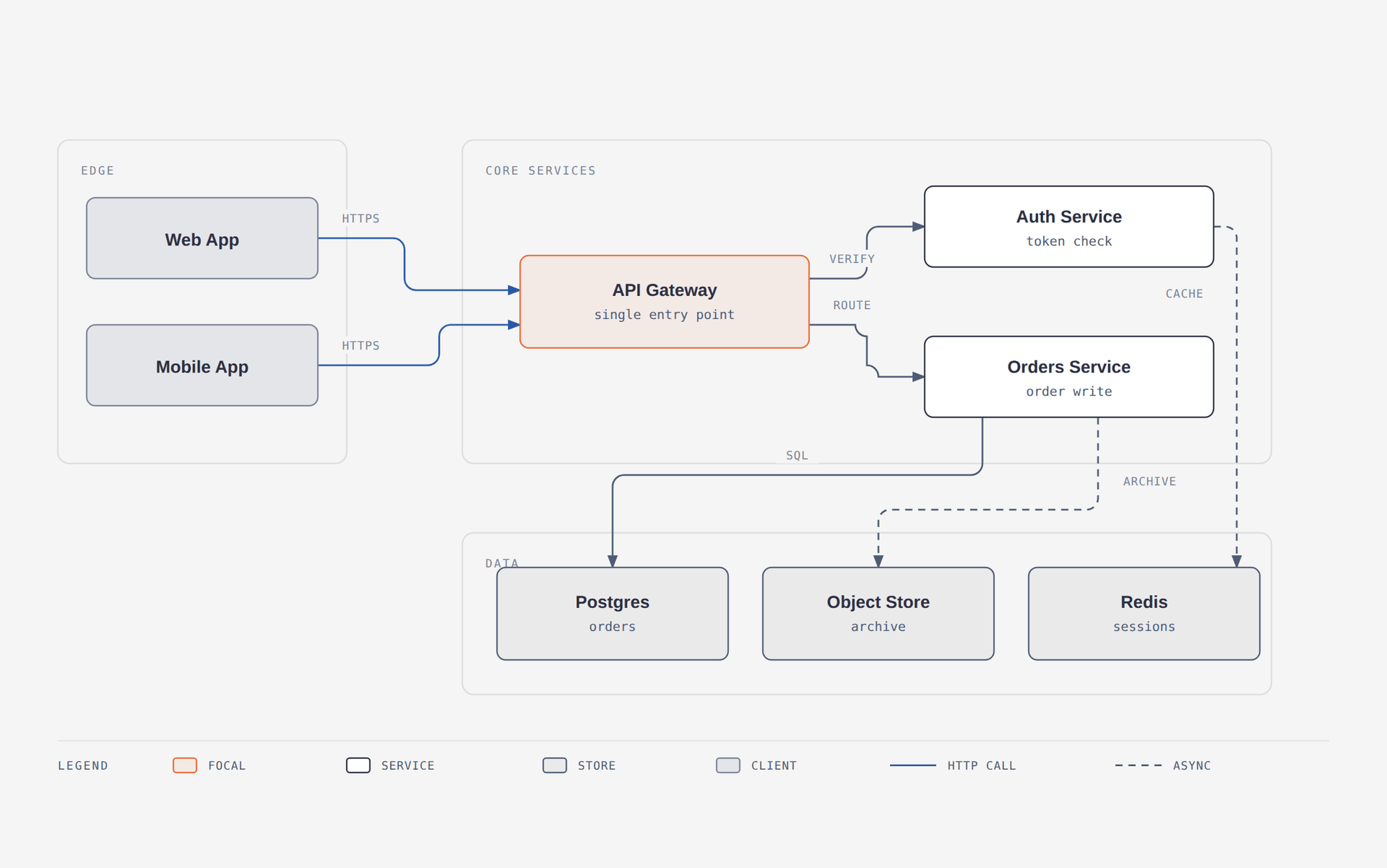
一个 12 节点的 draw.io 文件被重绘为适合博客文章的均衡细节级别。源文件的六个浅色填充变成一个强调色;手工拖拽的坐标变成 4px 网格。
/diagram-design:import platform.drawio
/diagram-design:import platform.drawio --size=slide-16x9 --detail=simplified --audience=executive
/diagram-design:import platform.drawio --detail=faithful --format=png --page=all
/diagram-design:import-mermaid README.md --diagram=all
/diagram-design:import-mermaid architecture.mmd --size=slide-16x9 --detail=simplified
或者直接问:"redraw this drawio file for my deck"、"make this Mermaid block editorial",或"この Mermaid をスライド用にきれいにして"。
它读取 draw.io 写入的常见容器 — .drawio、.drawio.xml、.drawio.png(嵌入式图表)和 .drawio.svg — 包括压缩后的内容(在编辑器中看起来像 base64 乱码)。对于 Mermaid,它接受 .mmd、.mermaid,以及 Markdown 中一个或多个 fenced mermaid 块。它只解析文本:不渲染、不执行 JavaScript、不访问浏览器、不联网、不跟随点击目标。
关键不是转换,而是让输出适配目的地。同一个源文件,三种不同图表:
每次导入结束时都会有一份保真度账本 — 记录了什么被合并、折叠或丢弃。你了解源文件;你反正也会注意到。
Detail: balanced · 12 source nodes → 8 drawn
Collapsed: "Token valid?" decision → edge label on Gateway → Auth
Dropped:   1 sticky note ("legacy path, to be retired") — unconnected in source
Kept in full: the request path (Web/Mobile → Gateway → Orders → Postgres)
永远不会继承的内容:源文件或渲染器坐标、源文件调色板、源文件字体、draw.io 的对角连接线乱象,或 Mermaid 的自动布局。始终保留的内容:组件、关系、分组和方向。详见 references/import-drawio.md、references/import-mermaid.md 和 references/output-spec.md。
图表以自包含 HTML 形式交付,但你可以将图表本身导出为 Figma、幻灯片或社交卡片格式。使用 agent 的斜杠命令:
/export-diagram path/to/diagram.html
/export-diagram path/to/diagram.html --svg-only
/export-diagram path/to/diagram.html --png-only --scale=3
/diagram-design:export path/to/diagram.html
/diagram-design:export path/to/diagram.html --svg-only
/diagram-design:export path/to/diagram.html --png-only --scale=3
或者用自然语言直接问:
"Export this diagram as SVG and PNG."
"Save my-diagram.html as PNG."
SVG — 提取 <svg> 节点并注入 Google Fonts,使其在浏览器、Figma 和 Illustrator 中独立渲染。
PNG — 通过 Playwright 将图表光栅化,默认 2× 分辨率。一次性设置:pip install playwright && playwright install chromium。
两种格式都只包含图表本身 — -full 变体的编辑卡片和标题不包含在内。要截取完整编辑布局的截图,请使用浏览器的打印为 PDF 或整页截图功能。完整流程见 skills/diagram-design/references/export.md。
SKILL.md 是一个精简索引 — 它告诉 agent 如何选择类型以及在哪里查找详情。每种类型都生活在自己的参考文件中,只在相关时才加载。
diagram-design/
├── commands/
│   ├── export-diagram.md            — Claude Code export command
│   ├── import-drawio.md             — Claude Code draw.io import command
│   └── import-mermaid.md            — Claude Code Mermaid import command
├── prompts/
│   ├── export-diagram.md            — Pi `/export-diagram` prompt template
│   └── import-mermaid.md            — Pi Mermaid import prompt template
├── skills/
│   └── diagram-design/
│       ├── SKILL.md                 — philosophy, selection guide, checklist
│       ├── references/              — loaded only when a type or primitive is chosen
│       │   ├── style-guide.md       — single source of truth for colors + fonts
│       │   ├── onboarding.md        — the URL-to-tokens flow
│       │   ├── import-drawio.md     — draw.io redraw procedure
│       │   ├── import-mermaid.md    — Mermaid redraw procedure
│       │   ├── output-spec.md       — format × size × detail level
│       │   ├── export.md            — SVG / PNG export + sizing
│       │   ├── type-architecture.md
│       │   ├── type-flowchart.md
│       │   ├── type-sequence.md
│       │   ├── type-state.md
│       │   ├── type-er.md
│       │   ├── type-timeline.md
│       │   ├── type-swimlane.md
│       │   ├── type-quadrant.md
│       │   ├── type-nested.md
│       │   ├── type-tree.md
│       │   ├── type-org-chart.md
│       │   ├── type-layers.md
│       │   ├── type-venn.md
│       │   ├── type-pyramid.md
│       │   ├── primitive-annotation.md
│       │   ├── primitive-sketchy.md
│       │   └── primitive-terminal.md
│       ├── scripts/
│       │   ├── drawio_extract.py    — draw.io → structured IR
│       │   └── mermaid_extract.py   — Mermaid → structured IR
│       └── assets/
│           ├── index.html           — live gallery, tabbed
│           ├── template*.html       — scaffolds for new diagrams
│           ├── example-<type>.html  — 3 variants × 27 types
│           ├── example-loop-terminal.html
│           ├── example-quadrant-consultant.html
│           ├── example-import-drawio.html
│           ├── example-import-mermaid.html
│           └── example-sequence-oauth*.html
├── scripts/fixtures/
│   ├── sample-flowchart.mmd
│   ├── sample-readme-with-mermaid.md
│   └── sample-adversarial.mmd
└── docs/screenshots/                — images used in this README
这保持了 agent 的工作上下文精简(只加载你需要的),也使 skill 易于扩展 — 添加一个新的 type-<name>.md 并在选择指南中接入即可。skill 附带 37 个参考文件,覆盖每种图表类型、图元和工具。
在提交新示例之前,运行 python3 scripts/lint-skin.py <your-new-example.html>。仓库级检查 python3 scripts/lint-skin.py --all --baseline 必须保持通过。linter 的 a11y 类别拒绝没有可解析无障碍名称、空或位置错误的 title/description、或不安全的裸露 title / desc ID 的图表 SVG。如果你触碰了 draw.io 导入路径,python3 scripts/verify-drawio-import.py 也必须通过 — 它在所有四种容器格式下驱动真实提取器处理 scripts/fixtures/sample-architecture.drawio,并检查引用保持同步。如果你触碰了 Mermaid 导入路径,python3 scripts/verify-mermaid-import.py 也必须通过 — 它覆盖所有支持的语法、多块 Markdown、对抗性标签、信任边界行为、资源限制、命名失败以及引用/命令接线。
所有 pull request 和推送都通过 GitHub Actions CI 自动验证(.github/workflows/ci.yml)。
启动时,agent 只看到 skill 名称和描述。当请求匹配时,它加载 SKILL.md;类型引用只在相关时才被拉取。即使有 37 个参考文件,这也能保持 skill 的速度。
无论存在多少种类型,agent 只读取你需要的那一个。明天添加一个新类型,其他一切都不变。
一个强调色,每张图表 1–2 个焦点元素。三种字体:Instrument Serif(标题 + 斜体标注)、Geist sans(节点名称)、Geist Mono(技术性子标签)。1px 发丝线边框,无阴影,最大 border-radius 10px。每个坐标、宽度和间距都是 4 的倍数 — 不可妥协,这是让图表不显得像 AI 生成的关键。Mono 用于技术内容(端口、URL、字段类型),而非泛用"开发者"美学。珊瑚色焦点节点将视线引向你需要强调的 1–2 个要点。完整规格见 SKILL.md。
推文或终端输出的快速 unicode 图表 → wiretext-style skill。
任何列表 → 用表格或要点。
前后对比 → 用表格。
单一形状"图表"— 一个带标签的单个框 → 直接写句子就好。
画之前先问:读者从这个图表中能学到比精心写的段落更多的东西吗?如果没有,就不要画。
作者 Cathryn Lavery — BestSelf.co 创始人。我在 littlemight.com 写关于 AI、创业和设计好看东西的文章 — 博客 + 时事通讯。
如果这对你有用,请给仓库加星并在 X 上打个招呼。